AI Returns Exchanges Automation Shopify: Setup Guide
AI returns exchanges automation shopify tools promise to save you money on every return. In fact, the real savings depend entirely on which piece of the process you automate. US retailers expect $849.9 billion in returned merchandise in 2025, and 19.3 percent of every online order will come back, according to the National Retail Federation’s 2025 Retail Returns Landscape report. Most Shopify founders I talk to can quote their refund total from memory. Almost none know how much of that total could have stayed as a sale instead, or what a manual returns queue actually costs once agent time is counted.
That gap is what AI-assisted returns automation is built to close, and it is not the same thing as full autonomy. Specifically, the setup that holds up lets rules auto-approve the low-stakes cases, nudges the customer toward an exchange before a refund, and still routes anything high-value or fraud-flagged to a person. Below is exactly how I wire that up on a Shopify store. This guide follows our editorial standard of citing only named, dated sources, and a human editor checked it before it went out. If a number here looks off, our contact page is open and we will fix it. For example, if AI is already handling your support tickets, this setup slots in next to my Shopify AI customer support guide. Similarly, if cart abandonment is still the bigger leak, start with reducing cart abandonment using AI first.
Key Takeaways
- US retailers expect $849.9 billion in returns in 2025. That is 19.3 percent of every online order, according to the NRF.
- Manual return processing runs roughly $25 to $35 per apparel item all in. This is close to a separate $15 to $30 benchmark Redo cites. Automation does not erase that cost. Instead, it removes the agent time that pushes cost toward the top of the range.
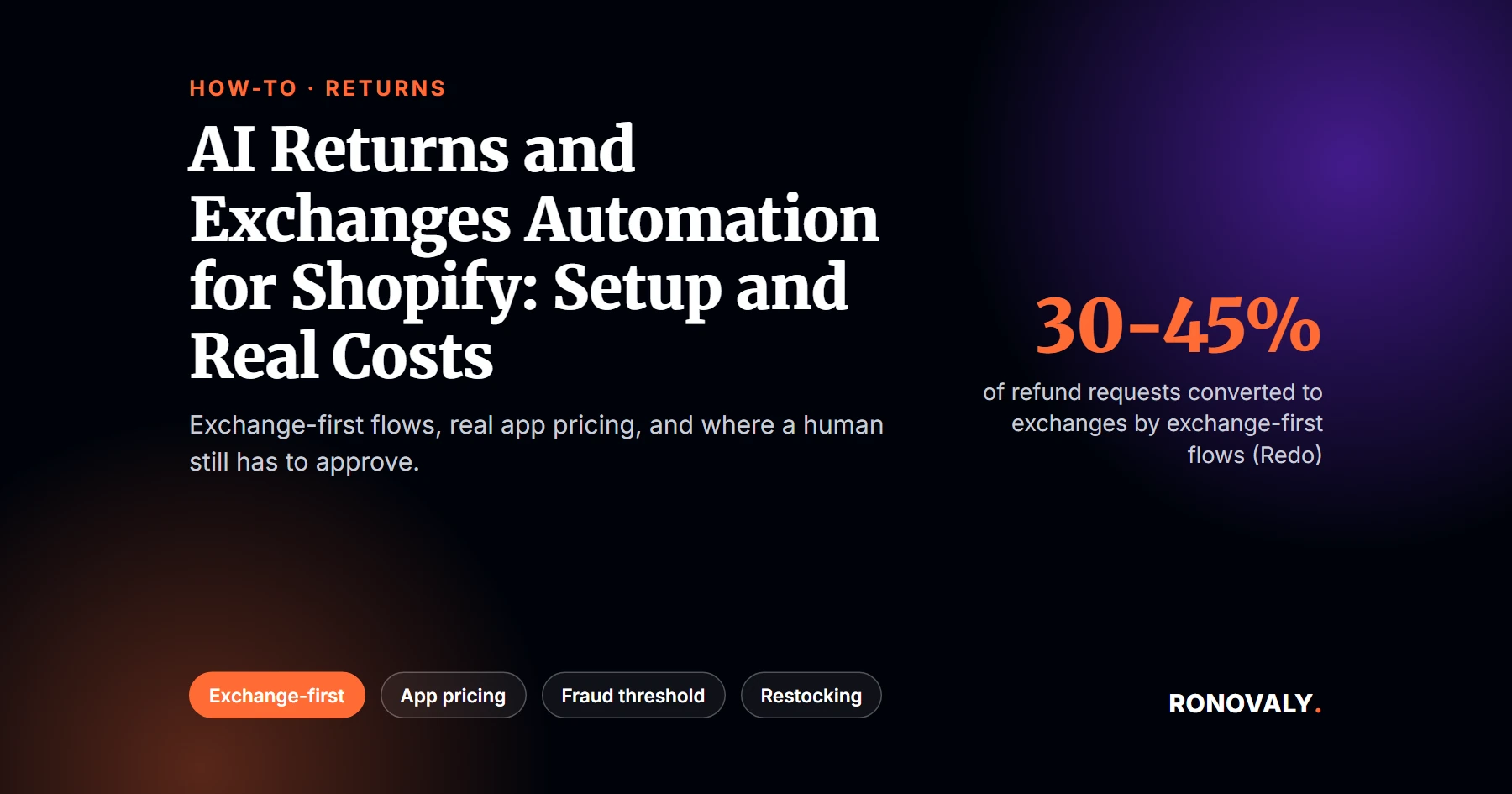
- Exchange-first flows convert 30 to 45 percent of refund requests into exchanges. In contrast, refund-default flows convert only 10 to 20 percent, according to Redo’s comparison of the two flow types.
- Vendor pricing spans a wide range. AfterShip Returns starts at $11 a month for 20 returns, while Loop Returns’ Essential tier runs $155 a month on an annual contract.
- A credible setup still routes high-value or fraud-flagged returns to a human. Full autonomy is not what the data supports, since 9 percent of all returns are fraudulent, according to the NRF.
- Time to resolution drops from 1 to 3 days for manual review to near-instant for rules-eligible cases.
What You Need Before an AI Returns Exchanges Automation Shopify Setup
By the end of this setup, you will have a returns flow that handles routine cases on its own and still stops for a human on the ones that matter. Here is what to have ready first.
- Admin access to your Shopify store. Specifically, you need Orders, Settings, and the Apps section.
- A written return and exchange policy, even an informal one. AI automation enforces whatever policy you give it. It does not invent a fair one on its own.
- Your last 2 to 3 months of return volume and dollar totals, pulled from Shopify’s Orders or Analytics.
- A first pass at which return reasons are low-risk, such as wrong size or a changed mind, versus which always need a human look, such as damage claims or repeat returners.
- Time: 45 to 60 minutes for the initial setup, plus ongoing rule tuning as you see real cases.
- Difficulty: Beginner to intermediate. No code is required for any of the five apps covered here.
Step 1: Decide What Actually Gets Automated
By the end of this step, you will have a written rule set that splits your returns into three buckets: auto-approve, exchange-nudge, and human-required. This matters because treating every return the same way is the single most common mistake in this setup.
Start by pulling your last few months of returns and sorting them by dollar value and reason code. Low-value, common reasons like wrong size or color are generally safe to auto-approve. In contrast, high-value orders, damage claims, and anything from a customer with more than two or three prior returns should always route to a person, at least until you trust the pattern.
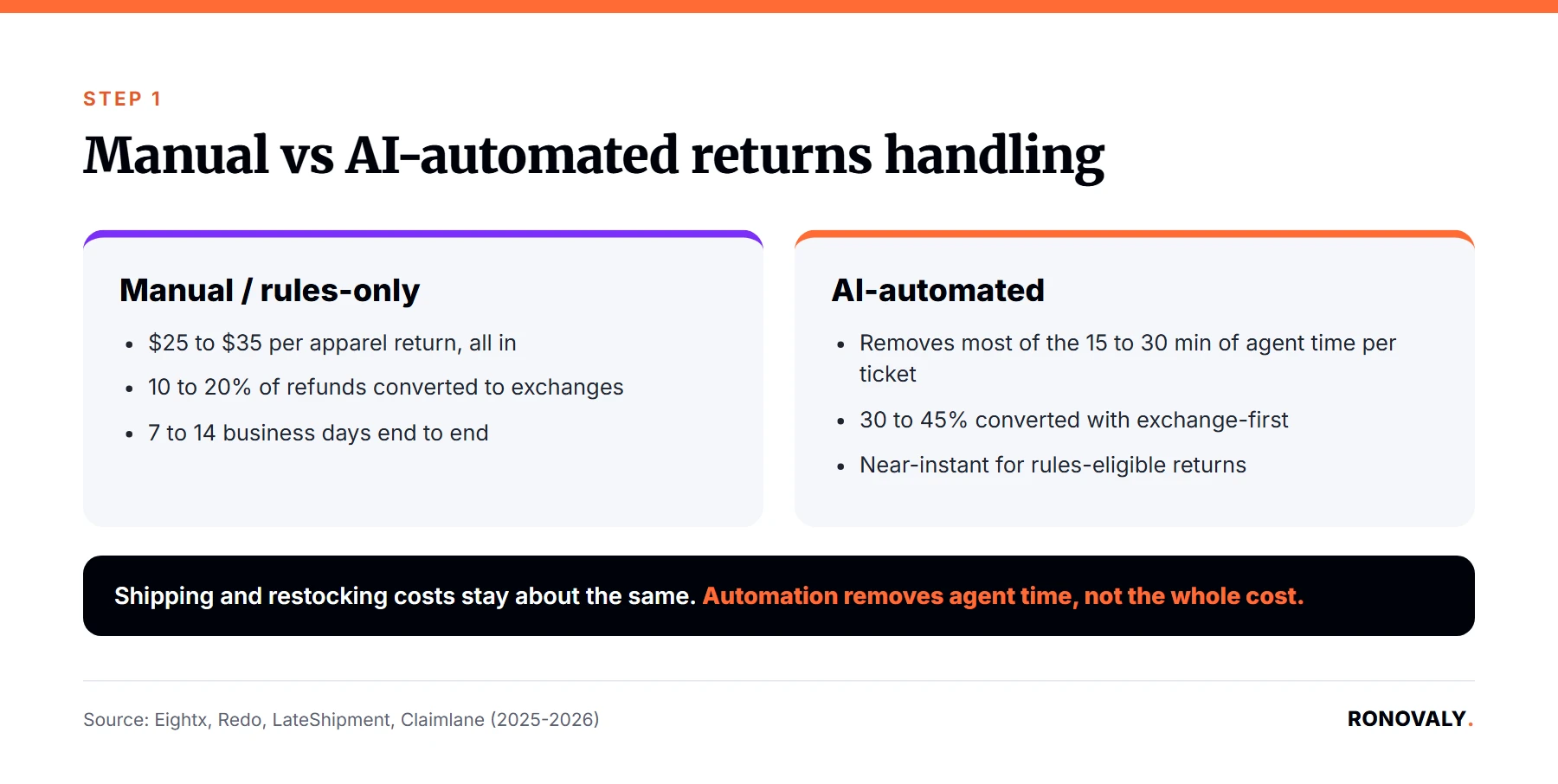
I built the table below from the cost, conversion, and resolution-time data behind this guide. It is worth reviewing before you pick a tool, because it shows where automation actually saves money and where it does not.
| Dimension | Manual / rules-only returns handling | AI-automated returns handling |
|---|---|---|
| Processing cost per return (apparel/soft goods) | $25 to $35 all in, per Eightx’s 2026 analysis. A separate benchmark Redo cites from a Shopify Enterprise 2025 study puts it at $15 to $30. | The underlying shipping and restocking cost stays about the same. However, automation removes most of the 15 to 30 minutes of agent time a manual ticket takes, per LateShipment’s returns-automation benchmarks. At the median $21.53 hourly wage the BLS reports for customer service representatives (May 2025), that is roughly $5.38 to $10.76 in labor cost per manual ticket alone. |
| Refund-to-exchange conversion | Roughly 10 to 20 percent when refund is the default path, according to Redo. | 30 to 45 percent when the flow presents an exchange first, per Redo’s comparison. This is directionally matched by Narvar’s marketed “up to 45 percent” exchange conversion. |
| Time to resolution | 7 to 14 business days end to end for a fully manual process, or 1 to 3 days for the refund step alone once a claim is approved, per Claimlane’s own benchmarks (vendor-reported, not independently audited). | Near-instant to same-day for rules-eligible returns. That said, a human step is still required for anything flagged high-value or fraud-risk. |
Pick the reason codes you are willing to auto-approve today, and keep the list short at first. You can always widen it once you see how the tool performs against real cases.
Step 2: Pick a Returns Platform on Real Pricing, Not the Marketing Page
By the end of this step, you will have narrowed the field to one or two apps that fit your actual return volume, not the app store’s most-reviewed option.
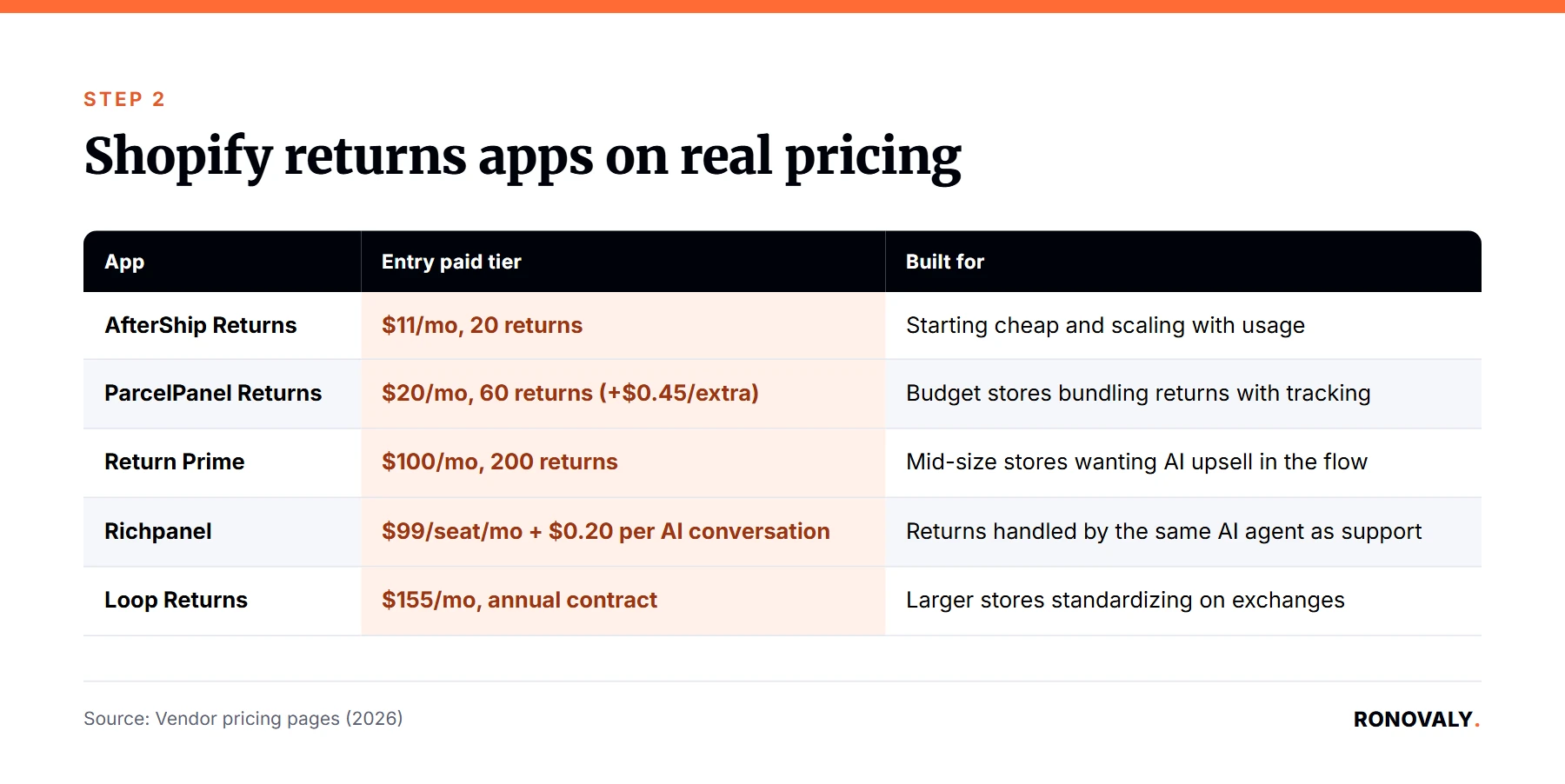
App-store rankings favor whichever tool has the most installs, not the best fit for a $500K to $5M ARR store. Therefore, I checked five returns-automation apps built for Shopify directly against their own pricing pages this month. The spread is wide enough that picking the wrong one costs real money either way. On the cheap end that means overage fees; on the expensive end, a wasted annual contract.
| App | Entry paid tier | Next tier up | Built for |
|---|---|---|---|
| AfterShip Returns | Essentials, $11/month, 20 returns. | Pro, $119/month, 400 returns, adds auto-approve rules and 1-click exchange. | Stores that want to start cheap and scale with usage. |
| Return Prime | Grow, $100/month, 200 returns. | Thrive AI, $100/month, 200 returns, adds AI features Return Prime says recover an extra 20 to 25 percent of refund value. | Mid-size stores wanting AI upsell inside an existing flow. |
| ParcelPanel Returns | Essential, $20/month, 60 returns, plus $0.45 per extra return. | Professional, $59/month. | Budget-conscious stores bundling returns with order tracking. |
| Loop Returns | Essential, $155/month, annual contract. | Advanced, $340/month, adds Shop Now instant exchange and fraud prevention. | Larger stores standardizing on exchange-first at scale. |
| Richpanel | $99 per seat/month plus $0.20 per AI-handled conversation. | Returns & Exchanges add-on, $99/month to start, with a guarantee to improve exchange ratio 10 percent in 60 days or the fee is refunded. | Stores that want returns handled inside the same AI agent as support tickets. |
Loop Returns, Return Prime, and Richpanel’s prices above were checked directly against each vendor’s live pricing page in September 2026. AfterShip’s and ParcelPanel’s figures are cross-checked against their own published help-center and app-store listings, since their live pricing pages blocked automated access during this research.
Per-return overage pricing is the fee an app charges once you exceed your plan’s included return volume, billed per extra request rather than folded into the base price. In other words, it is the number that actually determines your real monthly cost once volume grows. For instance, if your store processes fewer than 60 returns a month, AfterShip or ParcelPanel’s entry tiers cost less than Loop’s Essential plan, even before the annual contract. Past a few hundred returns a month with exchange conversion as the main goal, Loop’s or Richpanel’s pricing starts to make more sense, since both are built around exchange-first flows rather than a bare refund button.
Step 3: Turn On Exchange-First Defaults, Not Just Refund Automation
By the end of this step, your return portal should present an exchange or store credit as the first option a customer sees, with a refund only one click further. Why does the order matter so much?
Exchange-first automation is a returns flow that defaults to offering an exchange or store credit bonus before a straight refund, reversing the order most refund-only tools ship with out of the box. The conversion difference is not small. Refund-default portals convert roughly 10 to 20 percent of requests into exchanges. Exchange-first portals, on the other hand, convert 30 to 45 percent for apparel brands, according to Redo’s comparison of the two flow types.
In practice, this means going into your returns app’s settings and finding the exchange or store credit configuration, usually under a name like “resolution options” or “exchange rules.” Set exchange and store credit as the first-presented choice. Add a small store credit bonus if the app supports it, since most of the five above do. Then, show the refund option only after the customer has seen the exchange path. Test it yourself as a customer would, by starting a return on a real order and confirming which option appears first.
Step 4: Set the Dollar Threshold Where a Human Has to Step In
By the end of this step, any return above a dollar amount you choose, or flagged for a fraud signal, routes to a person instead of an automatic approval.
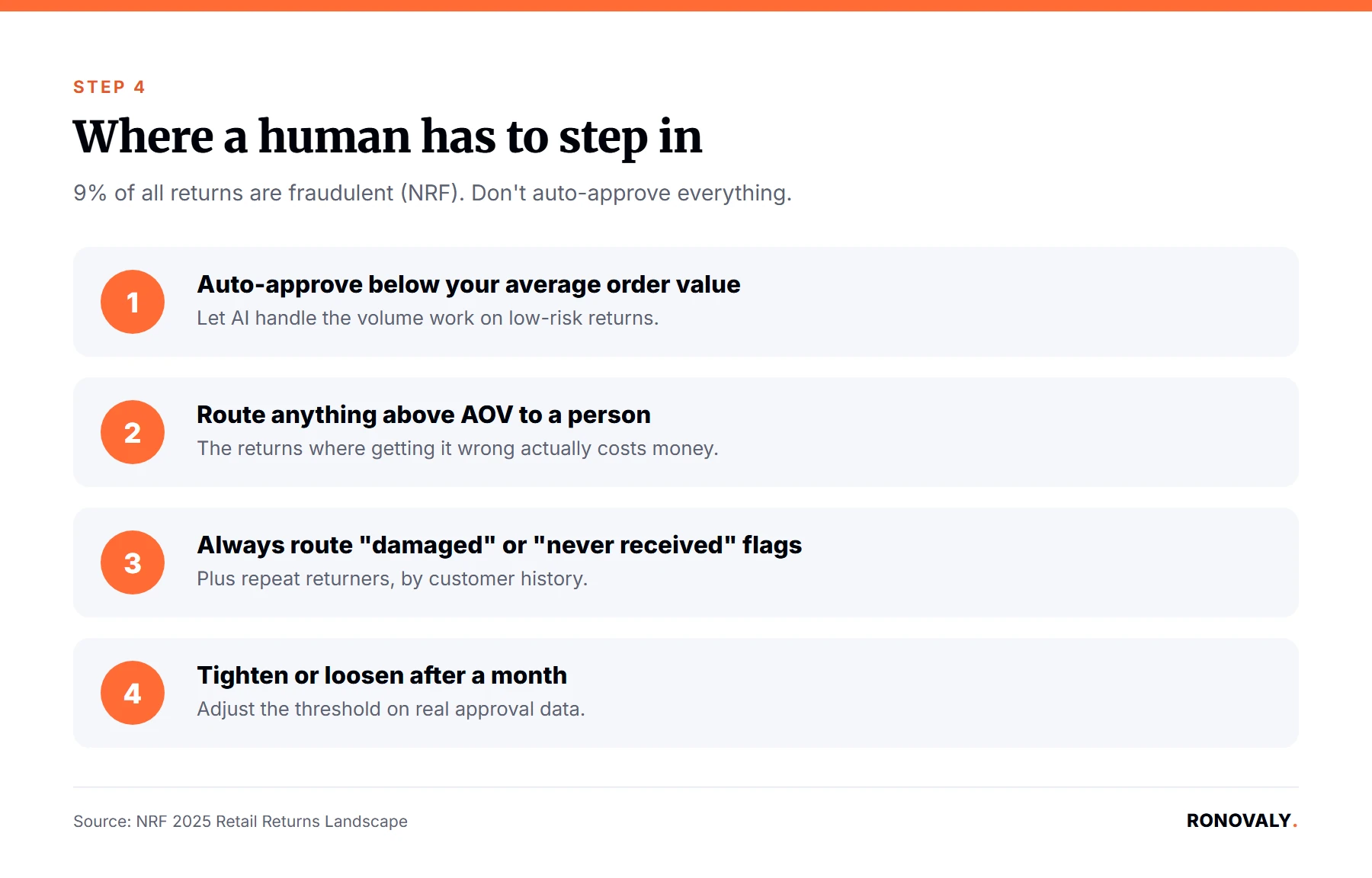
Nine percent of all returns are fraudulent, according to the NRF’s 2025 Retail Returns Landscape report. Consequently, that is the number that should stop anyone from wiring a returns app to auto-approve everything. A credible setup keeps AI doing the volume work while a person still signs off on the returns where getting it wrong actually costs something.
Most of the five apps above let you set an approval threshold by order value, by return reason, or by customer history, including repeat returners. Specifically, a reasonable starting point for a $500K to $5M ARR store is to auto-approve returns under your average order value. Anything above it, plus any return flagged as damaged or “never received,” should route to a human instead. Subsequently, tighten or loosen that line after a month of watching what actually comes through, rather than guessing at the outset.
Step 5: Sync Restocking So Exchanges Don’t Create Phantom Stock
By the end of this step, your inventory count updates the moment an exchange or return is approved, not days later when the physical item lands back in your warehouse.
An approved exchange that does not touch inventory immediately can oversell the replacement item before the original ever ships back. Check whether your returns app releases the new item’s inventory hold at approval or at physical receipt. The faster setting works for exchanges under the threshold you set in Step 4, where fraud risk is low. Requiring the returned item to be physically checked in first is the safer default for anything above that line.
This is also where the time-to-resolution gap matters most. Manual review queues take 1 to 3 days end to end, according to Claimlane’s return-processing benchmarks. Meanwhile, a rules-eligible automated exchange can confirm and adjust inventory the same day. That speed is arguably the real value of automation, more than the labor savings, because a customer who gets a fast exchange decision is more likely to take it instead of asking for a refund while they wait.
Common Mistakes to Avoid
The most expensive mistake I see is automating refunds only and never turning on the exchange-first setting. This throws away the entire conversion benefit this setup is supposed to deliver. What else goes wrong?
Automating refunds but never testing exchange-first. Most apps ship with a refund button as the default and the exchange option buried in settings. Install one of these tools and leave the defaults alone, and you get faster refunds with none of the conversion lift.
Setting no human-approval threshold at all. With 9 percent of returns fraudulent industry-wide, letting AI auto-approve every return regardless of value is, in fact, the fastest way to turn a cost-saving tool into a new leak.
Ignoring the restocking sync setting. An exchange approved without a corresponding inventory hold can oversell the replacement item. As a result, one return turns into two customer service problems instead of one. Also, if you charge a return shipping fee on US orders, read our guide to Shopify tax on return shipping fees, since Shopify starts taxing that fee on October 23, 2026.
Comparing app sticker price only, not per-return overage cost. A $20-a-month plan with a high overage fee can cost more than a $100 plan once your return volume climbs past the included limit. This is the same trap I flagged in my Shopify AI app stack cost audit.
Treating an AI upsell claim as automatic revenue. Return Prime says its Thrive AI plan recovers an additional 20 to 25 percent of the monthly refund value. Notably, that figure is Return Prime’s own claim, not a third-party audit. Test it against your own average order value before assuming it holds for your catalog specifically.
What Success Looks Like
If you followed all five steps, you should now have a returns flow where routine cases resolve without you, a human still checks the ones that matter, and your inventory count reflects reality in real time.
Look for three signs the setup is working. First, your exchange-to-refund ratio should climb toward the 30 to 45 percent range instead of sitting near 10 to 20 percent. Second, your time-to-resolution for standard returns should drop from days to hours or less. Third, the returns that do reach you personally should be the ones actually worth your time, such as anything high-value, flagged, or unclear. As a next step, revisit your auto-approve rules and dollar threshold monthly for the first quarter, since both should tighten or loosen based on what you actually see, not what you guessed on day one.
Frequently Asked Questions
How much does AI returns automation cost for a small Shopify store?
It depends on your return volume more than your revenue. A store processing under 60 returns a month can run AfterShip Returns or ParcelPanel’s entry tier for $11 to $20 a month. In contrast, a store doing several hundred returns a month and prioritizing exchange conversion will likely land in Loop Returns’ or Richpanel’s $150-plus range once volume-based pricing kicks in.
What’s the real cost difference between manual and AI-automated returns processing?
The underlying shipping and restocking cost stays roughly the same either way, at $25 to $35 per apparel item according to Eightx’s 2026 analysis. What automation removes is the agent time, typically 15 to 30 minutes per manual ticket per LateShipment’s benchmarks. At the BLS’s May 2025 median customer service wage of $21.53 an hour, that is about $5 to $11 of labor cost automation can eliminate per ticket.
Does AI returns automation actually increase refund-to-exchange conversion?
Only if you turn on exchange-first defaults specifically. Redo’s comparison found refund-default portals converting 10 to 20 percent of requests into exchanges, versus 30 to 45 percent for exchange-first portals. In other words, installing an AI returns app without changing that setting does not move the number on its own.
Should a human always approve high-value returns, even with AI automation in place?
Yes. With 9 percent of all returns fraudulent according to the NRF, a dollar threshold that routes high-value or flagged returns to a person is the difference between automation that saves time and automation that quietly approves fraud.
How long does it take to set up AI returns automation on Shopify?
The initial setup, covering app installation, rule configuration, and exchange-first settings, takes about 45 to 60 minutes for most of the five apps covered here. However, budget ongoing time each week for the first month to tune your auto-approve rules against real cases.
What happens if the AI returns tool makes a wrong call on a fraud-flagged return?
Every app covered here lets you review and reverse an automated decision manually, since none of them finalize a refund or exchange without at least a logged decision you can audit. Accordingly, set your approval threshold conservatively at first, and widen it only after you trust the pattern of what the tool flags.
Is Loop Returns worth it over a cheaper app like Return Prime or AfterShip Returns for a smaller store?
Not usually below a few hundred returns a month. Loop’s Essential plan starts at $155 a month on an annual contract, built for stores standardizing exchange-first flows at scale. A smaller store is often better served starting with Return Prime or AfterShip Returns, then reassessing once return volume outgrows the entry tier’s overage fees.
Next Steps
You now have a five-step setup for AI-assisted returns automation. Sort your returns into auto-approve, exchange-nudge, and human-required buckets. Pick a platform on real pricing rather than app-store rank. Default to exchange-first, set a dollar threshold for human review, and sync restocking so exchanges don’t oversell. Importantly, run it for a full month before judging the conversion numbers, since a rules engine only gets better once it has real cases to learn from.
If you have not built your core AI stack yet, my AI productivity stack guide covers where returns automation fits alongside support and inventory tools. Once this is running, revisit it using the audit method from our guide to checking a Shopify AI app stack for hidden subscription costs, since returns apps carry the same per-transaction and overage traps as any other AI tool in your stack.
This post contains affiliate links. If you make a purchase through these links, we may earn a commission at no extra cost to you.