LimeSpot Reviews 2026: Pricing, Billing and Who It Fits
LimeSpot reviews and pricing point to one answer: LimeSpot covers product recommendations, bundles and upsells for Shopify, but its billing model decides whether it pays off. LimeSpot Turbo is free up to 10 orders a month, then starts at $9.99 a month billed by orders. LimeSpot Max starts at $50 a month, billed by total store revenue (checked October 9, 2026).
LimeSpot is a Shopify app from LimeSpot, a developer based in Victoria, British Columbia, according to its Shopify App Store listing. It adds AI product recommendations, bundles, and cart, checkout and post-purchase upsells, and, on Max, audience segmentation and A/B testing. The listing shows a 4.6 out of 5 rating from 507 reviews and a launch date of January 6, 2015. In other words, it’s an established app with a long review record, so the open question is cost, not whether it works. How I reviewed it: I read LimeSpot’s pricing page, its App Store listing and every 1 and 2 star review there, plus the listings of three alternatives. However, I haven’t installed LimeSpot on a store. So you get current prices, how the bill is calculated, and who should skip it, not a star score.
Key Takeaways
- LimeSpot Turbo is free up to 10 orders a month, then starts at $9.99 a month and rises with order count (up to 250 orders costs $19.99).
- LimeSpot Max starts at $50 a month and rises with store revenue; a store with up to $50,000 in revenue per 30 days pays $150 a month.
- Turbo isn’t compatible with Shopify Plus, according to the App Store listing.
- Most recent 1 star reviews are about billing and how the app takes credit for sales, not about broken features.
- Shopify’s free Search & Discovery app covers basic related products, so test it before paying for any recommendation app.
LimeSpot Pricing 2026: What Each Plan Costs
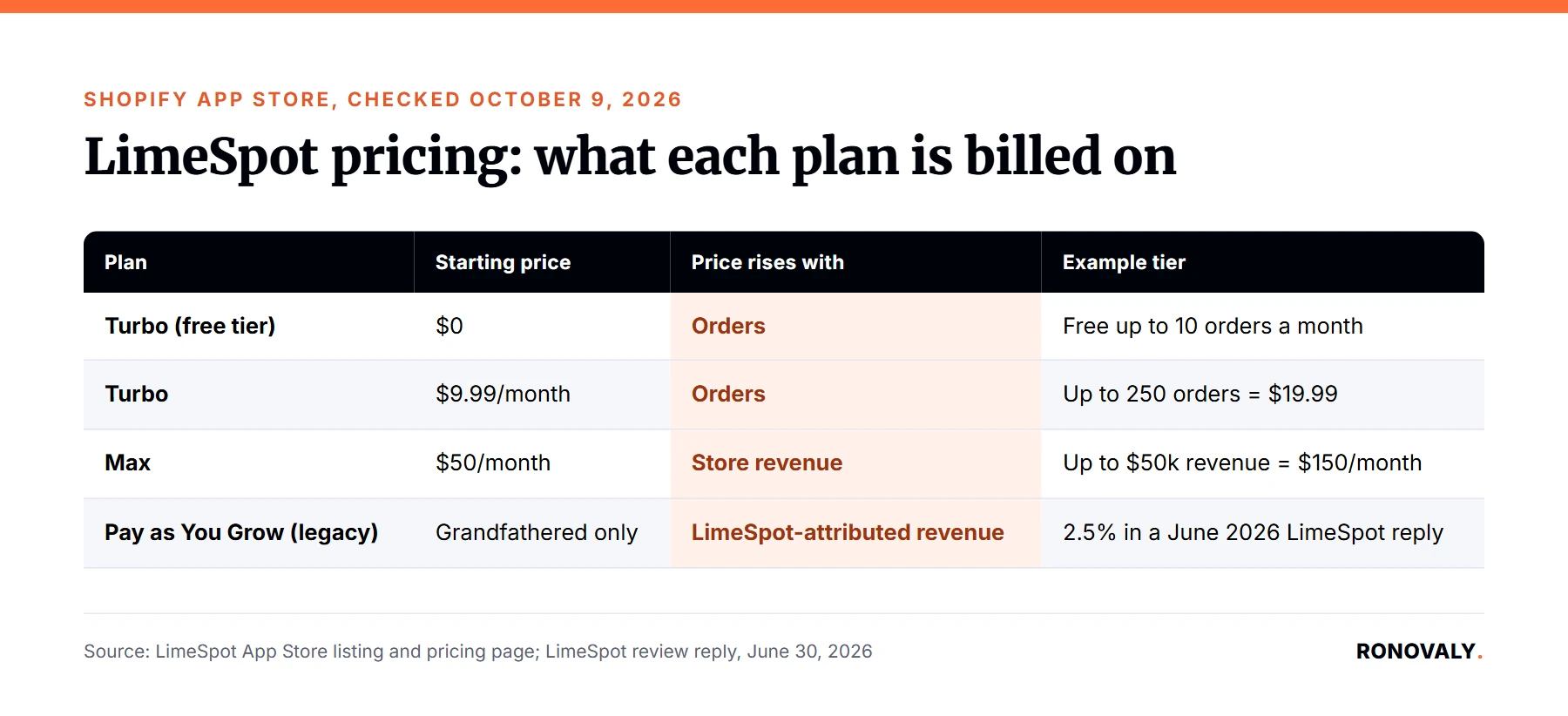
LimeSpot has two current plans, and they’re billed on different numbers. Turbo follows your monthly orders. Max, in contrast, follows your store revenue. Here’s the structure from the App Store listing, checked October 9, 2026:
| Plan | Starting price | What raises the price | Key features |
|---|---|---|---|
| Turbo (free tier) | $0 | Free up to 10 orders a month, standard Turbo fees after that | Same features as paid Turbo; also free on development stores |
| Turbo | $9.99/month | Number of orders (up to 250 orders = $19.99) | Unlimited recommendations, bundles, frequently bought together, checkout and post-purchase offers |
| Max | $50/month | Store revenue (up to $50k = $150/month) | Everything in Turbo, plus segmentation, personalized discounts, email and SMS personalization, A/B/n testing, 70+ integrations |
Both paid plans include a 15-day free trial, and charges are billed in USD every 30 days. In addition, LimeSpot’s pricing page advertises a 50% lifetime discount at sign-up, so check the calculator for your own revenue before you install.
You may still see older plans quoted on other sites, such as “Essentials” or “Pay as You Grow”. I found that the two LimeSpot help articles behind those prices returned a 404 error on October 9, 2026. That said, some long-time stores are still billed on the old plan, as the next section shows.
What Is Your LimeSpot Bill Based On?
Your LimeSpot bill is based on one of three numbers, depending on your plan. This matters more than the starting price, because each number grows in a different way:
- Turbo: your order count. More orders move you to a higher tier, whatever your basket size.
- Max: your total store revenue. Notably, the pricing page counts “revenue per 30 days from Online Store channel”, not only the sales LimeSpot influenced.
- Legacy Pay as You Grow: a share of LimeSpot-attributed revenue. In a June 30, 2026 reply to a review, LimeSpot said one store’s grandfathered plan billed about $500 on $20,396 of LimeSpot-driven revenue (2.5%).
For example, take a hypothetical store with $50,000 in revenue per 30 days on Max. At $150 a month, LimeSpot costs 0.3% of that revenue, which is modest. However, suppose the same store doubles its sales from ads. As a result, the Max price moves to a higher tier, even if LimeSpot’s widgets drove none of the growth. In fact, that’s the pattern behind several 1 star reviews: the merchant sees the bill rise and can’t link the increase to the app. Meanwhile, a Turbo store with the same growth pays by orders, so a store with high basket values pays less for the same revenue. Therefore, before you pick a plan, look at which of your numbers grows fastest: orders, revenue, or the sales the app can claim.
What Does LimeSpot Actually Do?
LimeSpot adds product recommendations and upsell offers across the store, from the homepage to after checkout. According to its App Store listing, Turbo already includes:
- Recommendations on any page: related products, frequently bought together, and AI recommendations.
- Bundles and offers: fixed and upsell bundles, volume and tiered discounts, free shipping offers.
- Cart, checkout and post-purchase: cart drawer upsells, checkout extension offers, and thank-you page offers.
Max adds the personalization layer: audience segments and journey funnels, personalized bundle discounts, smart collections and content, email and SMS product blocks, and A/B/n testing. In particular, the listing names Klaviyo, Omnisend, Yotpo, Okendo and LoyaltyLion among its integrations.
In other words, Turbo is an upsell and bundle app, and Max is a personalization platform. Decide which one you actually need before you compare prices.
What Do LimeSpot Reviews Say?
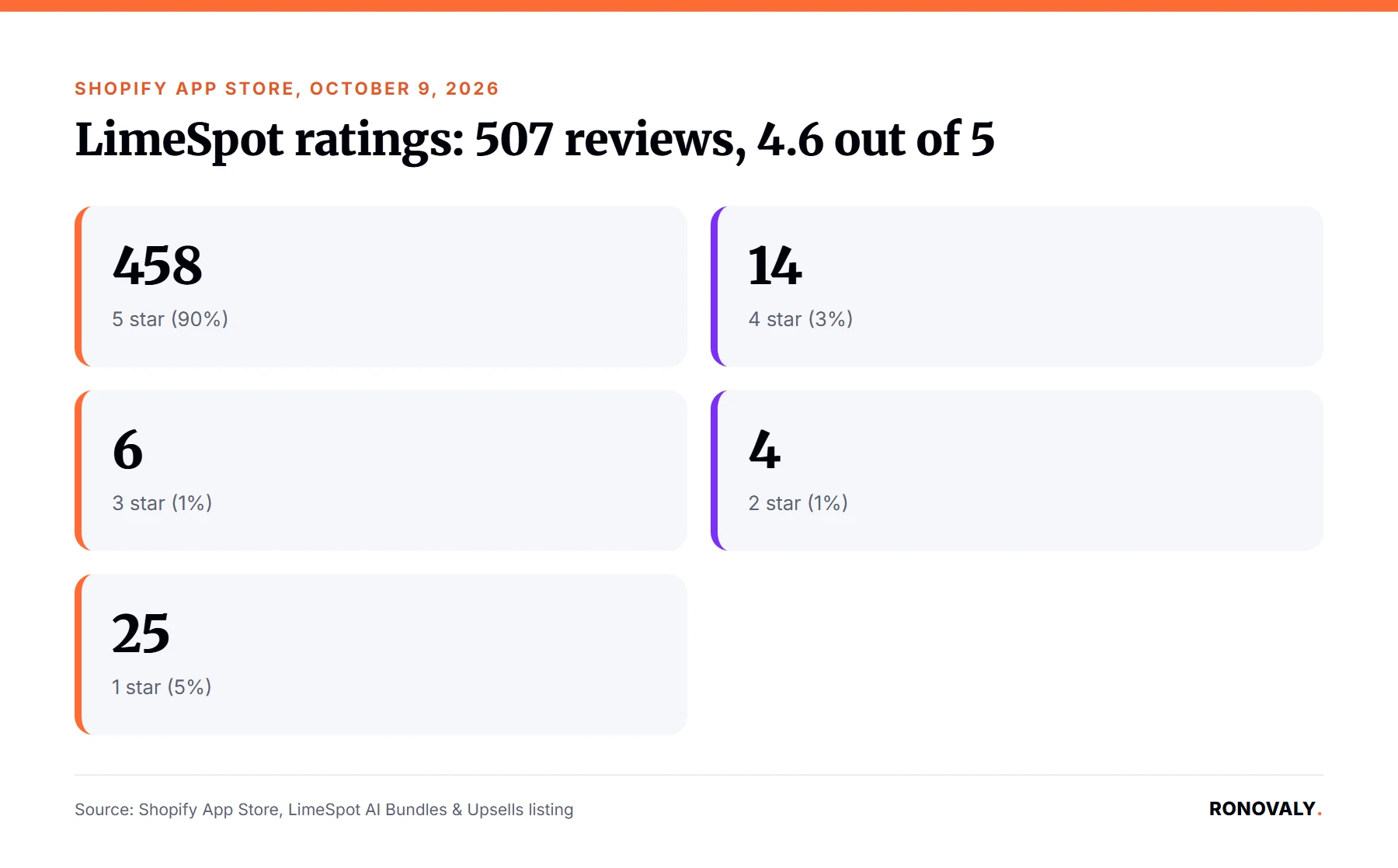
LimeSpot reviews are mostly positive, with a small but sharp group of billing complaints. Of the 507 ratings on the App Store on October 9, 2026, 458 are 5 stars (90%) and 25 are 1 star (5%). The 3 and 2 star ratings are rare, at 6 and 4. In other words, merchants tend to love it or leave it. The positive reviews I read mostly praise support and setup help rather than a specific feature. For example, a July 2026 review credits the team with moving a store’s personalization history during a migration to Shopify. Similarly, a February 2025 review from a store with a vintage theme says setup “took a while” but the support rep sorted out the styling. So if you value hands-on onboarding, the positive reviews back that up. However, the low ratings tell a different story, and it’s mostly about money.
The negative reviews follow two patterns, and the dates matter:
- Billing (2018 to 2026). Reviewers say the bill tracked total store revenue rather than the app’s results, or grew faster than expected as they scaled. A February 2026 reviewer called the pricing “exorbitent” and questioned how the app claims credit for sales.
- Reliability and theme issues (mostly 2017 to 2023). By contrast, older reviews mention recommendations showing draft or archived products, leftover theme code after uninstalling, and the app disconnecting without notice.
LimeSpot replies to many of these, often with its own numbers. Read both sides: a review is one merchant’s account, and a reply is the vendor’s.
How Does LimeSpot Count the Revenue It Reports?
LimeSpot counts a sale when a shopper clicks one of its widgets and then buys. Specifically, in a September 2023 reply to a review, LimeSpot said it uses click-based attribution and doesn’t count purchases made more than a week after the click. Ask LimeSpot to confirm the current window, since that statement is three years old. This matters for two reasons. First, on the legacy plan, attributed revenue is what you pay on, so a wider window means a bigger bill. Second, on any plan, the revenue the dashboard credits to LimeSpot is not the same as extra revenue. For instance, a shopper who clicks a recommendation for a refill may have bought that refill anyway. Consequently, the dashboard tells you where LimeSpot touched a sale, not how many sales it created. Several 1 star reviewers made exactly this point.
LimeSpot’s own figures also vary from page to page. For example, its pricing page claims a 12 to 18% revenue uplift for the average customer, while its llms.txt file claims 10 to 25% and “3x higher conversion rates”. Treat these as marketing. Instead, if you install it, compare a period with the widgets on against a period with them off.
LimeSpot Review: Pros and Cons
Based on the plans, the listing and the review record, here’s the balance:
Pros
– A free tier up to 10 orders a month, so a new store can try it at no cost.
– Turbo covers recommendations, bundles, checkout and post-purchase offers from $9.99.
– Support gets consistent praise in positive reviews, including setup help on a vintage theme.
– Max adds segmentation, email blocks and A/B/n testing in one subscription.
Cons
– Max is billed on total store revenue, so the price grows with sales LimeSpot didn’t drive.
– Turbo isn’t compatible with Shopify Plus.
– Three billing models (two current, one legacy) make invoices hard to check.
– The app requests wide data access, including customer contact data, orders, and theme and checkout editing.
LimeSpot Alternatives for Shopify
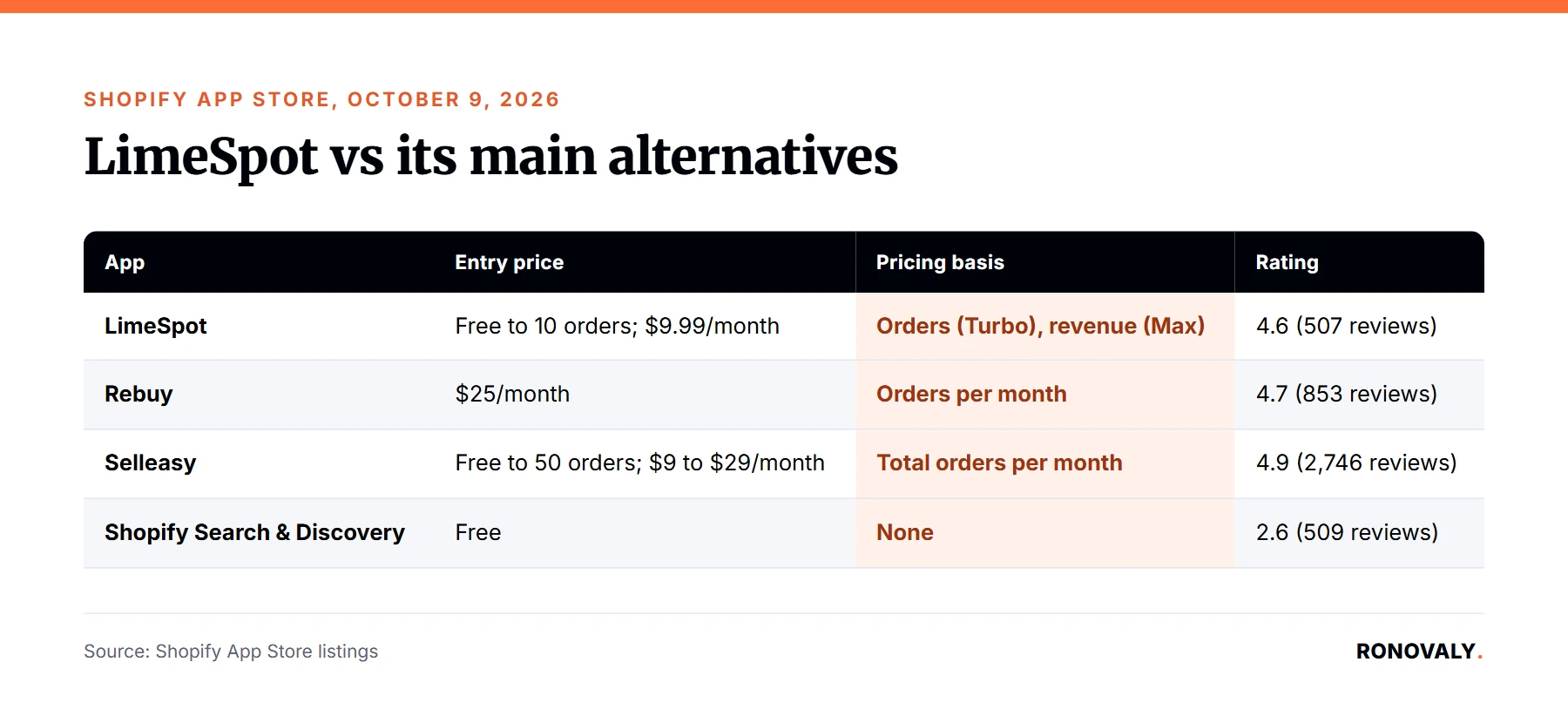
The main LimeSpot alternatives are billed on orders, not revenue, and one is free. I checked each Shopify App Store listing on October 9, 2026:
| App | Entry price | Pricing basis | Rating | Best for |
|---|---|---|---|---|
| LimeSpot | Free up to 10 orders; $9.99/month | Orders (Turbo), store revenue (Max) | 4.6 (507 reviews) | Upsells and bundles, plus personalization on Max |
| Rebuy | $25/month | Orders per month | 4.7 (853 reviews) | A full suite: cart, checkout, search, A/B testing |
| Selleasy | Free up to 50 orders; $9 to $29/month | Total orders per month | 4.9 (2,746 reviews) | Simple upsell and cross-sell offers on a budget |
| Shopify Search & Discovery | Free | None | 2.6 (509 reviews) | Basic related and complementary products |
That said, Shopify’s free option has limits. Per Shopify’s Help Center, you can pick up to 10 related products, show one complementary products block per product page, and your theme needs a complementary products section. Still, a February 2026 reviewer pointed out that newer themes cover the basics, so start there.
For a head-to-head, see our Rebuy vs LimeSpot comparison and the full Rebuy review.
Who Should Use LimeSpot (and Who Should Skip It)?
LimeSpot fits stores that want more than basic related products but won’t pay for a full suite. In particular, it suits multi-product stores where add-ons sell naturally. Here’s how I’d decide:
- Try the free Turbo tier if you’re under 10 orders a month and want bundles and upsells now.
- Pick Turbo if you sell several products with natural add-ons and you’re not on Shopify Plus.
- Consider Max if you’ll use segmentation, email blocks and A/B testing, and your revenue tier price makes sense to you.
- Skip it if you sell one product, or if Shopify’s free recommendations already do the job.
Before you install, run this short checklist:
- Find your tier: orders per month for Turbo, revenue per 30 days for Max.
- If you’re on Shopify Plus, ask LimeSpot which plan works for you.
- Ask for the current attribution window and how to export attributed orders.
- Test Shopify Search & Discovery first, so you know what the paid app adds.
- Measure a period with the widgets on and one with them off.
Additionally, if your app bill is already long, check for overlap first with our Shopify AI app stack audit guide.
Frequently Asked Questions
How much does LimeSpot cost on Shopify?
LimeSpot Turbo is free up to 10 orders a month, then starts at $9.99 a month and rises with orders (up to 250 orders costs $19.99). LimeSpot Max starts at $50 a month and rises with store revenue; up to $50,000 in revenue per 30 days costs $150. Both paid plans include a 15-day free trial.
Is LimeSpot free?
Yes, for small stores. The Turbo plan is free up to 10 orders a month and on development stores, with standard Turbo fees after that. However, the free tier isn’t compatible with Shopify Plus. Once you pass 10 orders a month, paid Turbo starts at $9.99 and grows with your order count.
Does LimeSpot work with Shopify Plus?
Not on Turbo. The App Store listing marks both Turbo tiers as not compatible with Shopify Plus. The listing doesn’t say the same for Max, but it doesn’t confirm Plus support either. Therefore, if you’re on Plus, ask LimeSpot which plan you can use before you start a trial.
How does LimeSpot track the sales it reports?
LimeSpot uses click-based attribution: a sale counts when a shopper clicks a LimeSpot widget and then buys. In a 2023 reply to a review, LimeSpot said it doesn’t count purchases made more than a week after the click. Ask for the current window, and compare results with the widgets on and off.
LimeSpot vs Rebuy: which one should I pick?
Pick by how you want to be billed and how much you need. LimeSpot Turbo starts at $9.99 and is billed by orders, while LimeSpot Max is billed by store revenue. In contrast, Rebuy starts at $25 a month, is billed by orders, and adds search and a full cart suite. Rebuy rates 4.7 (853 reviews).
Do I need LimeSpot if Shopify has free product recommendations?
Not always. Shopify’s free Search & Discovery app shows related and complementary products, up to 10, if your theme has a complementary products section. However, its listing doesn’t mention segmentation, bundles or A/B testing. Start with the free app, then add LimeSpot only if you need those features.
Bottom Line
LimeSpot is an upsell and recommendation app with a real free tier and support that positive reviews keep praising. However, the bill is the deciding factor. Turbo is easy to justify at $9.99 to $19.99 if you’re not on Shopify Plus. Max makes sense only if you’ll use its personalization features and accept a price that follows your total revenue. Start with the free trial and measure with the widgets on and off.
About the Author
Sarah Blake covers growth and conversion for Ronovaly, focusing on upsells, email, and retention for Shopify brands in the $500K to $5M ARR range. Editorial note: this review was written on October 9, 2026; every price and rating was checked against the vendor’s pricing page or Shopify App Store listing that day, and no app was installed for it.
Sources
- Shopify App Store, LimeSpot AI Bundles & Upsells (checked 2026-10-09): https://apps.shopify.com/limespot
- Shopify App Store, LimeSpot reviews, 1 and 2 star filters (checked 2026-10-09): https://apps.shopify.com/limespot/reviews
- LimeSpot, Pricing (checked 2026-10-09): https://limespot.com/pricing
- LimeSpot, llms.txt (checked 2026-10-09): https://limespot.com/llms.txt
- Shopify App Store, Rebuy (checked 2026-10-09): https://apps.shopify.com/rebuy
- Shopify App Store, Selleasy (checked 2026-10-09): https://apps.shopify.com/upsell-cross-sell-kit-1
- Shopify App Store, Shopify Search & Discovery (checked 2026-10-09): https://apps.shopify.com/search-and-discovery
- Shopify Help Center, Product recommendations (checked 2026-10-09): https://help.shopify.com/en/manual/online-store/search-and-discovery/product-recommendations
This post contains affiliate links. If you make a purchase through these links, we may earn a commission at no extra cost to you.