Shopify AI Customer Support: How to Set It Up (Step-by-Step)
Setting up Shopify AI customer support takes under an hour once your policies and FAQs are written down. The setup is rarely the hard part. The prep work is. Stores with a messy AI support rollout often skipped the prep, installed a tool right away, and then wondered why the bot gave wrong answers in week one.
This guide is part of our complete guide to AI tools for Shopify stores. If you haven’t picked a tool yet, start with our comparison of the 7 best AI chatbots for Shopify, then follow the steps below.
What Is AI Customer Support (and Why It’s Different From a Basic Chatbot)
A basic chatbot follows scripted decision trees: click a button, get a pre-written answer. AI customer support reads the actual question instead. It checks your store’s live data (order status, policies, product details) and writes a specific answer in plain language. It hands off to a human only when it’s truly unsure.
Here’s the difference in practice. A scripted bot can tell a customer “here’s our return policy page.” An AI one can tell a specific customer “your order #4471 can be returned until August 3rd, here’s how to start.” It can do that because it sees that order’s real data.
What You’ll Need Before You Start
- Admin access to your Shopify store
- Your return policy, shipping windows, exchange rules, and warranty terms — ideally already written on your Policies pages (Settings → Policies)
- A list of the exceptions your support team makes that aren’t written down anywhere. This step gets skipped all the time, and it’s the one that causes wrong answers later.
- 45-60 minutes total, split across prep and installation

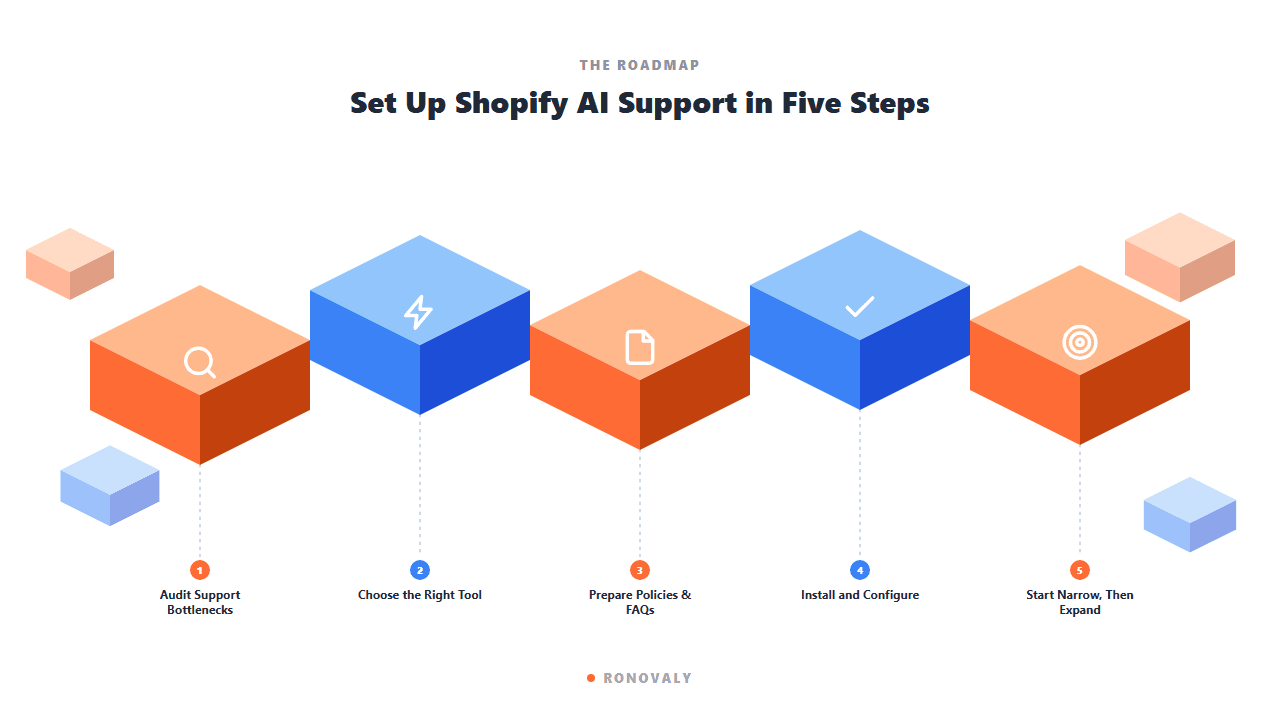
Step 1: Audit Your Current Support Bottlenecks
Before picking a tool, look at your last 30 days of support tickets or messages. Sort them into two piles. Pile one: repeat questions with a clear, consistent answer (where’s my order, what’s your return window, do you ship to Canada). Pile two: judgment calls that truly need a human.
The most reliable way to scope an AI support rollout is that 30-day audit. Split the conversations into repeat, policy-based questions and judgment calls that need human context. Order status, return policy, and shipping time questions are usually the biggest share of ecommerce support. They’re also the safest to automate, because your store data fully decides the right answer. Judgment calls should stay with a human even after AI support is live. Think of a damaged-item negotiation, a loyalty exception, or a complaint that needs empathy. Automate the repeat questions first and expand step by step. That way you can check each stage against real conversations before you turn on the next one.
The audit also tells you what to set up first. Automate the biggest repeat category, not the most technically interesting one.
Step 2: Choose the Right AI Tool for Your Store
Match the tool to your real needs, not the most-hyped option. Three things matter most: your budget, how deeply it must connect to your order and product data, and whether you want a Shopify-native tool or a more flexible third-party one.
Shopify Inbox is the native starting point. It’s free, installs from the Shopify App Store, and sets up instant FAQ answers through the theme editor. For most stores under $50k/month, it covers the repeat questions from Step 1 at no extra cost. Shopify’s own guide to AI customer service strategies is a useful reference for the platform’s official take on how to order a rollout.
For more advanced AI chat, deeper customization, or several channels at once (email, chat, and social), a third-party tool is usually the next step. Shopify keeps its own list of AI chatbots built for ecommerce customer service, worth checking against our comparison. If you’ve outgrown Shopify Inbox, our Tidio vs Gorgias comparison helps you pick between the two most common upgrades.

Step 3: Prepare Your Policies and FAQ Content
This step decides whether your AI gives correct answers or embarrassing ones. If your return policy, shipping windows, exchange rules, and warranty terms already live on your Policies pages, you’re most of the way there. What’s usually missing is the exceptions your team makes in practice but never wrote down.
Write a short document listing every judgment call your team makes that isn’t on your public policy pages. For example: “we allow late returns for loyalty customers” or “we cover shipping on defective items even past the window.” The AI can only be as accurate as what you give it. It doesn’t know your team’s unwritten habits until you write them down.
Step 4: Install and Configure
Search for your chosen tool in the Shopify App Store, click Install, and approve the permissions. The tool needs access to orders, customers, and products to answer correctly. No mainstream option needs any coding.
During setup, most tools ask you to import or link your policy pages and FAQ content. This is where the prep from Step 3 pays off. With complete, accurate source material, the tool sets up right in one pass. Without it, you’ll keep fixing gaps after customers hit them.
Set the AI’s tone to match your brand voice in this step too. Most tools let you pick professional, friendly, or a custom tone. It’s far easier to get this right at the start than to fix it later.
Step 5: Start Narrow, Then Expand
Don’t turn on full automation for every question type on day one. Start with order status, the highest-volume and lowest-risk category. Check that it’s accurate for a week. Then expand into policy-driven workflows (returns, exchanges), with clear escalation rules for anything the AI isn’t sure about.
The recommended rollout order is: order status first, policy-driven workflows second, open-ended conversation last. Each stage adds risk and complexity, so check each one before you move on. Order status is the safest start, because the answer is a direct data lookup with no interpretation. Returns and exchanges bring more nuance and need clear escalation rules for edge cases. Run a weekly review the whole way through. Have a team member check a sample of the AI’s automated answers. Use what you find to improve replies, tighten escalation triggers, and close policy gaps before a wrong answer reaches many customers.
Build in that weekly review from week one, not after a mistake forces you to. A 15-minute weekly audit of automated resolutions catches drift long before it becomes a customer complaint.
Illustrative example (hypothetical): picture a skincare brand whose two-person support shift gets dozens of “where’s my order” messages a day. Writing down shipping windows and automating order-status replies first targets that category directly. The team’s time can then go to judgment calls like refund edge cases and product questions. Track that ticket category before and after to see the real effect.

Common Mistakes to Avoid
Skipping the policy documentation step. This is the single most common cause of AI support giving wrong or inconsistent answers. If it’s not written down, the AI doesn’t know it.
Automating everything on day one. Judgment calls (damaged-item negotiations, loyalty exceptions, real complaints) should stay with a human, even after AI support is live for the repeat categories.
Never reviewing automated resolutions. Set a recurring weekly 15-minute check from the start. Catching a wrong answer after one customer complaint is far cheaper than catching it after fifty.
Picking a tool based on features instead of fit. A powerful, highly customizable third-party tool is wasted complexity for a store that just needs order-status automation. Match the tool to the audit from Step 1, not to the longest feature list.
FAQ
How long does it take to set up AI customer support on Shopify?
The install and setup usually take under an hour once your policies and FAQs are written down. Most of the real time goes in before the install: auditing tickets and writing down policy exceptions. That can take a few hours, depending on how much is already written.
Is Shopify Inbox good enough, or do I need a third-party AI tool?
Shopify Inbox is free and native. It covers most repeat questions (order status, basic policy questions) for stores under roughly $50k/month. Stores that need deeper customization, several channels, or more advanced chat usually move to a third-party tool once they outgrow it.
Will AI customer support give customers wrong information?
It can, if your policy documents are incomplete or out of date. The AI is only as accurate as what you give it. Two safeguards prevent most of this: thorough policy documents before setup, and a weekly review of automated answers to catch drift early.
What should I automate first with Shopify AI customer support?
Order status questions. They’re the safest and most valuable start, since the answer is a direct data lookup with no judgment. Returns and exchanges come next, once order status is confirmed accurate. Questions that need real human context should stay with a human for good.
Does AI customer support replace my support team?
No. It takes on the repeat, high-volume questions so your team can focus on issues that truly need a human. The usual goal is to shift the team’s time to complex cases and proactive customer care, not to cut the role.
Key Takeaways
- The setup itself takes under an hour — the real time investment is auditing support tickets and documenting policy exceptions beforehand.
- Start with Shopify Inbox (free, native) before evaluating a third-party tool; most stores under $50k/month don’t need more.
- Automate order status first, then policy-driven workflows, and keep judgment-call questions with a human indefinitely.
- Undocumented policy exceptions are the most common cause of wrong AI answers — write them down before installing anything.
- Build a weekly review of automated resolutions into the process from week one, not after the first customer complaint.
For the full tool comparison, see the 7 best AI chatbots for Shopify and Tidio vs Gorgias. For the full picture, revisit the complete guide to AI tools for Shopify stores.
This post contains affiliate links. If you make a purchase through these links, we may earn a commission at no extra cost to you.