Shopify Tax Return Shipping Fees: What Changes October 23
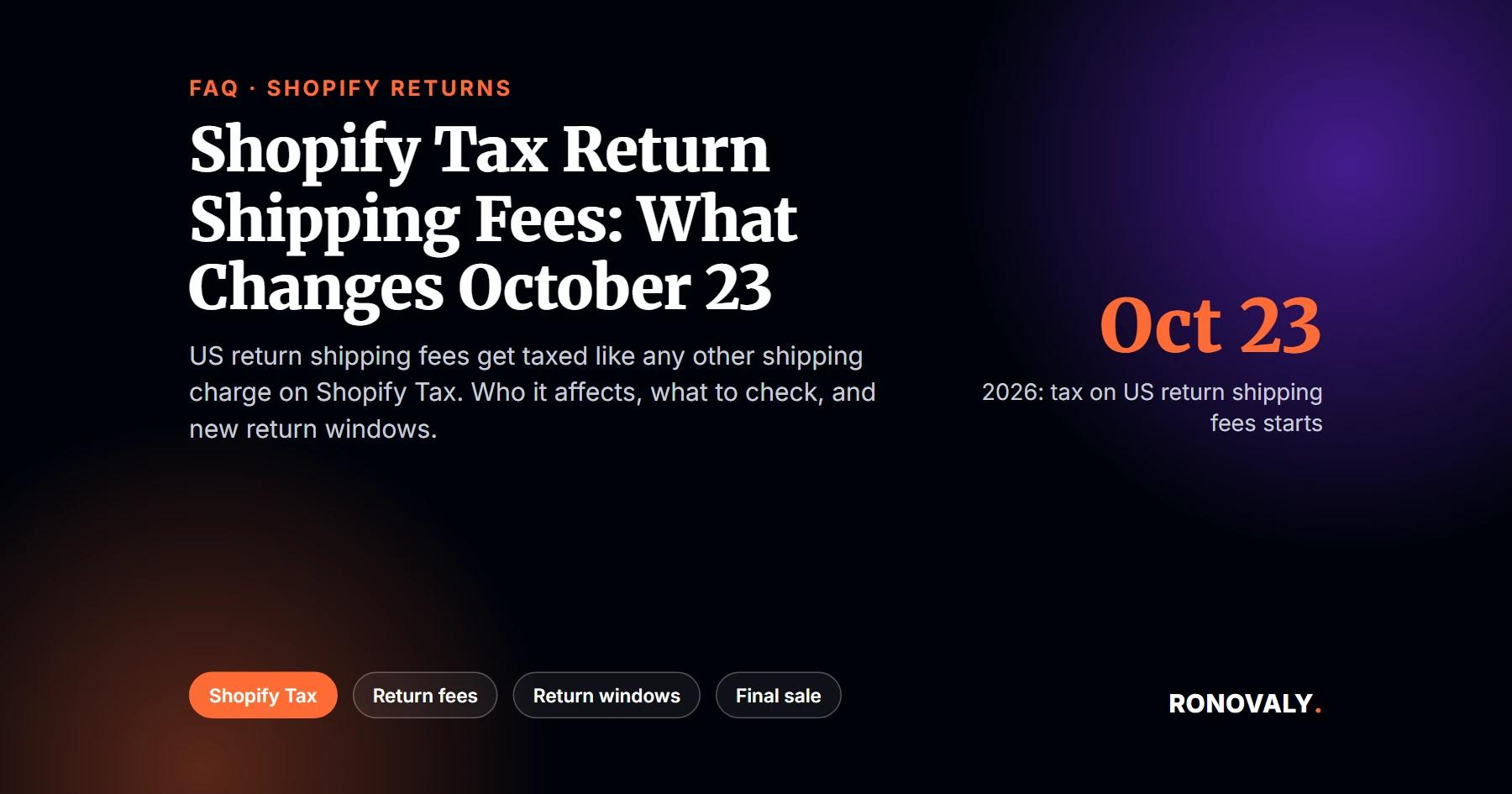
Shopify tax return shipping rules change on October 23, 2026. From that date, Shopify calculates sales tax on the return shipping fee you charge for US returns, if you use Shopify Tax or Tax Platform. That’s according to Shopify’s changelog. As a result, a flat return shipping fee can now carry tax, and any manual fix you built for it could count that tax twice.
A return shipping fee is the flat amount you can charge a customer per return, set in your return rules. A return window override is a separate new setting: a different return period for chosen collections, products, or variants.
I read Shopify’s changelog, three Help Center pages, and a Shopify staff post on October 5, 2026. I don’t run a store, and this isn’t tax advice. Shopify’s own Help Center says the same thing about its tax pages, so check the details with a tax professional.
Key Takeaways
- From October 23, 2026, US return shipping fees are taxed “like any other shipping charge” for stores on Shopify Tax or Tax Platform.
- Nothing changes if you offer free returns or customers buy their own label, because there’s no fee to tax.
- Restocking fees, handling fees, non-US returns, tax-exempt orders, and Manual Tax or Basic Tax stores aren’t affected.
- If you calculate or reconcile this tax by hand today, review that process before October 23 to avoid double counting.
- Since September 29, 2026, return window overrides let you set a shorter or longer window for chosen items, and the shortest matching one wins.
Getting Started with the Return Shipping Tax Change
What exactly changes on October 23, 2026?
Shopify starts taxing the return shipping fee. The changelog says that “return shipping fees will be taxed like any other shipping charge” for merchants on Shopify Tax or Tax Platform in the United States. Today, a Shopify staff member wrote in the Community announcement, “these fees may appear with $0 tax.” After the change, Shopify shows the estimated tax when you create a return and records the final amount when you process it. In addition, the changelog says these taxes “flow into your tax reports automatically.” In other words, Shopify now handles the fee like the shipping on the original order. The change covers orders shipped to US addresses only. Moreover, it doesn’t change how you set the fee itself: you still choose free returns, a flat fee per return, or a label the customer buys. So the tax math moves inside Shopify.
Does this affect my store?
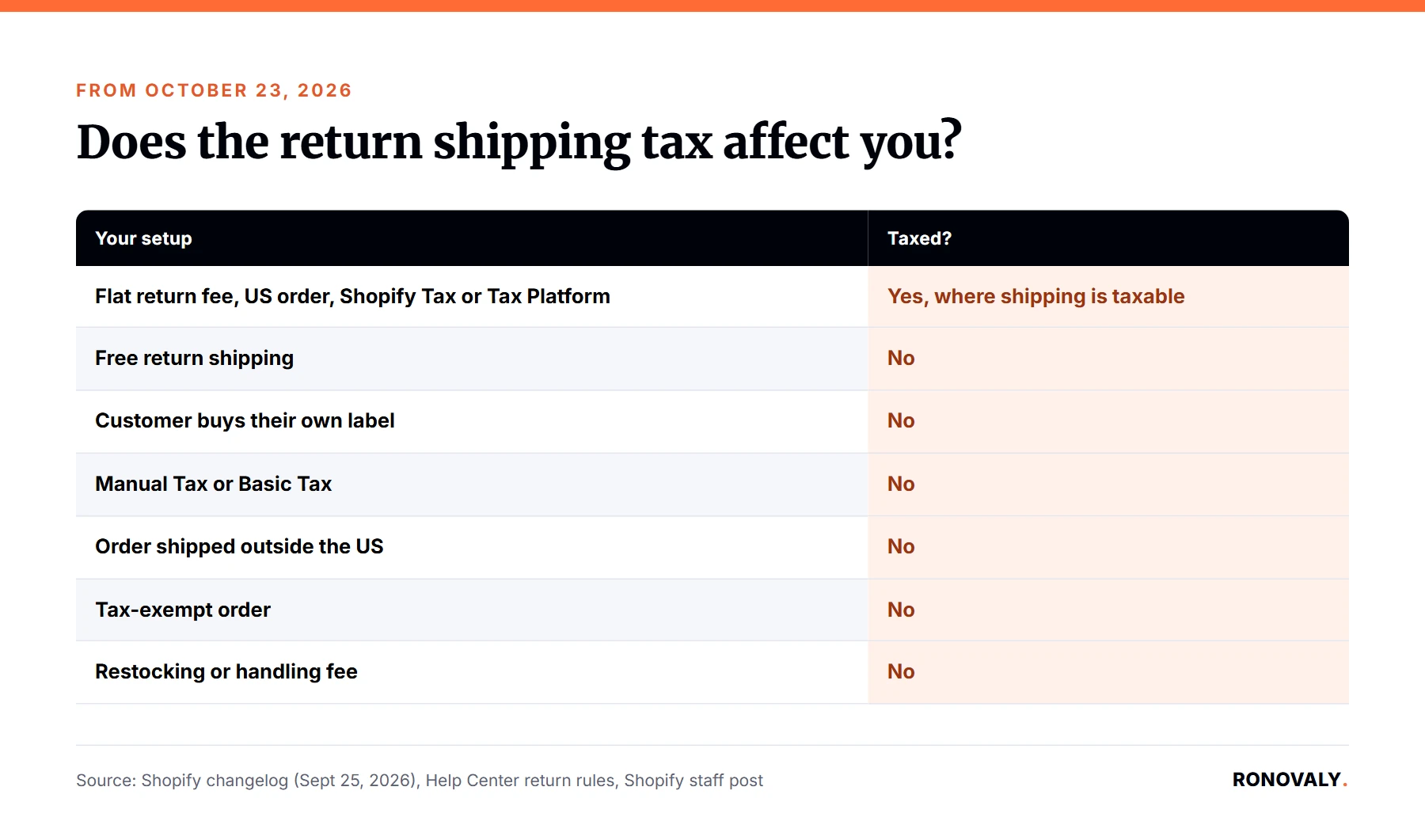
Only if three things are true at once. First, you charge a return shipping fee. Second, the order shipped to a US address. Third, you use Shopify Tax or Tax Platform. I built this table from the changelog, the return rules page, and the staff post:
| Your setup | Tax on return shipping from October 23? |
|---|---|
| Flat return shipping fee, US order, Shopify Tax or Tax Platform | Yes, where shipping is taxable |
| Free return shipping | No: there’s no fee to tax |
| Customer buys their own return label | No: you charge no fee |
| Manual Tax or Basic Tax | No |
| Order shipped outside the US | No |
| Tax-exempt order | No |
| Restocking fee or handling fee | No |
Will every US state tax the fee?
No. Instead, Shopify says, “Tax is calculated only if the fee is taxable in the tax jurisdiction that the order was shipped to.” The changelog adds that your existing shipping tax settings still apply. For instance, if you’ve set shipping to be untaxed in a state, “return shipping fees in that state remain untaxed.” Notably, the “Charge tax on shipping rates” checkbox isn’t the switch for this. Shopify’s shipping tax page says that in the United States, shipping is taxed where applicable regardless of that setting. Therefore, the result follows each state’s rules, not one store-wide toggle.
What to Check Before October 23
What should I review this month?
Any manual workaround. Fortunately, Shopify’s advice is short: “If you use a manual workaround today to calculate, collect, import, or reconcile tax on return shipping fees, review it before October 23 to avoid double-counting tax.” Otherwise, Shopify says no action is required. From my research, Shopify doesn’t name specific apps or tools, so don’t assume your returns app is affected. Instead, ask whoever handles your tax filing one question: do we add tax to return shipping fees anywhere outside Shopify today? If the answer is yes, that step needs to stop on October 23.
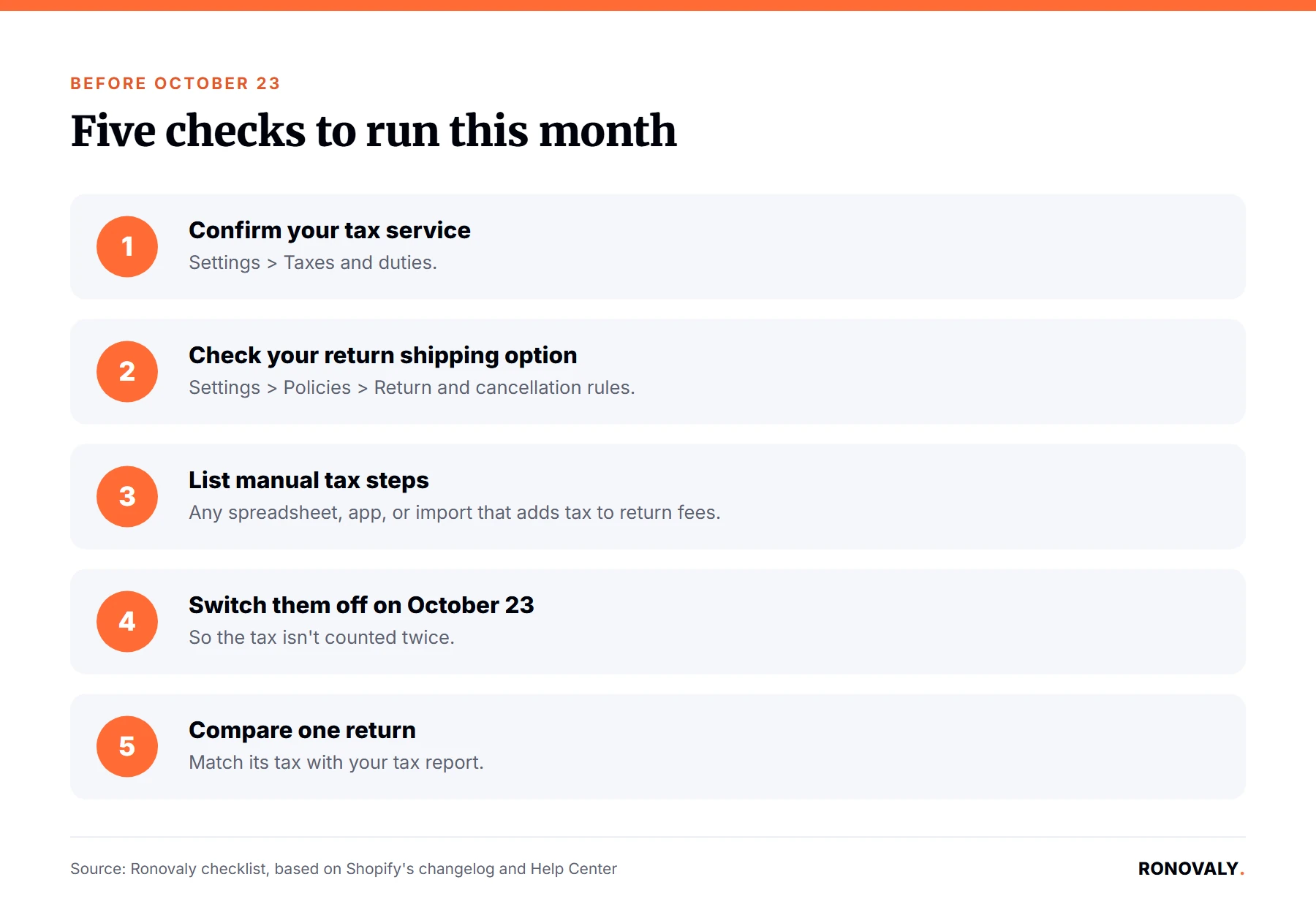
- Confirm your tax service under Settings > Taxes and duties.
- Check your return shipping option under Settings > Policies > Return and cancellation rules.
- List any spreadsheet, app, or import that adds tax to return shipping fees.
- Plan to switch that step off on October 23, 2026.
- After the date, compare one return’s tax with your tax report.
Where will the tax show up?
In several places. First, the staff post says the tax “may appear in return totals, refund summaries, and supported return APIs.” Similarly, the Help Center says the tax amount is “displayed with the return shipping fee when you create a return,” and it’s “included in the total tax for the return.” As a result, your support team will see a new line when they create a return. That’s worth a short note in your support playbook before the holidays. For a wider view of returns tooling, see our guide to AI returns and exchanges automation for Shopify.
Does Shopify take the fee out of the refund for me?
No, and this didn’t change. In fact, the return rules page states, “Return fees aren’t automatically deducted from refunds. When you create a refund, you need to manually deduct any applicable return fees.” Shopify also shows the fee “when you create a return,” and you can edit it for a specific return. Therefore, check one full return from start to refund after October 23. Specifically, confirm that the fee, its tax, and the refund amount all match what your policy promises customers.
Return Window Overrides
What are return window overrides?
A way to give some items a different return period. Specifically, Shopify’s changelog from September 29, 2026 says you can now set overrides “for specific collections, products, or variants.” For example, Shopify suggests a 14-day window for seasonal items while the standard window stays at 90 days. Moreover, an override can be longer or shorter than your default. When an item matches an override, its window replaces your default. Otherwise, the market-specific window applies, and then the default window. In addition, the changelog says these overrides can be set by market.
What happens when an item matches two overrides?
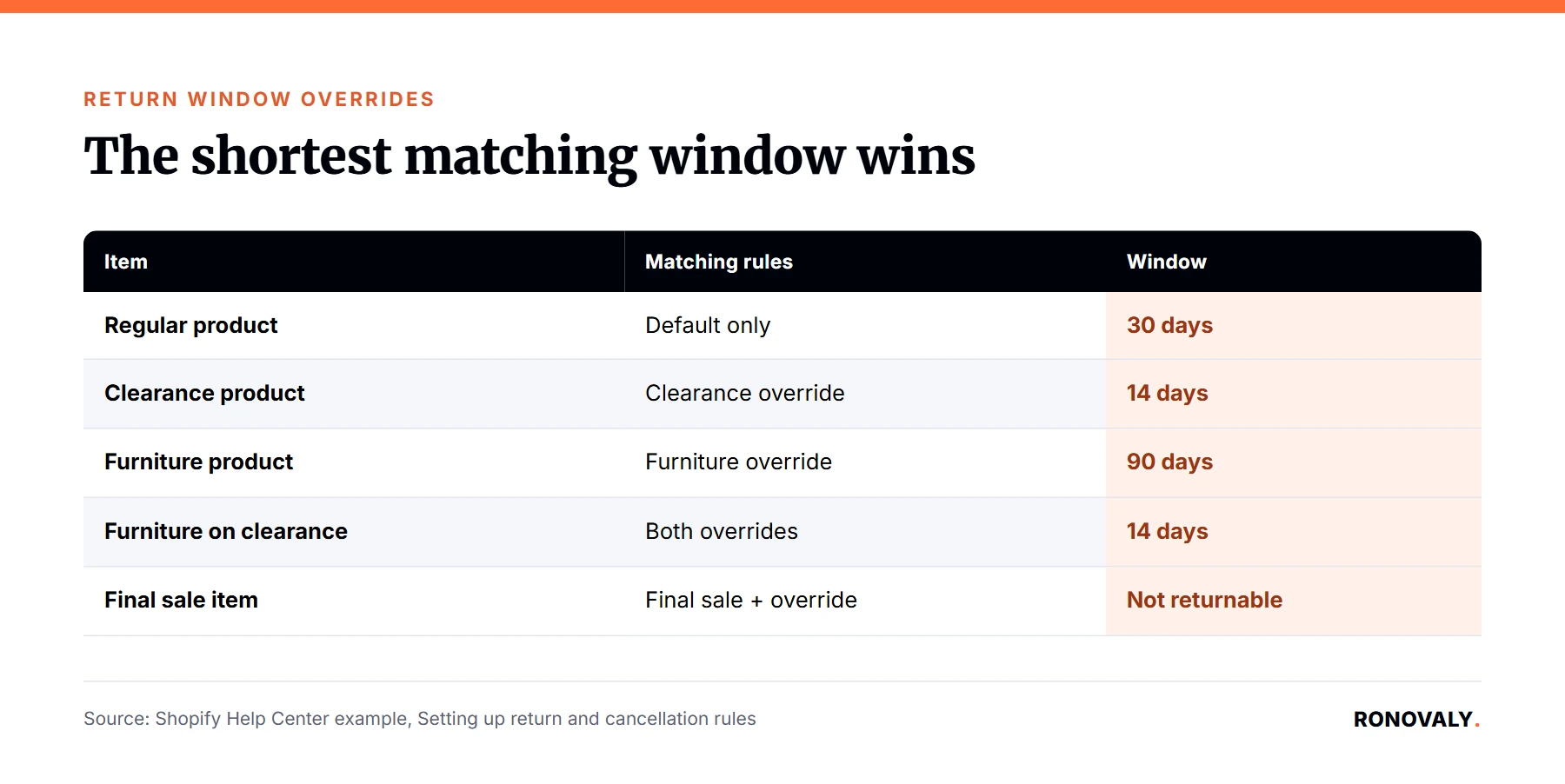
The shortest window wins. For example, Shopify’s Help Center describes a 30-day default, a 14-day override for a clearance collection, and a 90-day override for furniture. A product in both collections gets 14 days, “because the shortest override that applies is used.” Furthermore, final sale still beats everything. The changelog says items marked as final sale “can’t be returned (or cancelled), even if they also match a return window override.” I built this table from those rules:
| Item | Matching rules | Return window |
|---|---|---|
| Regular product | Default only | 30 days |
| Clearance product | Clearance override | 14 days |
| Furniture product | Furniture override | 90 days |
| Furniture on clearance | Both overrides | 14 days (shortest wins) |
| Final sale item in either collection | Final sale + override | Not returnable |
How do I add an override?
In your return rules. First, go to Settings > Policies, open Return and cancellation rules, and click the rule you want to edit. Next, click + Return window override, enter the number of days, and choose collections or products in Applies to. Then select the items, click Add, and click Save. Note that self-serve returns don’t need to be on for the rules to apply, since Shopify says return rules “still apply when you process returns manually.” However, market-specific rules are still in early access, so you may only see your default rule.
Advanced Topics
Should I set holiday overrides before Black Friday?
Yes, and the timing matters. Notably, Shopify states, “Changes to your return rules apply only to future orders.” Consequently, an override you add on December 1 won’t cover orders placed during Black Friday week. So if you want a different window for a holiday collection, set it before your sale starts. In particular, Black Friday orders arrive fast, and every order keeps the rules that applied when it was placed. Black Friday 2026 falls on November 27. Also, make sure your written return policy says the same thing, because Shopify notes the generated policy “doesn’t automatically include the return rules that you set up.”
Is this a good moment to review return fees overall?
It’s a natural one. From October 23, a flat return shipping fee can carry tax in places where shipping is taxable. Meanwhile, free returns and customer-bought labels carry no fee at all. Ultimately, that’s a policy choice, not a tax rule, so weigh it against your margins and your return rate. For a structured look at what your tools cost, see our guide to auditing your Shopify app stack for hidden costs.
Related Resources
- Shopify changelog, Tax is now calculated on return shipping fees: the October 23, 2026 change.
- Shopify Help Center, Setting up return and cancellation rules: tax on return fees and overrides.
- Shopify changelog, Return window overrides now available: the September 29, 2026 feature.
Still Have Questions?
Start with the “Does this affect my store?” table: if you charge a flat return shipping fee on US orders and use Shopify Tax, the change applies to you. Then run the five checks before October 23. For anything about what your state requires, talk to your tax professional, since Shopify’s own pages say they don’t replace professional tax advice.
About the Author
Alex Carter covers AI, automation, and Shopify platform changes for Ronovaly, focusing on what they mean for stores in the $500K to $5M ARR range. Editorial note: every quote in this post was checked against its source on October 5, 2026. This post is information, not tax advice.
Sources
- Shopify changelog, “Tax is now calculated on return shipping fees” (September 25, 2026): https://changelog.shopify.com/posts/tax-is-now-calculated-on-return-shipping-fees
- Shopify changelog, “Return window overrides now available” (September 29, 2026): https://changelog.shopify.com/posts/return-window-overrides-now-available
- Shopify Help Center, “Setting up return and cancellation rules” (checked 2026-10-05): https://help.shopify.com/en/manual/fulfillment/managing-orders/returns/return-rules
- Shopify Help Center, “Shipping tax” (checked 2026-10-05): https://help.shopify.com/en/manual/taxes/shipping-tax
- Shopify Community, staff announcement “Update to taxes on US return shipping fees coming October 23, 2026” (checked 2026-10-05): https://community.shopify.com/t/update-to-taxes-on-us-return-shipping-fees-coming-october-23-2026/687713
This post contains affiliate links. If you make a purchase through these links, we may earn a commission at no extra cost to you.