Shopify Google AI Mode Checkout: Should You Turn It Off?
Shopify Google AI Mode checkout lets US shoppers buy your products inside Google’s AI Mode and Gemini without visiting your store. It’s switched on by default for eligible stores, according to Shopify’s Help Center. Should you leave it on? For a simple catalog, usually yes. However, the same page lists features that stop working inside this checkout, and a few of them can cost you money.
Google AI Mode direct checkout is a Shopify-powered checkout that runs inside Google’s AI Mode and Gemini, so the shopper pays without leaving the conversation. The Universal Commerce Protocol (UCP) is the open standard behind it, which Google describes as a common language for AI agents, stores, and payment providers.
I read Shopify’s help page, its Agentic Storefronts terms, and Google’s Merchant Center documentation on September 30, 2026. However, I haven’t placed an order through AI Mode, so this is a decision guide built from those documents, not a test.
Key Takeaways
- Direct checkout in Google AI Mode and Gemini is “activated by default for eligible stores” based in the US, per Shopify’s Help Center.
- Google emailed merchants about it on September 22, 2026, after a wider rollout that began on September 18.
- Google Analytics and custom pixels don’t fire in this checkout. Only server-to-server pixels do.
- Subscriptions, bundles, customizable products, and B2B-only products aren’t supported. Upsell, loyalty, and consent blocks might not load.
- To opt out: Sales channels, then Agentic, turn off “Allow Shopify to manage for me,” open Google AI Mode and Gemini, turn off “Direct checkout,” then Save.
Getting Started with Shopify Google AI Mode Checkout
What is Shopify Google AI Mode checkout?
It’s a way for shoppers to buy your products inside a Google AI conversation. Shopify says the channel “lets customers complete their purchases in a Shopify-powered direct checkout without having to leave their chat conversation.” Specifically, the shopper clicks Buy, enters shipping and payment details, and pays. In other words, the order reaches your Shopify admin, but the shopper never loads your storefront.
Is it really on by default?
Yes. Shopify’s Help Center states that direct checkout “is active by default for eligible stores.” In fact, many merchants learned this from an email. Search Engine Roundtable published the text on September 22, 2026: “Your Shopify store was matched to your Merchant Center, enabling native checkout on Google AI Mode and Gemini.” In addition, it said eligible products “are automatically included.” According to PPC Land, the wider rollout began on Friday, September 18.
Who is eligible?
Stores that meet six conditions in Shopify’s Help Center. First, your store is based in the United States and sells to US customers. Second, you have a valid Google Merchant Center account that meets Google’s requirements. Third, your products are available in Merchant Center. Fourth, your products qualify for Shopify Catalog. Fifth, you’ve agreed to the Agentic Storefronts terms. Finally, your terms of service, privacy policy, and return and refund policy are filled in. In addition, the checkout is shown only to shoppers based in the United States.
How much does it cost?
Nothing extra today. Shopify’s Help Center says, “There are no fees associated with selling in Google AI Mode and Gemini’s direct checkout. You pay only your standard payment processing fees.” However, I found the same clause here as for other AI channels. Shopify’s Agentic Storefronts Supplemental Terms, last updated July 7, 2026, say Shopify “may, in its discretion, assess a fee on transactions” from these channels. Therefore, check the fee line in your admin every quarter.
What Changes Inside Google’s Checkout
What stops working in Google AI Mode checkout?
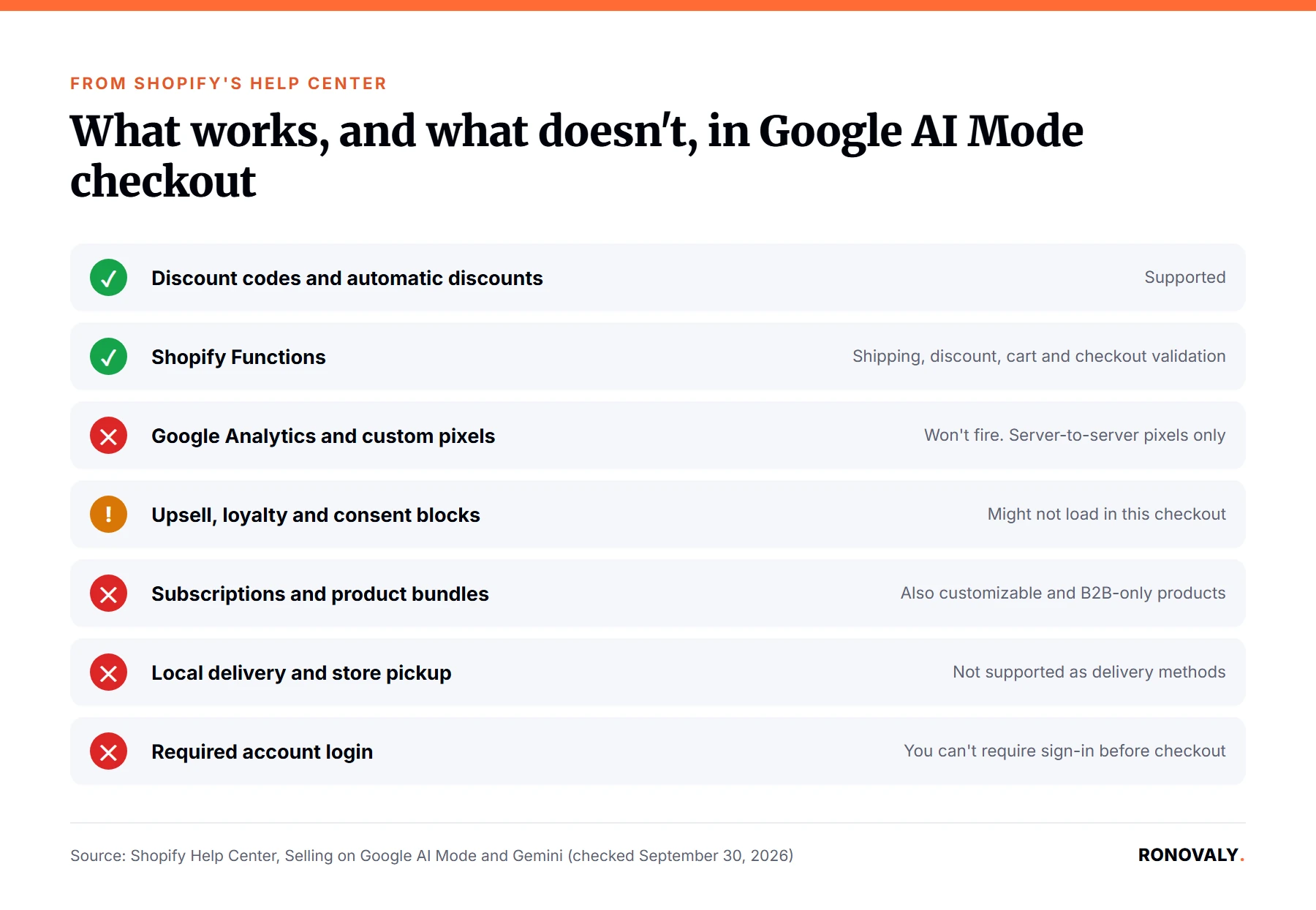
Several things your own checkout does today. Shopify lists them under “Unsupported features,” and I built this table from that list. For example, discount codes and automatic discounts still work, and so do Shopify Functions. The items below don’t, or might not.
| Feature | What Shopify says | Who it hurts most | What to do |
|---|---|---|---|
| Google Analytics and custom pixels | They “won’t fire”; only server-to-server pixels do | Stores that judge ads on browser pixel data | Read these orders in Shopify admin instead |
| Upsell and add-on blocks | Might not load | Stores that rely on checkout upsells | Compare order value by channel |
| Loyalty or rewards blocks | Might not load | Stores with points at checkout | Tell members where points apply |
| Consent collection blocks | Might not load | Stores that grow their list at checkout | Track new subscribers by channel |
| Subscriptions, bundles, customizable, B2B-only products | Not supported | Subscription and bundle brands | Check which SKUs remain |
| Local delivery and pickup | Not supported | Local retailers | Expect shipping-only orders |
| Required account login | Can’t be required | Member-only stores | Decide if guest orders are fine |
| Trust badges and disclaimer text | Might not load | Regulated products | Put disclosures in descriptions |
Will Google Analytics and my pixels still track these orders?
Not in the browser. Shopify’s Help Center says, “Google Analytics and custom pixels won’t fire in Google AI Mode and Gemini’s direct checkout.” It adds that the checkout fires only server-to-server pixels for the started and completed events. As a result, these sales can be missing from reports that depend on a browser pixel. However, the orders themselves still appear in Shopify admin. In other words, treat your admin as the source of truth for this channel.
Are subscriptions and bundles supported?
No. Shopify lists four product types that aren’t supported in this checkout: subscriptions, product bundles, customizable products, and B2B-only products. Notably, from my research, the page doesn’t say what a shopper sees for those products. Therefore, if most of your revenue comes from subscriptions, this channel covers only your one-time products. For the retention side of that model, see our guide to AI subscription cancellation flows.
Do my upsell, loyalty, and consent blocks still show?
Often not. Shopify says it “loads only the checkout blocks that are essential to completing checkout.” For example, blocks that might not appear include upsells and add-ons, loyalty or rewards, address autocomplete, consent collection, chat, and informational blocks such as trust badges. In addition, the terms let a channel restyle Shopify Checkout and override your branding. As a result, if an upsell app drives your order value, that value may be lower on this channel. Our Rebuy review covers how those checkout upsells work on your own store.
Common Problems and Decisions
Should I leave Google AI Mode checkout on?
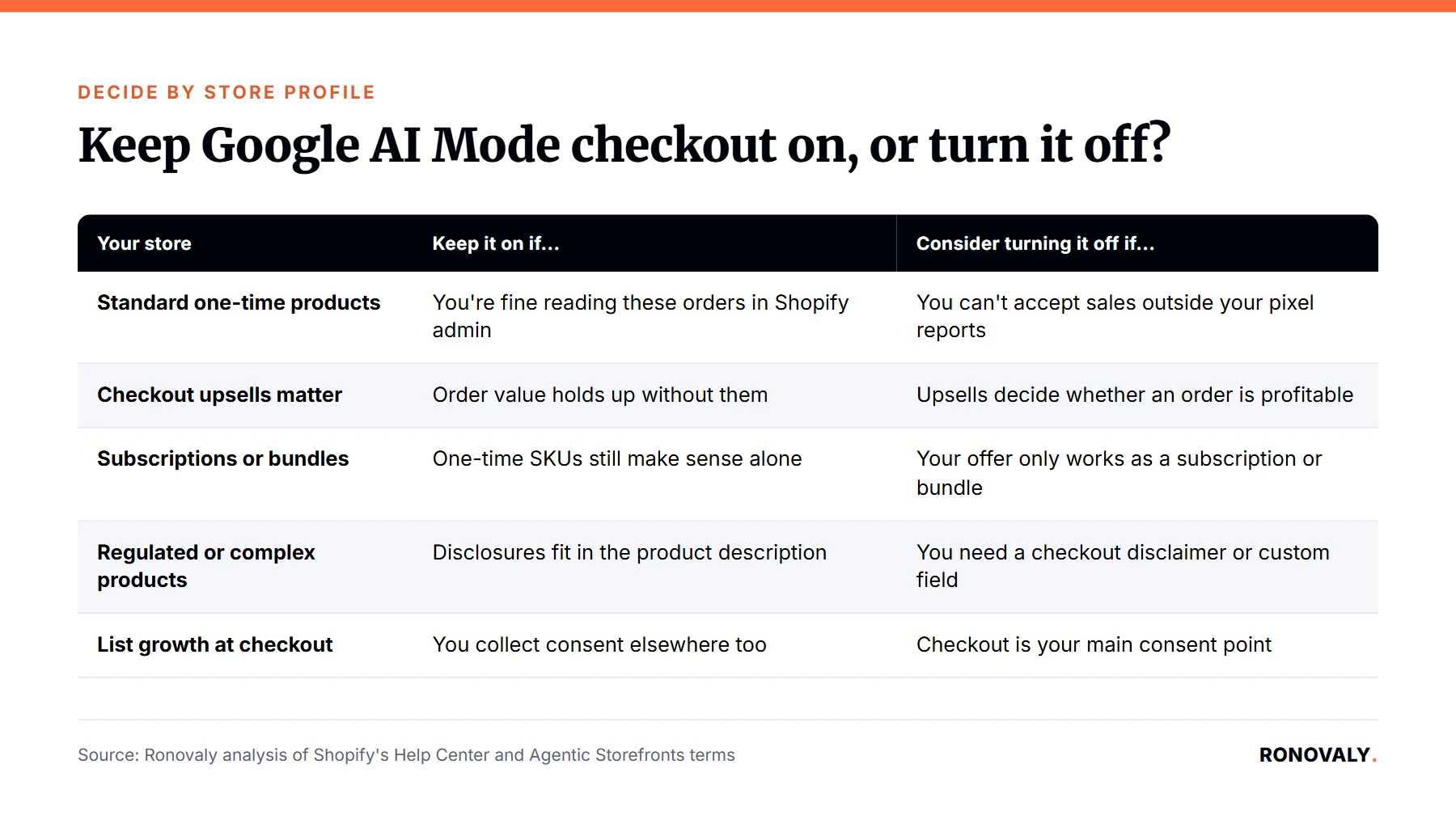
Leave it on if your store sells standard products and you can live with admin-only reporting. In fact, it’s an extra place to sell at no added fee. However, turn it off, or watch it closely, if your model depends on something in the table above. Here’s how I’d decide:
| Your store | Keep it on if… | Consider turning it off if… |
|---|---|---|
| Standard one-time products | You’re fine reading these orders in Shopify admin | You can’t accept sales outside your pixel reports |
| Checkout upsells matter | Order value holds up without them | Upsells decide whether an order is profitable |
| Subscriptions or bundles | One-time SKUs still make sense alone | Your offer only works as a subscription or bundle |
| Regulated or complex products | Disclosures fit in the product description | You need a checkout disclaimer or custom field |
| List growth at checkout | You collect consent elsewhere too | Checkout is your main consent point |
How do I turn off Google AI Mode direct checkout?
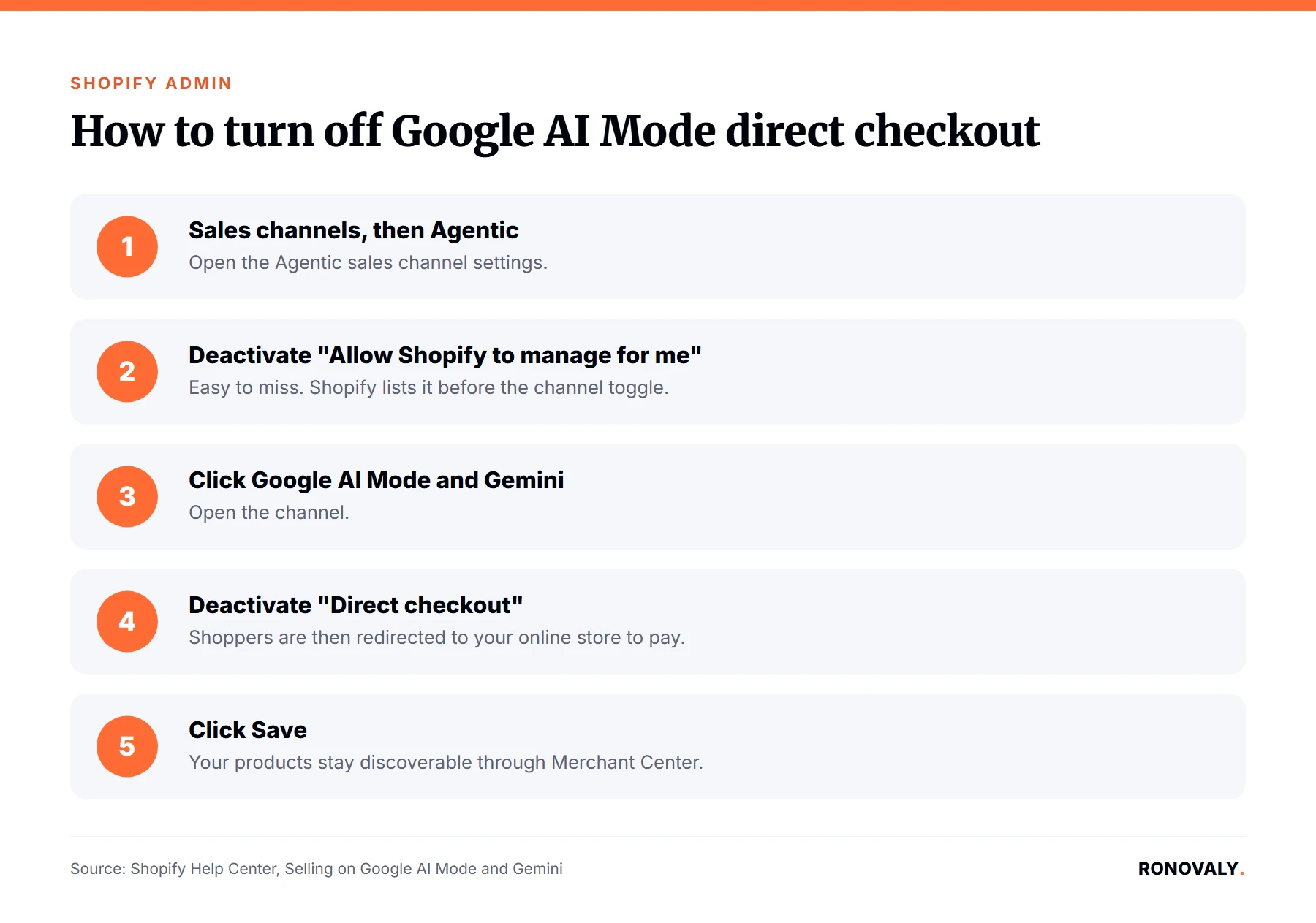
It takes five steps in Shopify admin, per the Help Center. Go to Sales channels, then Agentic. Deactivate Allow Shopify to manage for me. Click Google AI Mode and Gemini. Deactivate Direct checkout. Then click Save.
- Go to Sales channels, then Agentic.
- Deactivate Allow Shopify to manage for me.
- Click Google AI Mode and Gemini.
- Deactivate Direct checkout.
- Click Save.
However, the second step is easy to miss. Shopify lists it before the channel toggle. Therefore, switch off automatic management first.
What happens after I turn it off?
Your products stay visible, but the sale moves back to your store. Shopify says that with direct checkout off, shoppers “can still discover your products, but they’re redirected to your online store to complete their purchase.” Notably, discovery runs through Google Merchant Center, not through this toggle. In other words, turning it off doesn’t remove you from AI Mode results. Specifically, it changes where the payment happens, and your pixels, upsells, and consent blocks work again.
Who handles returns and customer data?
You do. Shopify’s terms say, “You remain the seller of record,” and that you’re responsible for every part of the transaction. Google’s Merchant Center Help says the same: checkout happens on Google’s surfaces “while keeping you the merchant of record.” Meanwhile, the terms let Shopify share customer and order details with the channel to complete the sale, send order updates, prevent fraud, and meet legal duties. If returns already strain your team, read our returns automation guide first.
Advanced Topics
How is it different from Meta direct checkout and ChatGPT?
It’s the same Shopify system, Agentic Storefronts, with different rules per channel. For instance, Shopify says ChatGPT works as a referrer, so shoppers still pay in your store checkout. By contrast, Google and Meta both use direct checkout. I compared the two help pages:
| Google AI Mode and Gemini | Meta | |
|---|---|---|
| Default for eligible stores | On | On |
| Countries covered | US stores selling to US shoppers | Stores selling to the US, Canada, or Mexico |
| Product data source | Google Merchant Center | Shopify Catalog |
| Fees today | Payment processing only | Payment processing only |
| Opt-out location | Sales channels, Agentic, Google AI Mode and Gemini | Sales channels, Agentic, Meta |
For the Meta side, see whether to keep Shopify Meta direct checkout on. For the protocols underneath, read our agentic commerce guide for Shopify merchants.
What should I watch over the next few months?
Watch four things each month. First, the order count for this channel, since Shopify says AI channel orders show “channel or referrer attribution” in your admin. Second, average order value against your store average. Third, the return rate on those orders. Fourth, the fee line for agentic channels. In addition, reread the help page, because Shopify notes that direct checkout “is also rolling out to Google users and might not yet be available in your store.”
Related Resources
- Shopify Help Center, Selling on Google AI Mode and Gemini: requirements, unsupported features, opt-out steps, fees.
- Shopify Help Center, Shopify agentic storefronts: how each AI channel sells and how orders are attributed.
- Shopify, Agentic Storefronts Supplemental Terms: seller of record, fees, data sharing.
Still Have Questions?
Start with the first table and mark every row that applies to your store. If none does, leave the default on and check the four numbers above each month. However, if one row decides your profit, follow the five steps and turn direct checkout off. Notably, your products stay discoverable either way, so the choice is only about where the payment happens.
About the Author
Alex Carter covers AI, automation, and agentic commerce for Ronovaly, focusing on what these channels mean for Shopify stores in the $500K to $5M ARR range. Editorial note: every quote in this post was checked against its source on September 30, 2026.
Sources
- Shopify Help Center, “Selling on Google AI Mode and Gemini” (checked 2026-09-30): https://help.shopify.com/en/manual/online-sales-channels/agentic-storefronts/google
- Shopify Help Center, “Shopify agentic storefronts” (checked 2026-09-30): https://help.shopify.com/en/manual/online-sales-channels/agentic-storefronts
- Shopify, Agentic Storefronts Supplemental Terms of Service (last updated July 7, 2026): https://www.shopify.com/legal/terms-agentic-storefronts
- Google Merchant Center Help, “About the Universal Commerce Protocol (UCP) and UCP-powered checkout feature on Google” (checked 2026-09-30): https://support.google.com/merchants/answer/16837055?hl=en
- Search Engine Roundtable, “Google Merchant Center Auto Enables Native Checkout: Buy On AI Mode & Gemini” (September 22, 2026): https://www.seroundtable.com/google-native-checkout-emails-42140.html
- PPC Land, “Google switched on AI Mode checkout for Shopify stores without asking” (September 23, 2026): https://ppc.land/google-switched-on-ai-mode-checkout-for-shopify-stores-without-asking/
This post contains affiliate links. If you make a purchase through these links, we may earn a commission at no extra cost to you.