Shopify Session Measurement Update: Why Your Numbers Changed
The Shopify session measurement update changed how Shopify Analytics counts sessions, starting September 21, 2026. As a result, your sessions and conversion rate can look different even though your sales didn’t move. Shopify’s changelog says orders, sales, and customer counts “aren’t changed” by it. Therefore, if your conversion rate jumped or dropped last week, check this first.
A session is one visit to your store, which now ends after 30 minutes of inactivity. Conversion rate is the share of sessions that end in an order, so it moves whenever the session count moves.
I read Shopify’s changelog entry and its Help Center page on September 30, 2026. However, I don’t have store data, and Shopify gives no typical size for the change. Therefore, this guide explains the mechanics and shows you how to measure your own shift.
Key Takeaways
- The rollout ran from September 21 to 23, 2026, per Shopify’s Help Center.
- Three things changed: sessions no longer end at midnight UTC, some sessions without a pageview now count, and identified bot sessions are filtered out by default.
- Sessions can go up or down. Conversion rate moves in the opposite direction, with no change in orders.
- Shopify says to treat data after the update as “your new baseline for session-based metrics.”
- Bot classification only covers sessions from October 7, 2025 onward, which limits year-over-year comparisons.
Getting Started with the Shopify Session Measurement Update
What is the Shopify session measurement update?
It’s a change to how Shopify Analytics defines and counts a session. Shopify’s Help Center lists three changes. First, sessions now follow continued activity “instead of ending at midnight Coordinated Universal Time (UTC).” Second, some sessions without a pageview are counted, such as a shopper who goes straight to checkout from a cart link. Third, identified bot sessions are filtered out of session reports by default. In addition, a session now ends after 30 minutes of inactivity. As a result, the same store can show more sessions or fewer sessions than before, depending on its mix of bot traffic, cart links, and late-evening visits. However, Shopify states that orders, sales, and customer counts aren’t affected. In other words, the update changes how visits are counted, not how many people bought.
When did it happen?
Between September 21 and 23, 2026. The changelog entry is dated September 21, and the Help Center says the rollout “runs from September 21 to 23, 2026.” In other words, your store switched on one of those three days. For that reason, treat September 24 as the first fully clean day when you build a new baseline.
Did I lose traffic or sales?
Probably not. Shopify says a change in these metrics “doesn’t necessarily mean that your traffic, orders, or customer behavior changed.” In fact, it reflects a new way of measuring. Specifically, compare your orders and sales for the same dates. If those are steady while sessions moved, the update explains the gap. However, if orders fell too, you have a real problem to investigate.
Do I need to do anything?
Usually no. The Help Center states, “Most merchants don’t need to take action for this session measurement update.” However, the exception is a store that received a message about its storefront. In that case, Shopify points to guides on session cookie rotation, Hydrogen, and custom headless setups. If you run a headless build, our Hydrogen vs Liquid comparison explains what that setup involves.
How the New Session Counting Works
Why did my conversion rate change if my sales didn’t?
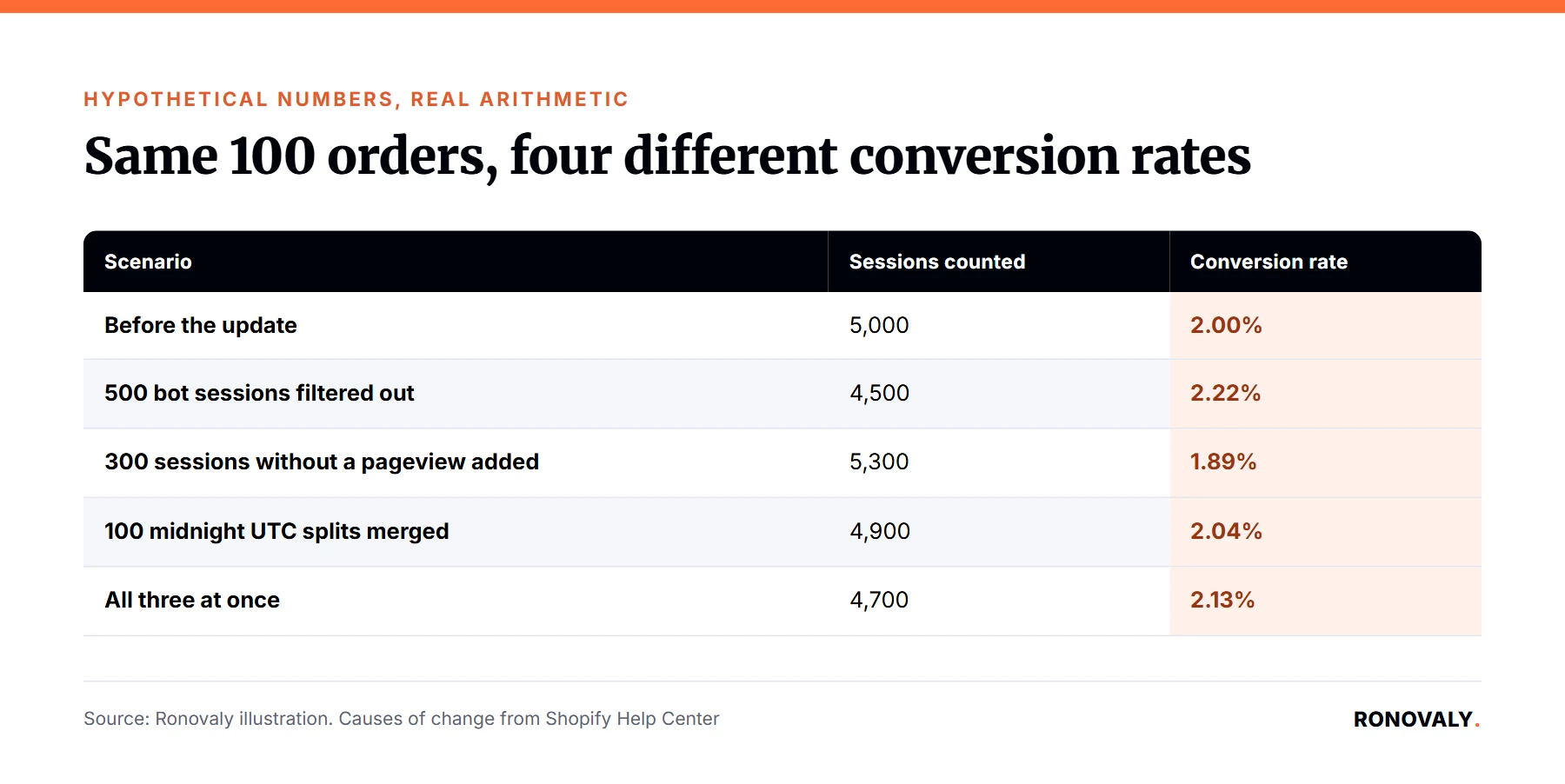
Because conversion rate is orders divided by sessions. Shopify puts it plainly: “When your session count changes, your conversion rate can also change, even when your orders or sales haven’t changed.” Here’s an illustration I built. The numbers are hypothetical, and only the arithmetic is real.
| Scenario (same 100 orders) | Sessions counted | Conversion rate |
|---|---|---|
| Before the update | 5,000 | 2.00% |
| 500 bot sessions filtered out | 4,500 | 2.22% |
| 300 sessions without a pageview added | 5,300 | 1.89% |
| 100 midnight splits merged | 4,900 | 2.04% |
| All three at once | 4,700 | 2.13% |
Why would my sessions go up?
Because Shopify now counts some visits it used to miss. The Help Center gives one example: “a customer goes directly to checkout from a cart link.” In other words, that visit has no standard pageview, so it wasn’t a session before. For instance, stores that send cart links by email or SMS may see more sessions. As a result, their conversion rate can look lower while orders stay flat.
Why would my sessions go down?
For two reasons. First, identified bot sessions are now filtered out by default. Second, a visit that crosses midnight UTC is counted once instead of twice. Notably, that second point matters more for US stores than it sounds. Midnight UTC is 8 p.m. Eastern and 5 p.m. Pacific during daylight time, and 7 p.m. Eastern in winter. In other words, the old cutoff fell in the middle of the US evening.
Is a higher conversion rate good news now?
Not by itself. Shopify says, “A higher or lower conversion rate after this update isn’t automatically good or bad.” For example, a jump may only mean bots left your session count. Similarly, a drop may only mean cart-link visits joined it. Therefore, judge the rate against the new baseline, not against August.
Common Problems and Decisions
Which metrics and reports are affected?
Every metric built on sessions. Shopify lists sessions, conversion rate, add to cart rate, reached checkout rate, checkout conversion rate, bounce rate, pageviews per session, average session duration, and online store visitors. The changelog also names searches. Affected reports include the Analytics overview dashboard, Live View, and the acquisition, behavior, and marketing reports. In addition, custom reports that use session data change too.
What is the Human or bot session filter?
It’s a report filter that separates identified bot sessions from the rest. Specifically, bots are filtered out by default. In reports that support it, you can adjust it “to review both human and bot sessions.” However, not every screen has it. Shopify says the Home page and Live View show session data without the filter, with bots already removed. Similarly, search and product recommendation reports remove bots automatically.
Can I still compare this year to last year?
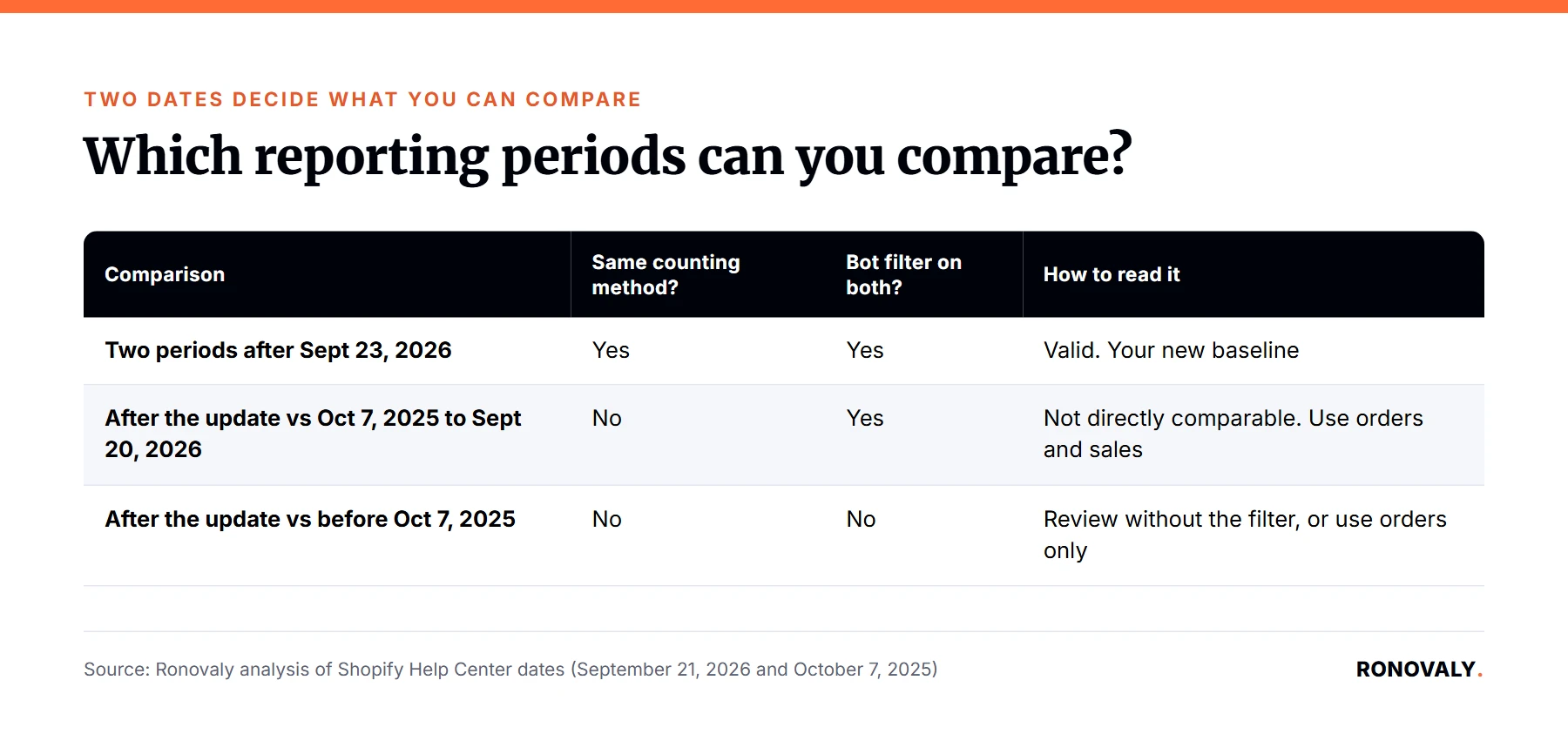
Only with care, and Black Friday is the hard case. I mapped the two dates in Shopify’s page against common comparisons:
| Comparison | Same counting method? | Bot filter on both periods? | How to read it |
|---|---|---|---|
| Two periods after September 23, 2026 | Yes | Yes | Valid. This is your new baseline |
| After the update vs October 7, 2025 to September 20, 2026 | No | Yes | Not directly comparable. Lean on orders and sales |
| After the update vs before October 7, 2025 | No | No | Review both without the filter, or use orders only |
Black Friday 2025 fell on November 28, after October 7, 2025. As a result, the filter can apply to both Black Friday periods. Nevertheless, Shopify warns that the same filter setting “doesn’t make sessions measured before the update directly comparable with sessions measured after the update.”
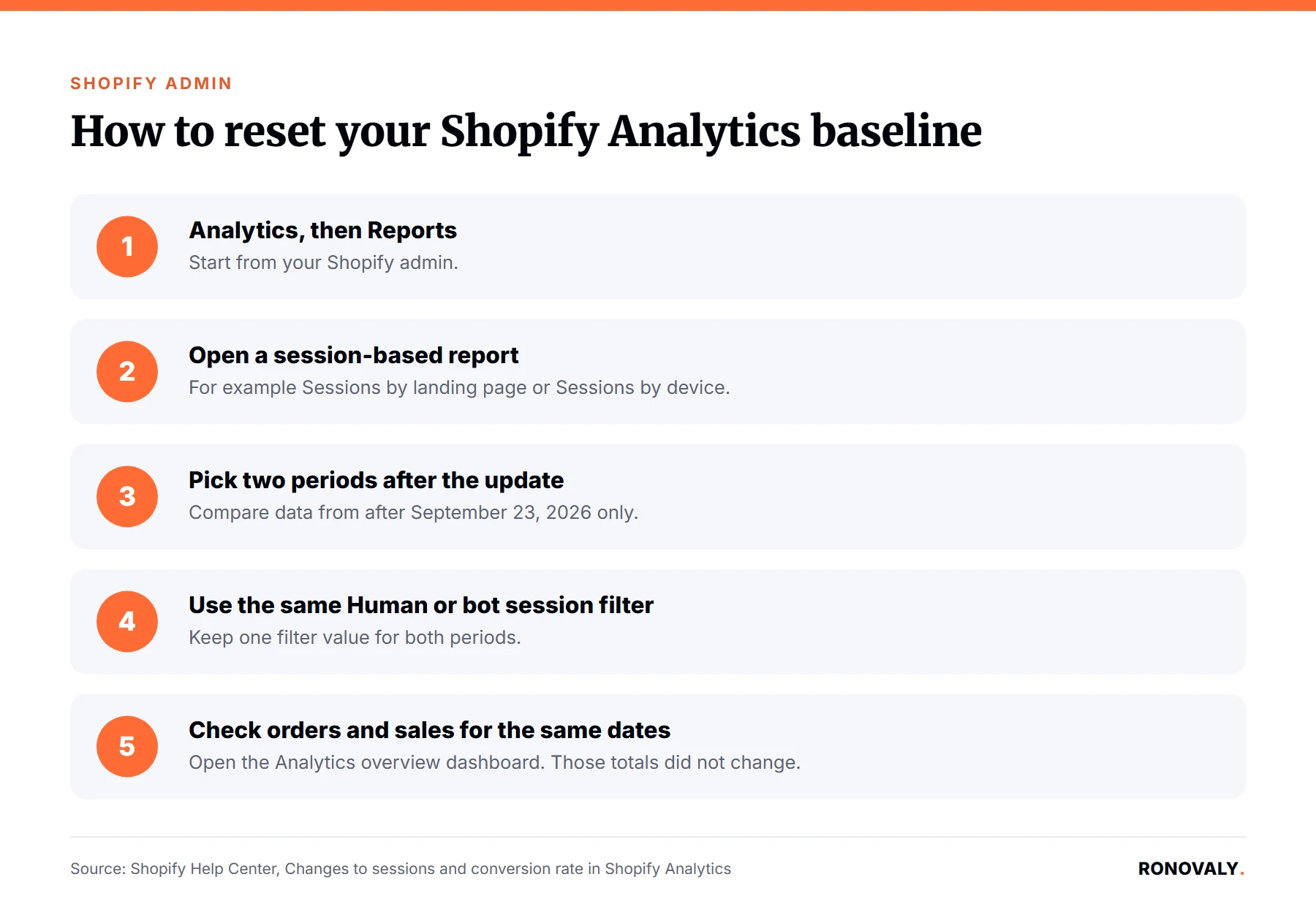
How do I set a new baseline?
Follow the steps in Shopify’s Help Center. Go to Analytics, then Reports. Open a session report such as Sessions by landing page or Sessions by device. Set a date range after the update. Keep the same filter value in both periods. Then open the Analytics overview dashboard to check orders, sales, and customers.
- Go to Analytics, then Reports.
- Open a session-based report, such as Sessions by landing page or Sessions by device.
- Set the date range to a period after the update, and compare it with another period after the update.
- Confirm both periods use the same Human or bot session filter value.
- Open the Analytics overview dashboard with the same dates and check orders, sales, and customer counts.
Advanced Topics
Does this change my ad targets and forecasts?
It can, if they use Shopify’s conversion rate. For example, a break-even cost per click depends on the conversion rate you plug in. As a result, an old rate gives a wrong target. Therefore, recalculate with a rate from after September 23. Our ChatGPT Ads break-even guide shows that math step by step. Meanwhile, orders and revenue are unchanged, so revenue-based targets still hold.
Will my apps and dashboards change too?
Possibly. Shopify says, “If an app uses session data from Shopify Analytics, then the data that’s available to that app can also change.” It tells you to contact the app developer to learn how the app uses those metrics. In contrast, tools with their own tracking count sessions by their own rules, so expect different numbers there. For how attribution tools fit in, see our guide to how DTC brands use AI analytics.
What should I do before Black Friday?
Do three things in October. First, write down your conversion rate, add to cart rate, and sessions for a full period after September 23. That’s your baseline. Second, set Black Friday goals on orders and revenue, since those didn’t change. Third, note the update date in every report you share, so nobody reads a measurement change as a performance swing. In addition, the report editor may show a notice when a query crosses September 21, 2026.
Related Resources
- Shopify Changelog, Shopify Analytics session measurement improvements: the announcement and the list of metrics.
- Shopify Help Center, Changes to sessions and conversion rate in Shopify Analytics: the three changes, the bot filter, comparison guidance, and review steps.
- Another default change from the same month: Shopify Google AI Mode checkout, which is on by default for eligible US stores.
Still Have Questions?
Start with one check: did orders and sales change for the same dates? If not, the update explains your numbers, and you only need a new baseline. However, if they did change, look at traffic sources and checkout next. Either way, stop comparing session metrics across September 21, 2026 without a note.
About the Author
Sarah Blake covers growth and conversion for Ronovaly, focusing on analytics, paid acquisition, and retention for Shopify brands in the $500K to $5M ARR range. Editorial note: every quote in this post was checked against its source on September 30, 2026, and the worked example is illustrative, not a measured result.
Sources
- Shopify Changelog, “Shopify Analytics session measurement improvements” (September 21, 2026): https://changelog.shopify.com/posts/shopify-analytics-session-measurement-improvements
- Shopify Help Center, “Changes to sessions and conversion rate in Shopify Analytics” (checked 2026-09-30): https://help.shopify.com/en/manual/reports-and-analytics/discrepancies/session-measurement-update
This post contains affiliate links. If you make a purchase through these links, we may earn a commission at no extra cost to you.