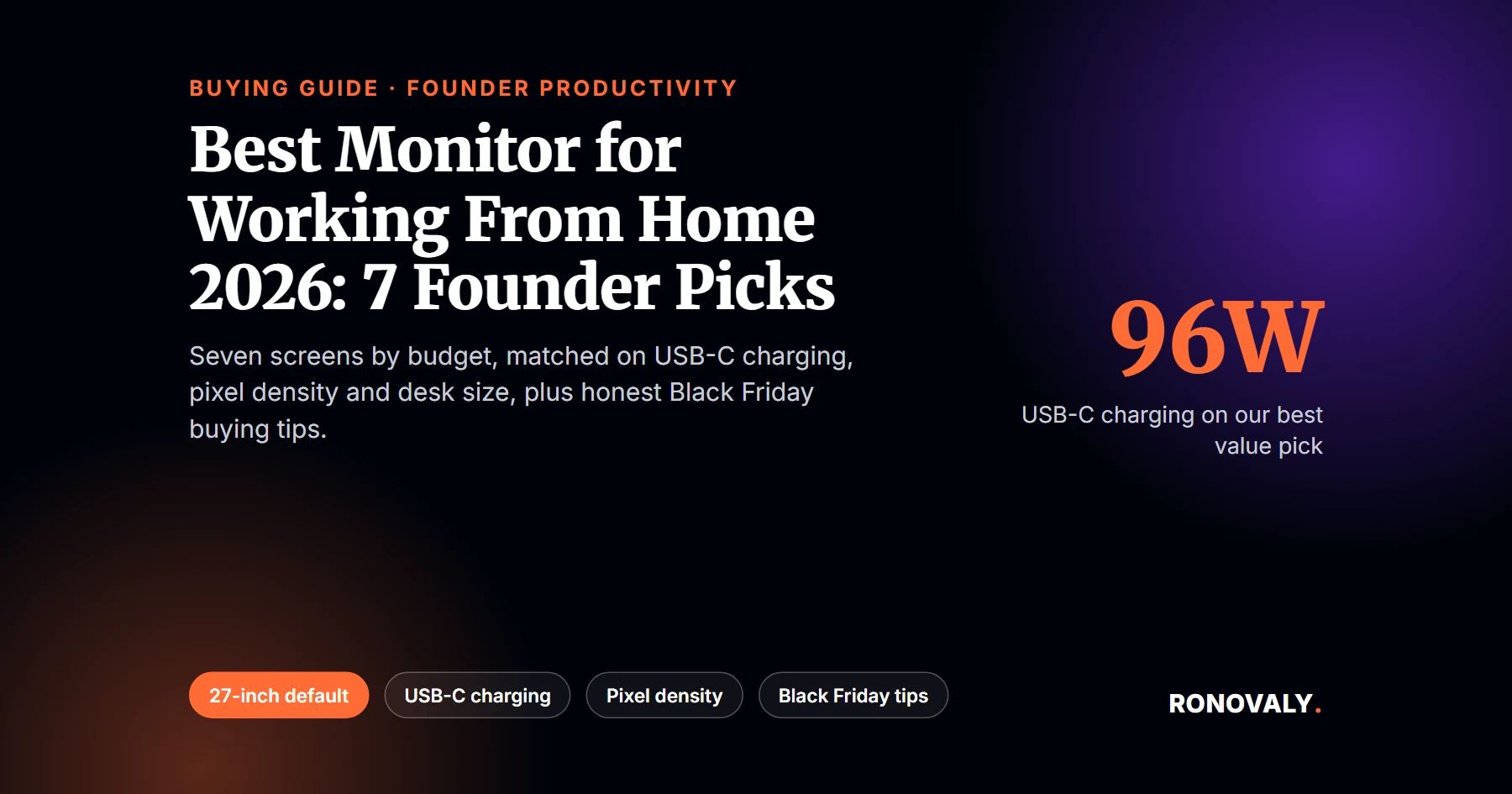
Best Monitor for Working From Home 2026: 7 Founder Picks
Disclosure: this article contains affiliate links. If you buy through them, Ronovaly may earn a commission at no extra cost to you. As an Amazon Associate I earn from qualifying purchases.
The best monitor for working from home in 2026, for most Shopify founders, is a 27-inch screen with a USB-C port that charges your laptop. In other words, one cable carries video, power and your accessories. Our top pick is the Dell UltraSharp U3225QE if budget allows. Otherwise, the Asus ProArt PA278CFRV gets you 1440p and 96W charging for a $379 list price, per PCWorld.
Remote work is not a phase anymore. In fact, 75% of US workers whose job can be done from home work remotely at least some of the time, per Pew Research Center. As a result, your monitor is where you read orders, ad dashboards and supplier emails for hours every day.
USB-C Power Delivery is a feature that lets one USB-C cable send video to the monitor and charge your laptop at the same time. Pixel density is the number of pixels per inch (ppi). In particular, higher density means sharper text at the same size.
Key Takeaways
- A 27-inch monitor is the best default size for most home desks, per PCWorld’s buying advice.
- USB-C with 90W or more of charging lets a single cable run a laptop setup.
- Pixel density on our picks ranges from 92 ppi on a 24-inch 1080p screen to 218 ppi on Apple’s 5K display.
- For spreadsheets and long product feeds, a taller 3:2 screen shows 18.5% more vertical pixels than a 16:9 4K panel.
- Black Friday falls on November 27, 2026. Check live prices and return windows before you buy.
Quick Comparison: 7 Best Monitors for Working From Home
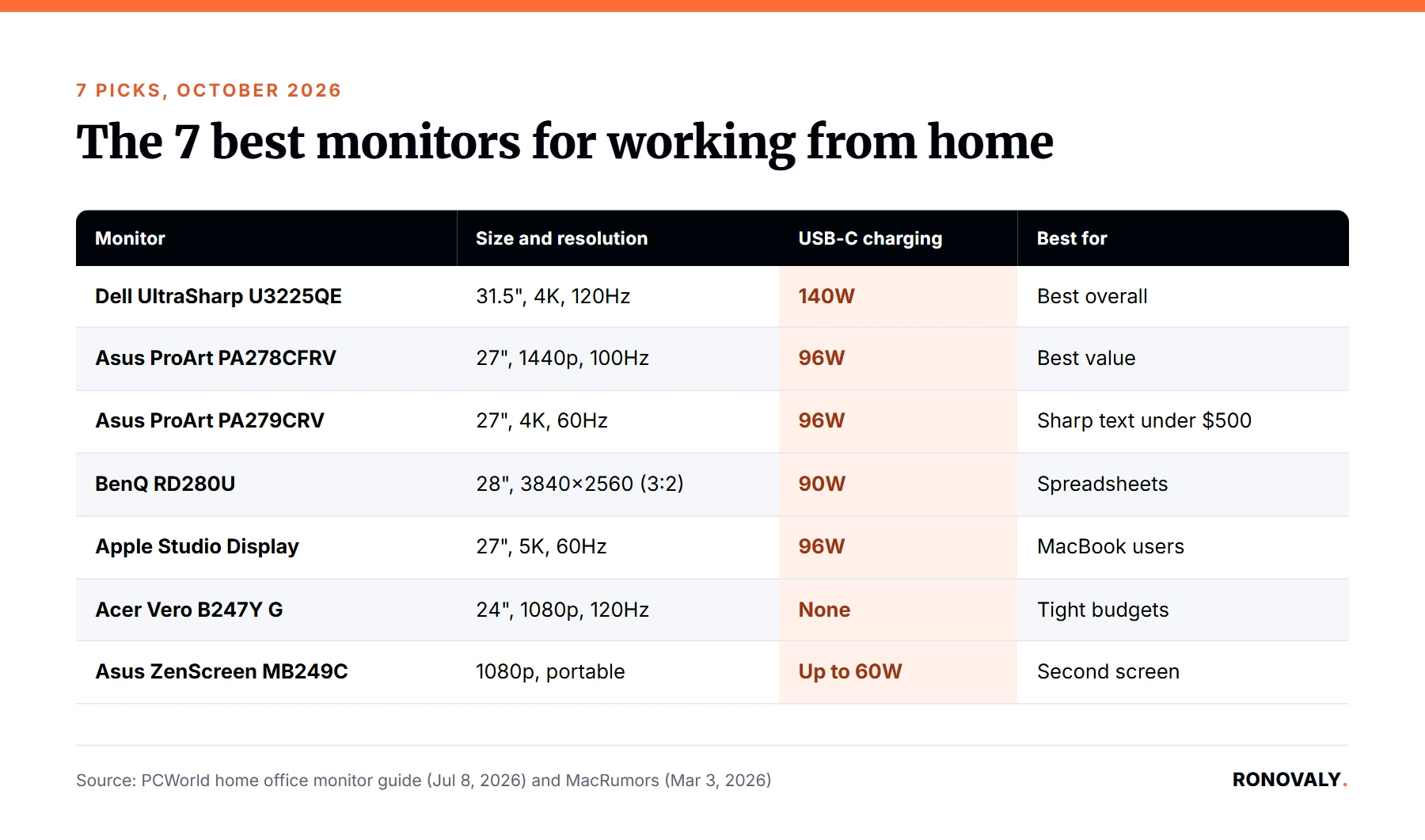
| Monitor | Size and resolution | USB-C charging | Best for |
|---|---|---|---|
| Dell UltraSharp U3225QE | 31.5″, 4K, 120Hz | 140W (Thunderbolt 4) | Best overall, one-cable desk |
| Asus ProArt PA278CFRV | 27″, 1440p, 100Hz | 96W | Best value |
| Asus ProArt PA279CRV | 27″, 4K, 60Hz | 96W | Sharp text under $500 |
| BenQ RD280U | 28″, 3840×2560 (3:2) | 90W | Spreadsheets and long pages |
| Apple Studio Display | 27″, 5K, 60Hz | 96W (Thunderbolt 5) | MacBook users |
| Acer Vero B247Y G | 24″, 1080p, 120Hz | None | Tight budgets |
| Asus ZenScreen MB249C | 1080p, portable | Up to 60W | Second screen and travel |
Specs come from PCWorld’s July 2026 home office guide and, for Apple, from MacRumors.
How We Picked These Monitors
We did not test these monitors in person. Instead, I compared manufacturer specs with independent reviews, mainly PCWorld’s updated home office guide. Specifically, I kept only screens that solve a founder problem: reading dense dashboards, charging a laptop and fitting a normal desk.
Next, I computed pixel density for each pick from its resolution and size. From my research, I found that this number predicts text sharpness better than refresh rate does for admin work. Finally, I checked each monitor’s USB-C wattage, because that decides whether one cable can run your whole desk.
1. Dell UltraSharp U3225QE: Best Overall
The Dell UltraSharp U3225QE is PCWorld’s best home office monitor overall. It pairs a 31.5-inch 4K IPS Black panel with a 120Hz refresh rate. As a result, scrolling through long dashboards feels smooth.
Its real strength is the hub. You get Thunderbolt 4, USB-C, Ethernet, USB-A ports and 140W of Power Delivery, per PCWorld. Therefore, a single cable can charge a large laptop, connect wired internet and run your keyboard and webcam.
- Best for: founders who want one premium screen and a clean desk.
- Consider instead: the PA279CRV if 31.5 inches is too wide for your desk.
Check the Dell U3225QE price on Amazon
2. Asus ProArt PA278CFRV: Best Value
The Asus ProArt PA278CFRV is PCWorld’s best 1440p pick, with a list price of $379. It is a 27-inch 1440p screen that runs up to 100Hz. In addition, it has a built-in USB-A and USB-C hub.
The USB-C port delivers 96W, so it can charge most laptops while showing your store admin. Additionally, its wide color gamut helps if you edit product photos yourself. At 109 ppi, text is sharp enough for spreadsheets at normal scaling.
- Best for: most founders who want a single-cable setup without paying for 4K.
- Consider instead: the PA279CRV if you want sharper text.
Check the Asus PA278CFRV price on Amazon
3. Asus ProArt PA279CRV: Best 4K Under $500
The Asus ProArt PA279CRV puts 4K on a 27-inch panel for a $469 list price, per PCWorld. In fact, that gives it 163 ppi, so small text in ad dashboards looks crisp. However, it runs at 60Hz, which is fine for office work.
Ports are generous. You get two DisplayPort 1.4 inputs, two HDMI 2.0 ports, three USB-A ports and 96W over USB-C. Moreover, one DisplayPort supports daisy chaining, so you can add a second screen later.
- Best for: founders who read a lot of small text and want room to grow to two screens.
- Consider instead: the PA278CFRV if 4K scaling feels too small on your laptop.
Check the Asus PA279CRV price on Amazon
4. BenQ RD280U: Best for Spreadsheets and Long Pages
The BenQ RD280U is unusual. It uses a 3:2 aspect ratio at 3840×2560, so it is taller than a normal widescreen. PCWorld names it the best monitor for coding because the taller panel shows more lines at once.
Similarly, for a founder the same benefit applies to inventory sheets, order lists and long product pages. In fact, its 2,560 vertical pixels are 18.5% more than the 2,160 on a 16:9 4K panel. In addition, it offers 90W over USB-C and lists at $599.99, per PCWorld.
- Best for: founders who live in spreadsheets, reports and long documents.
- Consider instead: a 16:9 screen if you watch a lot of video.
Check the BenQ RD280U price on Amazon
5. Apple Studio Display: Best for MacBook Users
The Apple Studio Display was updated in March 2026 and still starts at $1,599 in the US, per MacRumors. It has a 27-inch 5K panel at about 218 ppi, the sharpest on this list. Brightness reaches up to 600 nits.
It now uses two Thunderbolt 5 ports. One upstream port charges your MacBook at 96W, and the other connects accessories or more displays. Additionally, the 12MP Center Stage camera supports Desk View, which helps on supplier calls.
- Best for: MacBook founders who want text that matches a Retina screen.
- Consider instead: the PA279CRV if you use Windows or want to spend far less.
Check the Apple Studio Display price on Amazon
6. Acer Vero B247Y G: Best Budget Monitor
The Acer Vero B247Y G is PCWorld’s best budget pick at about $150. It is a 24-inch 1080p screen with a 120Hz refresh rate and an adjustable stand. Notably, for a first home office that stand matters more than extra pixels.
However, it has no USB ports, only HDMI, DisplayPort and VGA. Consequently, you will still need your laptop charger. At 92 ppi, text is softer than on the other picks, but PCWorld notes that 1080p is an adequate baseline for office work.
- Best for: new founders on a tight budget, or a second screen for a team member.
- Consider instead: the PA278CFRV if you want single-cable charging.
Check the Acer Vero B247Y G price on Amazon
7. Asus ZenScreen MB249C: Best Second Screen
The Asus ZenScreen MB249C is PCWorld’s best second monitor. It is a 1080p screen that connects over USB-C, with up to 60W of power. Moreover, because it mounts flexibly, it works next to your main screen or on a trip.
For example, use it for the window you always check: live orders, Slack or your ad account. As a result, your main monitor stays free for deep work. That said, it offers few other connections, so it is not a hub.
- Best for: founders who travel or want a dedicated status screen.
- Consider instead: a second PA278CFRV for a permanent dual setup.
Check the Asus ZenScreen MB249C price on Amazon
Pixel Density: How Sharp Is Each Monitor?
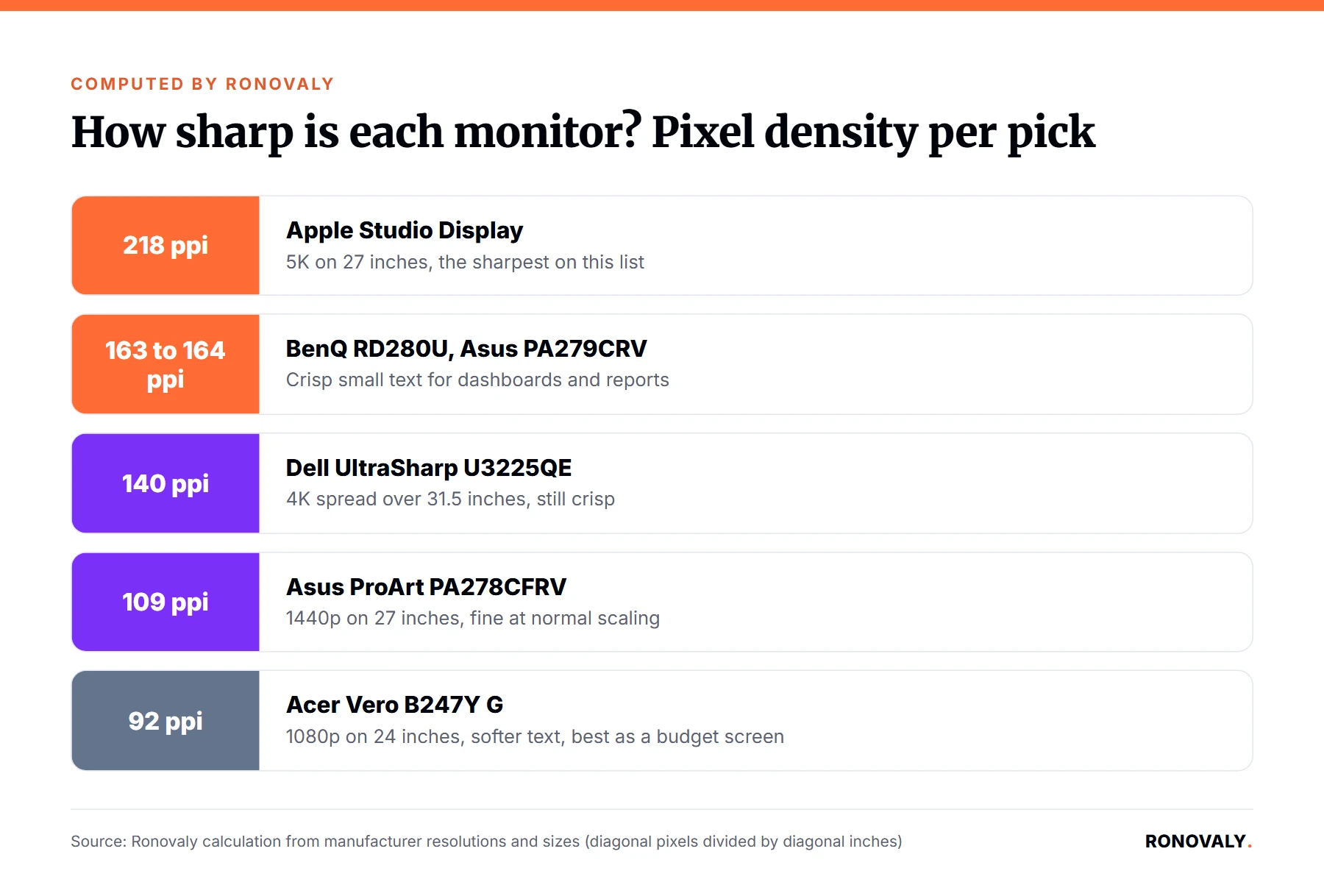
Pixel density tells you how crisp text looks. Specifically, I calculated it from each monitor’s resolution and screen size. Here is the result for the six picks with a fixed size:
| Monitor | Resolution | Size | Pixel density |
|---|---|---|---|
| Apple Studio Display | 5120×2880 | 27″ | 218 ppi |
| BenQ RD280U | 3840×2560 | 28.2″ | 164 ppi |
| Asus ProArt PA279CRV | 3840×2160 | 27″ | 163 ppi |
| Dell UltraSharp U3225QE | 3840×2160 | 31.5″ | 140 ppi |
| Asus ProArt PA278CFRV | 2560×1440 | 27″ | 109 ppi |
| Acer Vero B247Y G | 1920×1080 | 24″ | 92 ppi |
In practice, 140 ppi and up looks crisp for dashboards and documents. In contrast, around 100 to 110 ppi is fine at normal scaling. Below that, small text looks softer, so it suits a budget or secondary screen.
How to Choose a Monitor for Your Home Office
First, match the size to your desk. PCWorld suggests a 24-inch screen for a desk about 24 inches deep or less, 27 inches as the default, and 32 to 34 inches for deep desks.
Second, check USB-C wattage against your laptop charger. For instance, if your laptop charger is rated above the monitor’s wattage, it may charge slowly. Third, aim for 300 nits or more, since home offices are often brighter than offices, per PCWorld.
Finally, set it up well. OSHA’s workstation guidance says to place the monitor directly in front of you, at least 20 inches away, with the top line at or below eye level, per OSHA eTools. Importantly, refresh rates above 60Hz mainly help gaming, so do not pay extra for 144Hz for admin work.
Black Friday Monitor Buying Tips
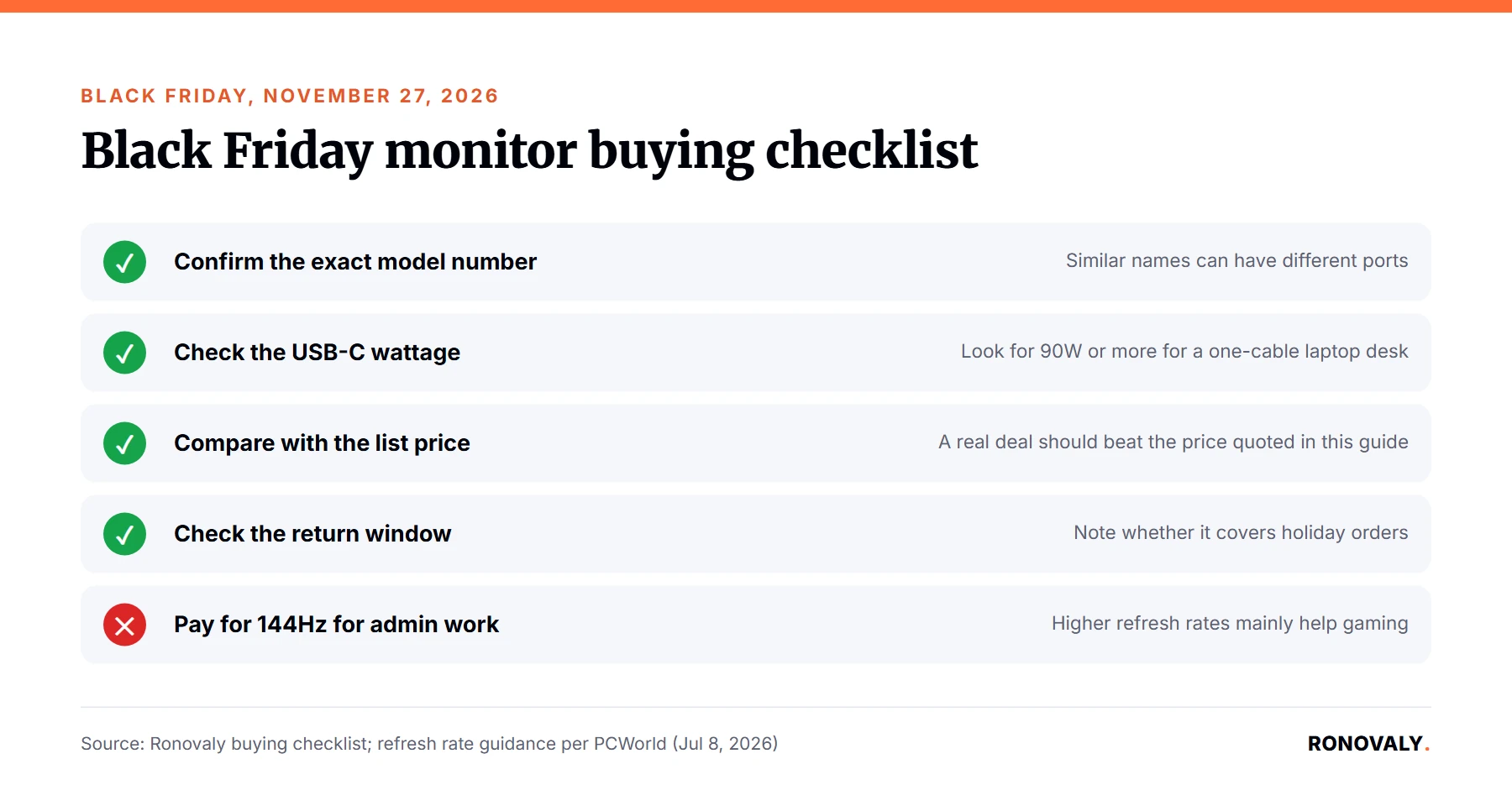
Black Friday falls on November 27, 2026, and Cyber Monday on November 30. Deals vary by retailer and change fast, so we do not list deal prices here. Accordingly, use this checklist:
- Confirm the exact model number. For example, a PA278CFRV and a similar-sounding model can have different ports.
- Check the USB-C wattage on the product page, not just “USB-C”.
- Compare against the list price quoted above, so a “deal” is really lower.
- Check the return window before you buy, and note whether it covers holiday orders.
- Buy the cable you need. Make sure a USB-C or Thunderbolt cable is in the box.
If you are also trimming your tool stack before buying hardware, see our guide to auditing your Shopify AI app stack for hidden costs. For software that saves hours at the desk, read our list of the best AI tools for Shopify stores.
Frequently Asked Questions
What is the best monitor for working from home?
For most founders, the best monitor for working from home is a 27-inch screen with 96W USB-C charging, such as the Asus ProArt PA278CFRV at a $379 list price. If budget allows, PCWorld’s best overall pick is the Dell UltraSharp U3225QE, with 4K, 120Hz and 140W charging.
What size monitor is best for a home office?
A 27-inch monitor is the best default for most home offices, per PCWorld. Choose 24 inches for a desk about 24 inches deep or less, and 32 to 34 inches only if your desk is deep. In addition, keep the screen at least 20 inches from your eyes, per OSHA guidance.
Is 4K worth it for working from home?
4K is worth it if you read a lot of small text. On a 27-inch screen, 4K gives about 163 pixels per inch, against about 109 for 1440p. However, 1440p is sharp enough for most admin work and usually costs less.
Do I need a USB-C monitor?
You do not need one, but it makes a laptop desk much simpler. Specifically, a USB-C monitor with Power Delivery carries video and charges your laptop over one cable. Check that its wattage, such as 90W or 96W, matches or beats your laptop charger.
When is the best time to buy a monitor in 2026?
Black Friday falls on November 27, 2026 and Cyber Monday on November 30, and many retailers run sales then. However, prices change fast and vary by retailer. Compare any deal with the model’s list price and confirm the exact model number before you buy.
Bottom Line
The best monitor for working from home is the one that fits your desk and runs on one cable. For example, start with the Asus ProArt PA278CFRV for value, or the Dell UltraSharp U3225QE if you want the best overall. Alternatively, if you live in spreadsheets, the taller BenQ RD280U is the smart choice.
About the Author
Alex Carter covers AI, automation and productivity for Ronovaly, focusing on Shopify brands in the $500K to $5M ARR range. Alex Carter is a pen name of the Ronovaly editorial team. We did not test these monitors in person; every spec and price in this article comes from the cited sources, checked on October 29, 2026.
Sources
- PCWorld, Best monitors for a home office 2026 (updated Jul 8, 2026): https://www.pcworld.com/article/1389780/best-home-office-monitors.html
- MacRumors, Apple Updates Studio Display With Thunderbolt 5 and More (Mar 3, 2026): https://www.macrumors.com/2026/03/03/apple-updates-studio-display/
- Pew Research Center, remote workers survey (Jan 13, 2025): https://www.pewresearch.org/short-reads/2025/01/13/many-remote-workers-say-theyd-be-likely-to-leave-their-job-if-they-could-no-longer-work-from-home/
- OSHA eTools, Computer Workstations: Monitors: https://www.osha.gov/etools/computer-workstations/components/monitors
This post contains affiliate links. If you make a purchase through these links, we may earn a commission at no extra cost to you.