FlexiSpot E7 Plus: Is It Worth It in 2026?
Disclosure: this article contains no affiliate links. Other Ronovaly guides linked here may contain them, and Ronovaly may earn a commission on those pages.
The FlexiSpot E7 Plus is worth it in 2026 if you are tall or run a heavy setup, and it is overkill for a laptop and one monitor. It lifts 440 lb, holds 540 lb when still and reaches 51.6 inches, per FlexiSpot. TechRadar gave it 5 out of 5, and Tom’s Guide gave it 4 out of 5.
Those two scores tell the real story. Both reviewers praise its stability, yet they disagree on noise and assembly. So the right question is not whether this desk is good. Instead, ask whether you will use what you pay for.
A four-leg standing desk is a sit-stand desk on four lifting columns instead of two, which spreads the load and reduces wobble. Static capacity is the weight a desk holds while still. Lifting capacity is the weight it can move, so it is the number to watch on this desk.
Key Takeaways
- The E7 Plus lifts 440 lb and holds 540 lb when still, and those limits include the desktop, per FlexiSpot.
- It comes in two frames: 26 to 51.6 inches, or 24 to 45.7 inches.
- TechRadar rates it 5 out of 5 and Tom’s Guide 4 out of 5.
- Tom’s Guide measured 54 dB and needed an electric drill, while TechRadar built it in about 33 minutes.
- Tom’s Guide listed $879 with the cheapest top in April 2025, while price trackers now show less. Check the exact configuration.
- Most laptop founders can skip it, because the E7 Pro has a similar lifting capacity and range on two legs.
FlexiSpot E7 Plus Specs at a Glance
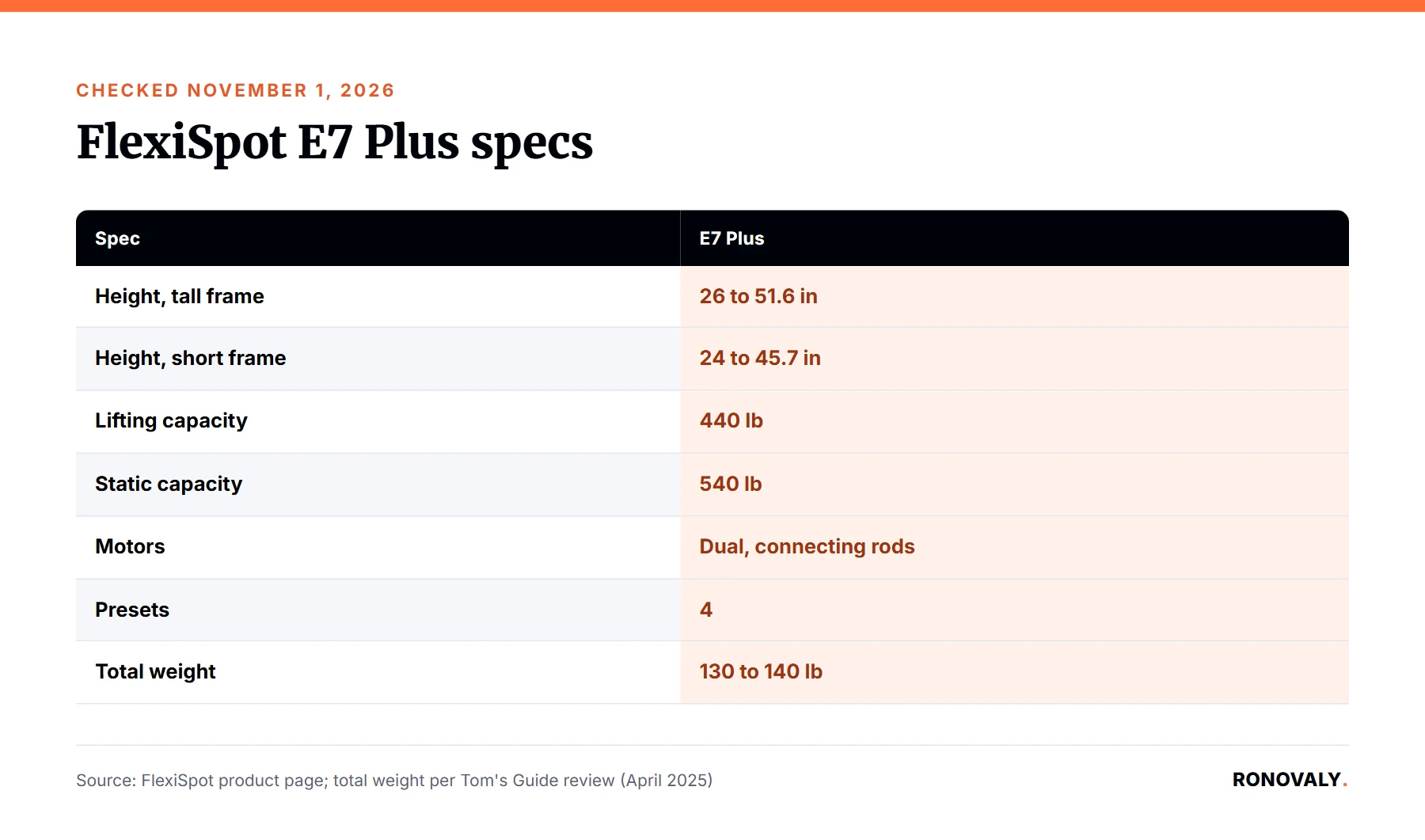
The E7 Plus is a dual motor, four-leg electric standing desk with two height ranges. The specs below come from FlexiSpot’s product page and were checked on November 1, 2026. Meanwhile, the review dates matter, because TechRadar’s review is from June 2024 and Tom’s Guide’s review is from April 2025.
| Spec | FlexiSpot E7 Plus |
|---|---|
| Height, tall frame | 26 to 51.6 in |
| Height, short frame | 24 to 45.7 in |
| Lifting capacity | 440 lb |
| Static capacity | 540 lb |
| Motors | Dual, with connecting rods |
| Presets | 4 |
| Desktop length | 47.2 to 78.7 in |
| Total weight | 130 to 140 lb, per Tom’s Guide |
| Warranty | 15 years on frame and motor, per FlexiSpot |
How We Researched This Verdict
We did not test the E7 Plus in person. Instead, I read two full reviews from people who built and used it, and then I checked each spec against FlexiSpot’s own page. In addition, I compared the desk with the picks in TechRadar’s October 2026 guide and Tom’s Guide’s September 2026 guide. Where the sources disagree, I show both sides rather than pick one. After that, I ran my own numbers on frame fit and cost. From my research, those two checks answer the question better than any star rating does. Keep in mind that a review from 2024 or 2025 can miss later changes, so I treat FlexiSpot’s current page as the reference for specs and warranty. Consequently, read the star ratings as a dated snapshot, not as a current ranking.
Is the E7 Plus Really More Stable?
Yes. Stability is the one point where every source agrees, and it is the main reason to buy this desk. TechRadar calls it rock-solid and says it could type fairly aggressively without any monitor or desk wiggle. Likewise, Tom’s Guide says it stayed firmly in place even when shaken at its tallest height.
Both reviewers also pushed it hard: TechRadar ran a primary workstation on it for a few months, with several monitors, laptops and desk shelves, and Tom’s Guide says it would be comfortable loading it with hundreds of pounds of equipment, although it did not test close to the limit. Additionally, FlexiSpot describes 10,000 lift tests with a glass of water on the desktop, although that claim comes from the manufacturer alone. There is one honest limit, because FlexiSpot itself says no standing desk is completely wobble-free, and some movement is still possible at maximum height or with extended monitor arms. Even so, this is a strong result for a founder with two or three monitors, since a wobble that seems small at 44 inches gets annoying during a long video call.
Which E7 Plus Frame Fits Your Height?
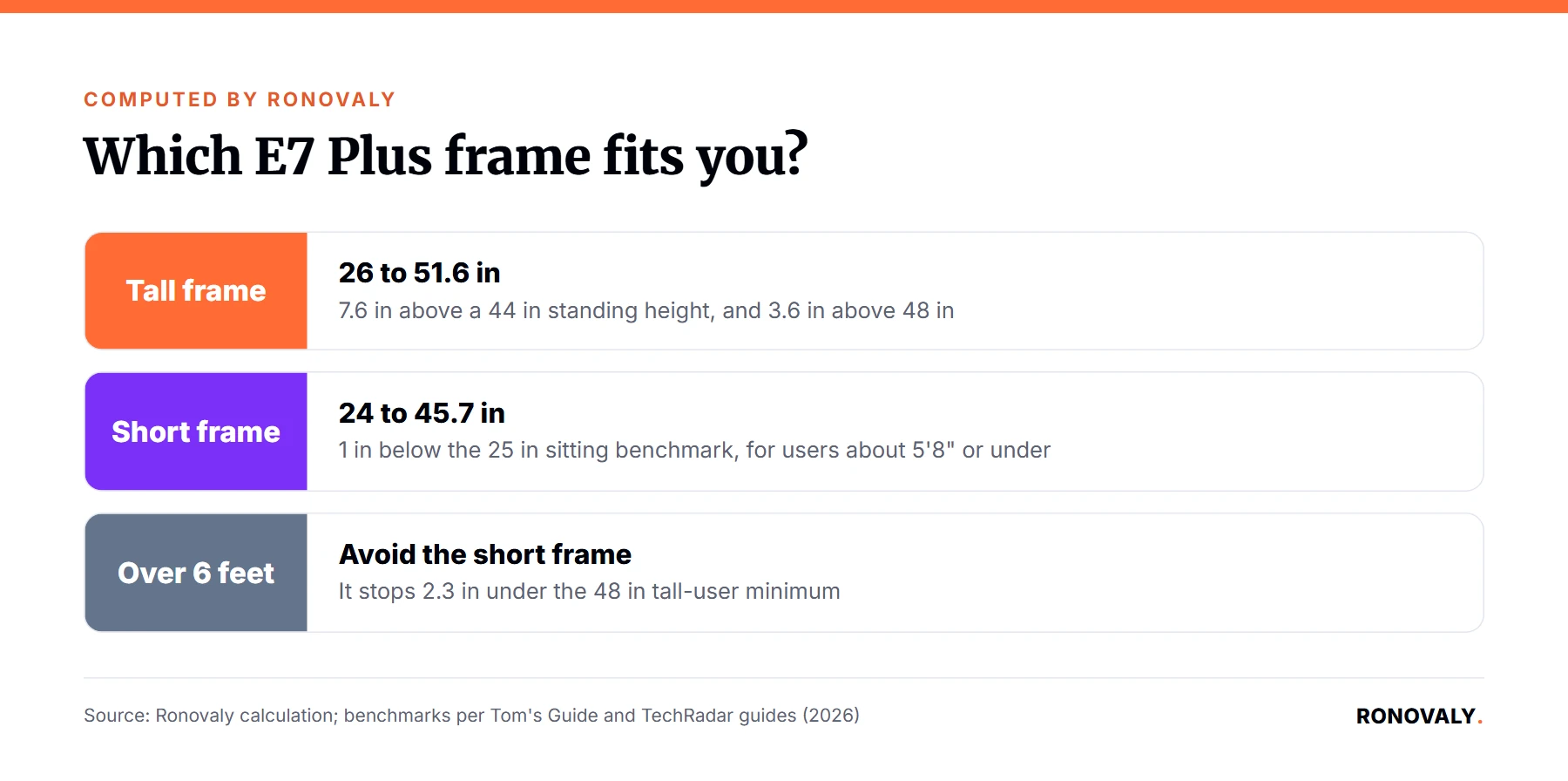
Choose the tall frame if you are near or above 6 feet, and the short frame if you are about 5’8″ or under. I checked both frames against three benchmarks. Tom’s Guide suggests about 25 inches at the low end, plus 48 to 50 inches at the top for users over 6 feet. Meanwhile, TechRadar says a 6 foot user stands at about 44 inches.
| Frame | Lowest vs 25 in | Top vs 44 in | Top vs 48 in |
|---|---|---|---|
| Tall (26 to 51.6 in) | 1 in above | 7.6 in above | 3.6 in above |
| Short (24 to 45.7 in) | 1 in below | 1.7 in above | 2.3 in below |
The result is simple. The tall frame clears every standing benchmark, and it misses the sitting benchmark by only 1 inch. By contrast, the short frame sits well for shorter users but runs out of room for tall ones. Both frames carry the same weight rating, per Tom’s Guide, so height is the only reason to choose.
How Loud Is the FlexiSpot E7 Plus?
The sources disagree here. TechRadar calls the adjustments smooth, quiet and quick, and it notes FlexiSpot’s claim of under 50 dB. However, Tom’s Guide measured 54 dB going from sitting to standing, and it says connecting rods make a more annoying sound.
The cause is the design. This desk has four legs but only two motors, so rods carry the movement across the frame. As a result, Tom’s Guide also warns of more moving parts that could break, and it wishes the desk had four motors at this price. For its part, FlexiSpot argues that four motors are not automatically necessary, since performance depends on the drive design and the frame.
In practice, you only hear it during height changes. Moreover, the keypad has four presets, so each move is one button press and takes little attention. Still, if you share a room or adjust the desk on live calls, noise is the weakest point of the E7 Plus.
How Hard Is the E7 Plus to Assemble?
Plan for two people and possibly a drill. Here again, the reviews split. TechRadar built its desk in about 33 minutes, and it found the holes pre-drilled. On the other hand, Tom’s Guide called assembly quite complex, because its desktop holes were not pre-drilled and it needed an electric drill.
The difference may come from the desktop chosen, although neither review confirms that. In addition, Tom’s Guide says its desk arrived in three boxes, one each for the desktop, the frame and the legs, so clear some floor space before delivery day. Either way, the weight is the real issue, because Tom’s Guide puts the desk at 130 to 140 lb and says you need two people to build and move it. Therefore, build it in the room where it will stay. Also, expect the setup to take longer than the build, since TechRadar spent a few more hours rearranging its office and managing cables, and an optional cable tray and a power strip made that job cleaner. However, TechRadar found no pre-drilled marks for those two accessories, so it measured and drilled them itself.
What Does the E7 Plus Really Cost?
Prices vary widely, so never trust one number without the configuration. Tom’s Guide listed the frame at $799 and $879 with its cheapest desktop in April 2025. Meanwhile, price trackers on TechRadar’s pages showed $499.99 and $599.99 on November 1, 2026, without saying which size or top that covers.
Here is a full budget using Tom’s Guide’s dated figures:
| Item | Price |
|---|---|
| Frame | $799 |
| Cheapest desktop (chipboard) | $80 |
| Metal cable tray | $35 |
| Full desk | $914 |
Next, I split that budget across the warranty. At FlexiSpot’s 15 years, it comes to about $61 a year. At the 10 years listed in TechRadar’s guide, it comes to about $91 a year. So confirm the warranty term before you pay, and note that FlexiSpot’s page covers the adapter, remote and control box for only 2 years.
E7 Plus vs E7 Pro: Which Should You Buy?
Buy the E7 Pro unless you need the four-leg frame or the extra height. It is TechRadar’s best overall desk, with a 25 to 50.6 inch range, a 440 lb capacity and a 15-year US warranty.
| Desk | Legs | Height range | Lifting capacity |
|---|---|---|---|
| FlexiSpot E7 Plus (tall) | 4 | 26 to 51.6 in | 440 lb |
| FlexiSpot E7 Pro | 2 | 25 to 50.6 in | 440 lb |
| Uplift V3 | 2 | 22.8 to 48.7 in | 355 lb |
In other words, the E7 Plus gives you 1 extra inch at the top and more stability, not more lifting power. Therefore, it earns its place only with a large desktop, several monitors or a body that needs every inch. For other options, see our guide to the best standing desk for home office setups.
Tom’s Guide also names two FlexiSpot alternatives. The E7Q Pro has four motors, so it suits buyers who want a higher limit. By contrast, the E2Q is a four-leg desk at $599 that holds less weight.
Who Should Buy the E7 Plus?
Buy it if you are over 6 feet, run heavy gear or want one desk for a decade. Skip it if you work from a laptop in a small room, because you would pay for capacity you never use.
- Buy it: founders with several monitors, product photo gear or a 72 inch desktop.
- Buy it: tall users who want more than the 48 inches Tom’s Guide suggests.
- Skip it: shared rooms where motor noise matters.
- Skip it: renters who move often, because of the 130 to 140 lb weight.
The desk also accepts monitor mounts, drawers and keyboard trays, per FlexiSpot. Once your desk is set, match the rest of your setup with our guides to the best ergonomic chair for long hours and the best monitor for working from home.
Buying the E7 Plus on Black Friday
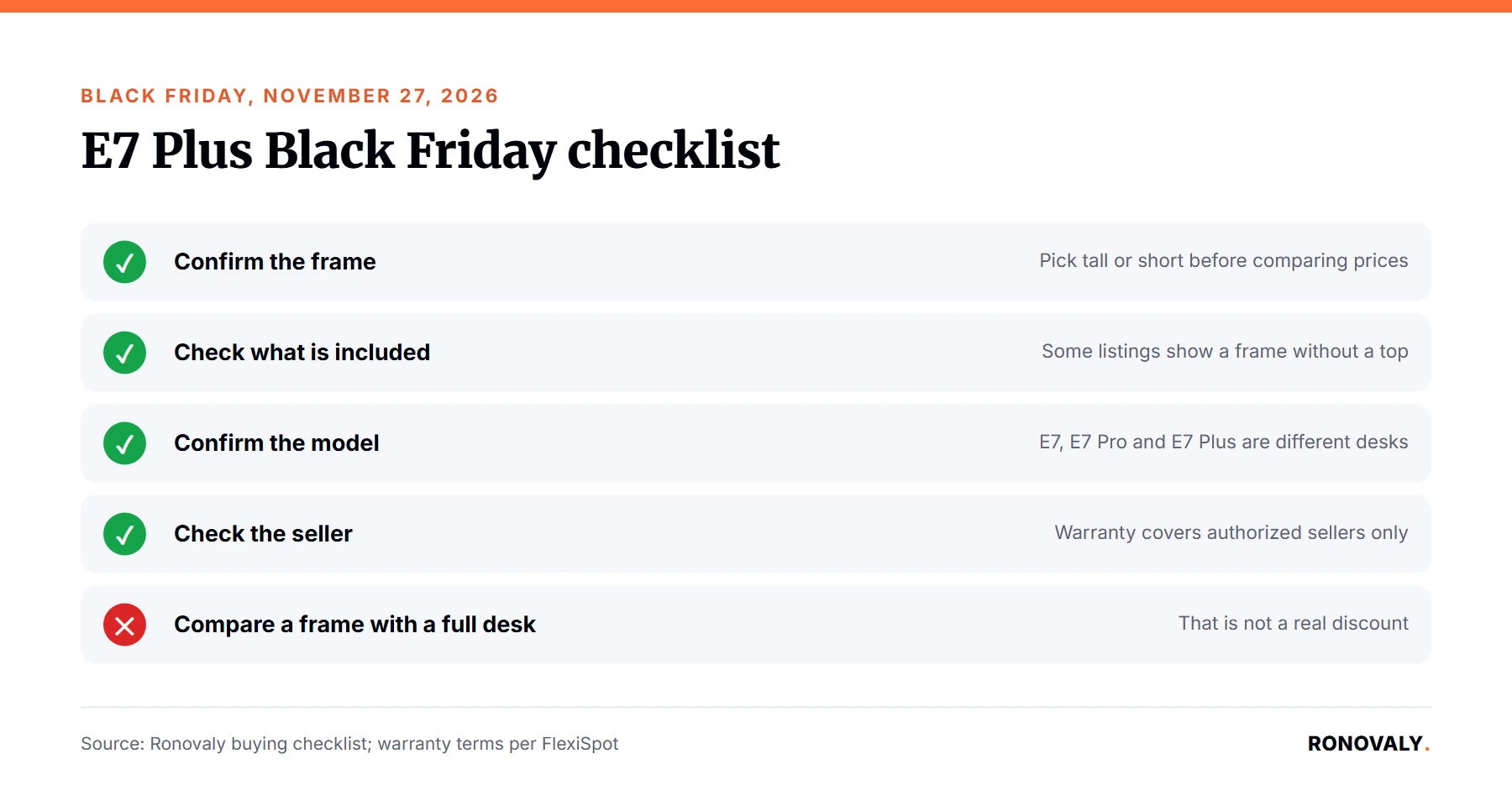
Black Friday falls on November 27, 2026, and Cyber Monday on November 30. Deals change fast, so we do not list deal prices here. Instead, use this checklist:
- Confirm the frame. Pick tall or short before you compare prices.
- Check what is included. Listings can show a frame without a desktop.
- Confirm the model. The E7, E7 Pro, E7 Plus and E7 Plus Fit are not the same desk.
- Check the seller. FlexiSpot says its warranty covers purchases from authorized sellers only.
- Check returns. FlexiSpot offers 30 days direct, but a 130 lb desk is hard to send back.
Frequently Asked Questions
Is the FlexiSpot E7 Plus worth it?
Yes, if you are tall or run a heavy setup. It lifts 440 lb, holds 540 lb when still and reaches 51.6 inches, per FlexiSpot. TechRadar rates it 5 out of 5 and Tom’s Guide 4 out of 5. For a laptop and one monitor, however, a two-leg desk is enough.
What is the difference between the E7 Plus and the E7 Pro?
The E7 Plus has four legs, while the E7 Pro has two. Both lift 440 lb. The E7 Plus tall frame reaches 51.6 inches, against 50.6 inches for the E7 Pro. So the E7 Plus adds stability and 1 inch of height, not more lifting power.
Which FlexiSpot E7 Plus frame should I choose?
Choose the 26 to 51.6 inch frame if you are near or above 6 feet. Choose the 24 to 45.7 inch frame if you are about 5’8″ or under. Tom’s Guide says both frames carry the same weight, so your height is the only deciding factor.
How much weight can the FlexiSpot E7 Plus hold?
The E7 Plus lifts 440 lb and holds 540 lb when still, per FlexiSpot. Those limits cover the total load, including the desktop. For example, FlexiSpot says an 80 lb desktop leaves about 360 lb of lifting capacity for monitors, computers and other equipment.
How loud is the FlexiSpot E7 Plus?
Tom’s Guide measured 54 dB going from sitting to standing, and it says the connecting rods sound more annoying than other designs. TechRadar found it quiet and notes FlexiSpot’s claim of under 50 dB. Either way, you only hear it during height changes.
Bottom Line
The FlexiSpot E7 Plus is worth it for tall founders and heavy multi-monitor setups, because few desks match its stability and range. On the other hand, it is heavy, it can be noisy and its price depends on the configuration. If you use a laptop and one screen, buy the E7 Pro instead.
About the Author
Alex Carter covers AI, automation and productivity for Ronovaly, focusing on Shopify brands in the $500K to $5M ARR range. Alex Carter is a pen name of the Ronovaly editorial team, and you can read more about Ronovaly. We did not test this desk in person; every spec and price in this article comes from the cited sources, checked on November 1, 2026. Spot an error? Contact us and we will fix it.
Sources
- FlexiSpot, 4-leg Standing Desk (E7 Plus): https://www.flexispot.com/flexispot-4-leg-standing-desk-e7plus
- TechRadar, Flexispot E7 Plus standing desk review (June 24, 2024): https://www.techradar.com/pro/flexispot-e7-plus-standing-desk-review
- Tom’s Guide, FlexiSpot E7 Plus review (April 13, 2025): https://www.tomsguide.com/home/home-office/flexispot-e7-plus-review
- TechRadar, The 6 best standing desks of 2026 (updated Oct 14, 2026): https://www.techradar.com/news/best-standing-desk
- Tom’s Guide, Best standing desks (updated Sep 28, 2026): https://www.tomsguide.com/best-picks/best-standing-desks
This post contains affiliate links. If you make a purchase through these links, we may earn a commission at no extra cost to you.