AI Subscription Cancellation Flow Shopify: Setup Guide
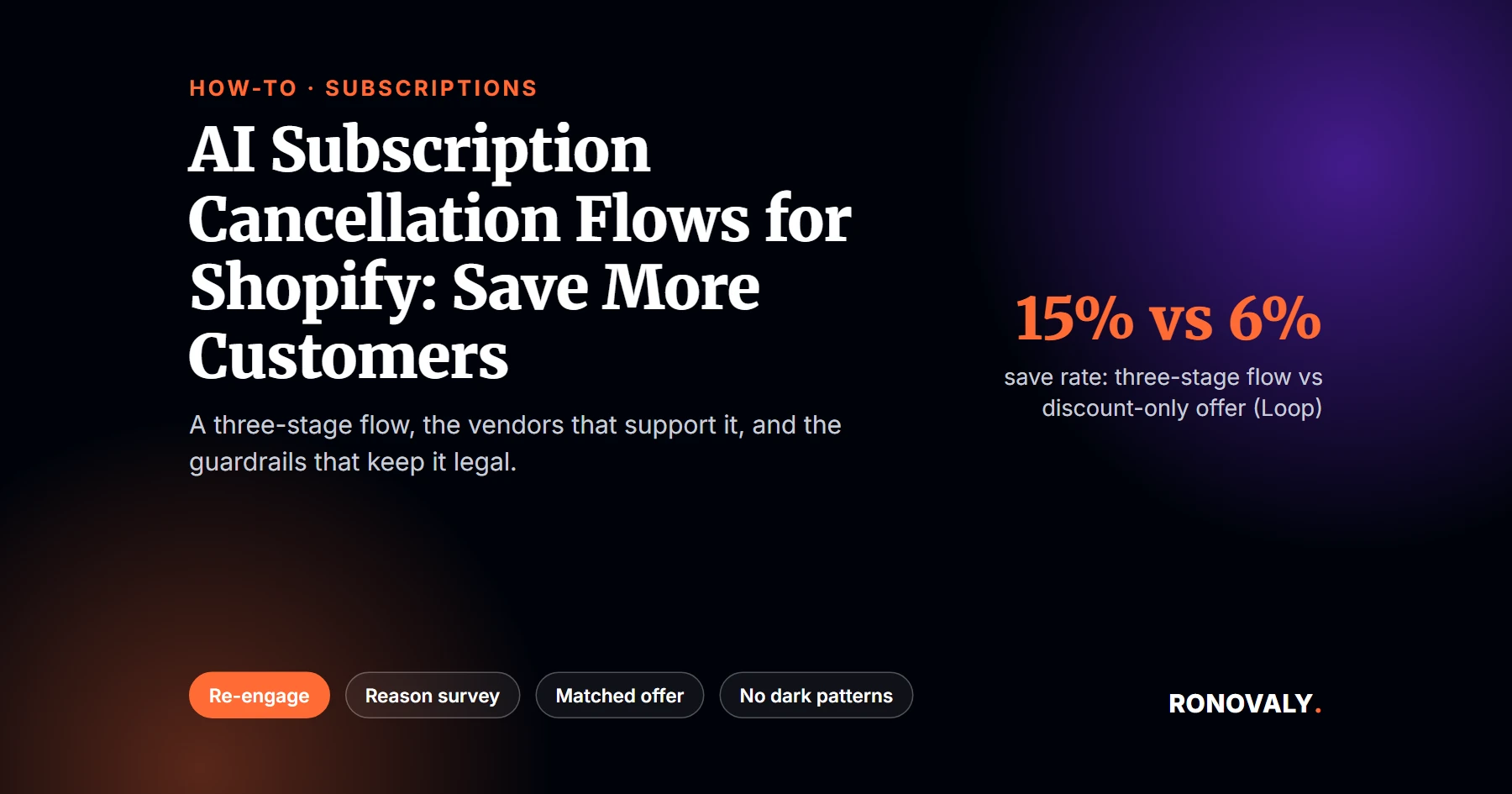
An ai subscription cancellation flow shopify setup is not one popup with a discount code. In fact, it is a sequence of three decision points. Most of the save happens before any offer even appears. Specifically, a structured three-stage flow (re-engage, reason survey, matched offer) delivers roughly 2.5 times more saves than a single generic discount, according to Loop Subscriptions’ own platform data across 441,000-plus cancel attempts on 87 DTC brands. That number is real. However, it comes from a vendor grading its own feature, so I treat it as a strong directional signal, not an audited average.
I compared these five apps’ cancel-flow features on their own pricing and documentation pages this month, and below is how to put one together on a Shopify subscription store: sourced save-rate ranges, real vendor pricing, and exactly where the flow backfires if you push it too hard. This guide follows our editorial standard of citing only named, dated sources, and a human editor checked it before publishing. If a number here looks off, our contact page is open and we will fix it. For example, if cart abandonment is the bigger leak in your funnel right now, start with reducing cart abandonment on Shopify using AI instead. This guide picks up later, at the moment a subscriber is already trying to leave.
Key Takeaways
- A structured three-stage cancellation flow saves about 15% of cancel attempts on average, versus about 6% for a generic discount alone, according to Loop Subscriptions’ platform data (441,000+ cancel attempts, 87 brands).
- The FTC’s “Click to Cancel” rule was vacated by the Eighth Circuit on July 8, 2025. As of March 2026, no federal click-to-cancel rule is in force, though ROSCA, FTC Section 5, and several state laws still require an easy cancellation path.
- 92% of surveyed US adults say they would switch to a competitor over an intentionally difficult cancellation process, and canceling takes 6.7 clicks on average versus 1-2 to subscribe, per EmailTooltester’s analysis of 40 subscription services.
- Vendor pricing varies widely: PayWhirl starts free, Recharge’s Starter plan runs $99 a month plus per-transaction fees, and Loop Subscriptions includes cancellation flows on every paid tier starting at $99 a month.
- Recharge acquired Skio for $105 million in April 2026, consolidating two of the five vendors covered here under one company, though Skio still operates as a separate product for now.
- Average monthly churn for DTC subscription brands runs 5.3% cross-category in 2026, according to Eightx, so a save-rate flow is judged against that baseline, not zero.
What You Need Before an AI Subscription Cancellation Flow Shopify Setup
By the end of this setup, you will have a cancellation flow that responds to why a subscriber is leaving instead of guessing. Here is what to have ready first.
- Admin access to your subscription app (Recharge, Loop, Skio, Stay AI, or PayWhirl) plus your Shopify admin.
- Your last 3 to 6 months of cancellation data, including whatever reason codes your current setup already captures, even informally.
- A short list of retention offers you can actually honor: a pause option, a frequency change, a discount tier, and a product swap, at minimum.
- A written stance on how many friction steps are acceptable before a cancel completes, since this determines whether your flow helps retention or invites a complaint.
- Time: 60 to 90 minutes for the initial build, plus ongoing tuning once real cancel attempts start flowing through it.
- Difficulty: Intermediate. No code is required for any of the five apps covered here.
Step 1: Understand What Actually Moves the Save Rate
By the end of this step, you will know which stage of a cancellation flow does the most work. As a result, you will not over-invest in the offer and under-invest in the first two stages.
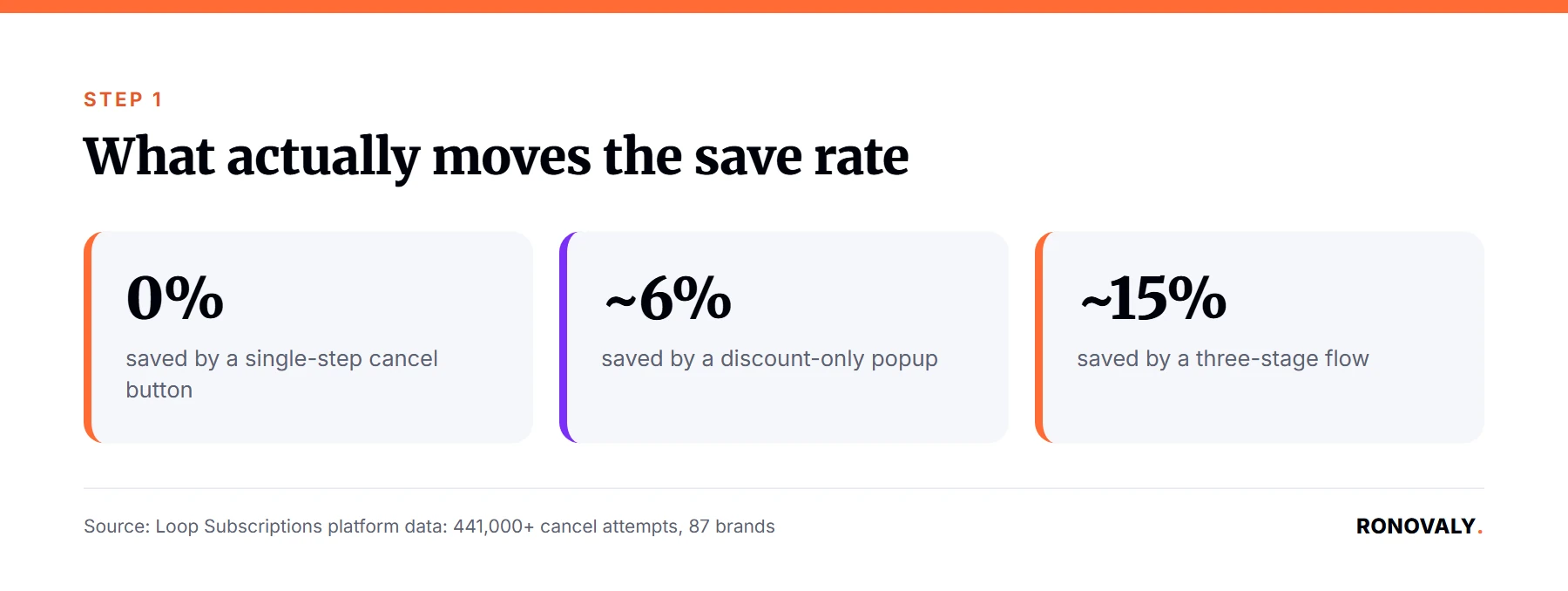
A common pattern is to install a cancellation app, turn on a single discount popup, and call the project done. That version saves a small slice of cancel attempts, then stops there. The gap between that and a structured flow is not marginal. Specifically, it is the difference between roughly 6% and roughly 15% of cancel attempts saved, according to Loop’s platform data. Notably, the best-optimized brands cross 20%.
The table below is the original artifact behind this guide. It maps four flow designs to sourced save-rate ranges, plus the point where each one backfires. That way, you can pick a design on evidence, not on whichever app’s onboarding wizard you clicked through first.
| Flow design | What it does | Sourced save-rate range | When it backfires |
|---|---|---|---|
| Single-step cancel button | Ends the subscription immediately, no intervention. | Baseline 0% save; average DTC monthly churn runs 5.3% cross-category, per Eightx’s 2026 churn benchmark. | Never backfires on friction, but leaves the entire save opportunity on the table. |
| Discount-only offer | One generic percentage-off popup before the cancel confirms. | About 6% average save rate, per Loop’s cancellation-flow analysis (441K+ cancel attempts, 87 brands). | Trains repeat cancellers to wait for the discount, and does nothing for subscribers leaving over fit or shipping delays, not price. |
| Multi-stage funnel (re-engage, reason survey, matched offer) | Surfaces a benefit reminder first, asks why before offering anything, then matches the offer to the stated reason. | About 15% average, 20%+ for top performers, roughly 2.5x a generic discount alone per Loop’s own platform data. Individual vendor case studies report even higher single-brand results, such as Recharge’s Tiege Hanley case study (churn down almost 44%) and Skio’s Just Ingredients case study (save rate up 323%, vendor-selected result). | Feels like a dark pattern if stages stack up as friction rather than genuine options. 92% of consumers say they would switch to a competitor over a hard-to-cancel process, per EmailTooltester’s dark-patterns report. |
| Win-back survey or post-cancel outreach | Runs after the cancellation completes, aimed at a later re-subscribe rather than stopping this one. | Not directly comparable to the save rates above, since it operates after the funnel, not inside it. | Backfires only if it is the sole retention step, since the emotional decision to leave is already made by the time it arrives. |
Multi-stage cancellation funnel is the term for a flow that separates re-engagement, reason capture, and the retention offer into distinct steps, rather than one screen. That separation is exactly what produces the save-rate gap in the table above. In other words, each stage gives the subscriber a different reason to stay, instead of repeating the same pitch three times.
Step 2: Pick a Vendor on Current Pricing, Not Last Year’s Comparison Post
By the end of this step, you will have narrowed your options to one or two apps that fit your store’s subscriber volume. Importantly, that choice should be checked against live pricing, not a roundup written months ago.
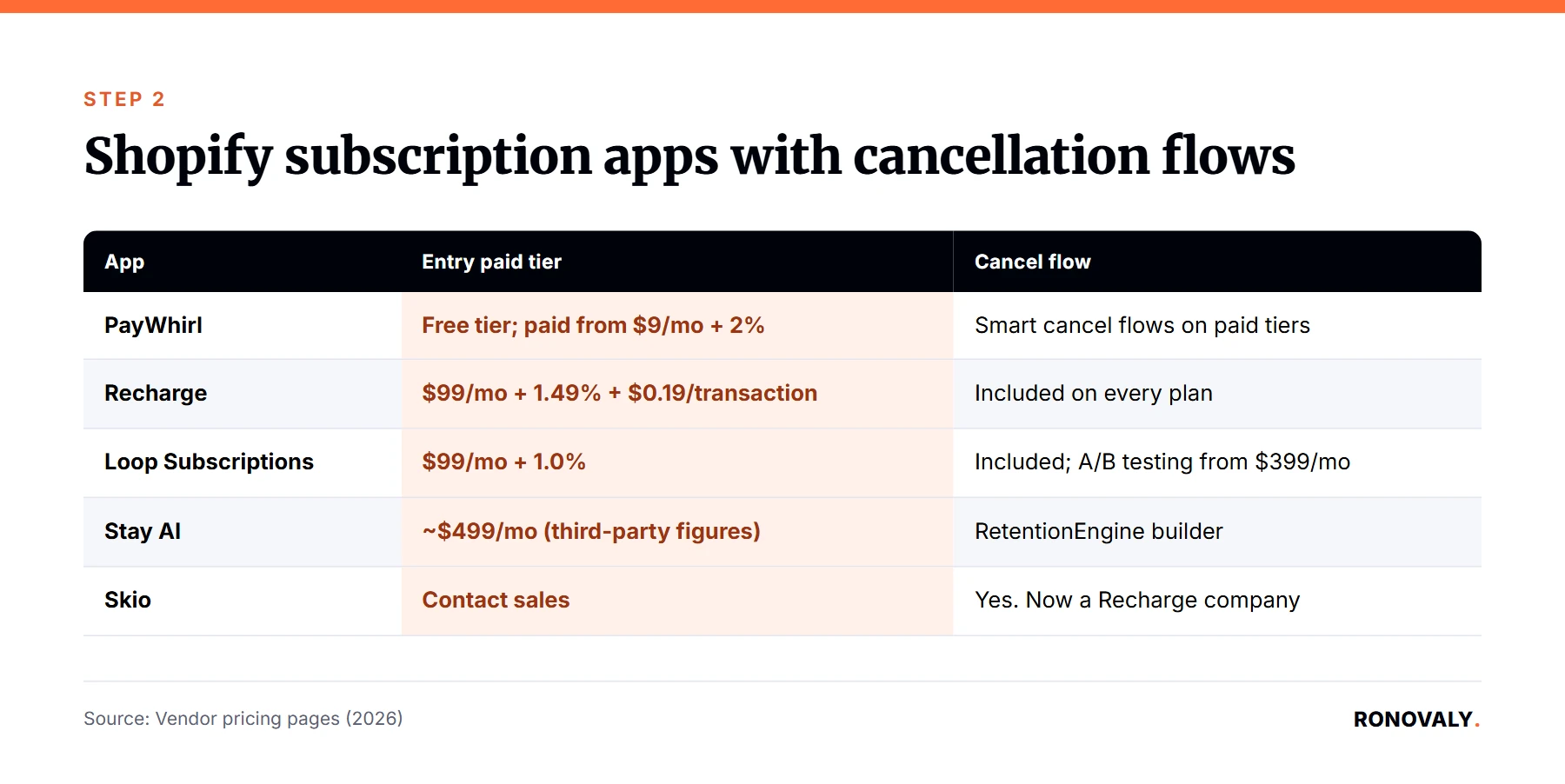
The Shopify subscription-app market moved this year. Specifically, Recharge acquired Skio for $105 million in April 2026, the largest private acquisition in subscription commerce to date. That deal combined two of the five vendors most founders shortlist for this exact feature. Skio still operates as a standalone product for now, per Recharge’s own announcement. However, pricing consistency across third-party trackers has gotten noisier since the deal closed. Therefore, treat any Skio price you see outside their own sales team as provisional.
| App | Entry paid tier | Cancellation flow included | Notes |
|---|---|---|---|
| Recharge | Starter, $99/month + 1.49% + $0.19/transaction; Plus, $499/month + 1.34% + $0.19/transaction. | Yes, included on every plan; Plus adds hands-on implementation support for it. | Owns Skio as of April 2026; broadest install base of the five. |
| Loop Subscriptions | Starter, $99/month + 1.0%, no per-order fee. | Yes, included on every paid tier. | Cancel-flow A/B testing is Pro ($399/month) and above. |
| Skio | Contact sales; public figures range widely post-acquisition. | Yes. | Now a Recharge company; verify current pricing directly rather than trusting a comparison post. |
| Stay AI | Roughly $499/month per third-party comparisons; not published on Stay AI’s own site. | Yes, via its RetentionEngine builder. | Reason-based rebuttals (pause instead of cancel on a price objection) are a named feature. |
| PayWhirl | Free tier available (0% fee on first $5,000 processed); paid tiers from $9/month + 2%. | Yes, “smart cancel flows” on paid tiers. | The budget option of the five; best fit for a newer or smaller subscriber base. |
Recharge’s, Loop’s, and PayWhirl’s figures above were checked directly against each vendor’s live pricing page in September 2026 (Recharge, Loop, PayWhirl). Stay AI does not publish pricing on its own site, so treat its figure as a third-party estimate. For instance, a store under a few hundred active subscribers gets a full-featured multi-stage flow from Loop or PayWhirl for $99 a month or less. In contrast, a store already running Recharge for checkout and billing usually stays on Recharge for the cancellation flow too. That is because re-platforming just for this one feature rarely pays for itself.
Step 3: Build the Three Stages in Order
By the end of this step, your flow will ask the subscriber to reconsider, then ask why, then respond with an offer matched to that reason. In that order.
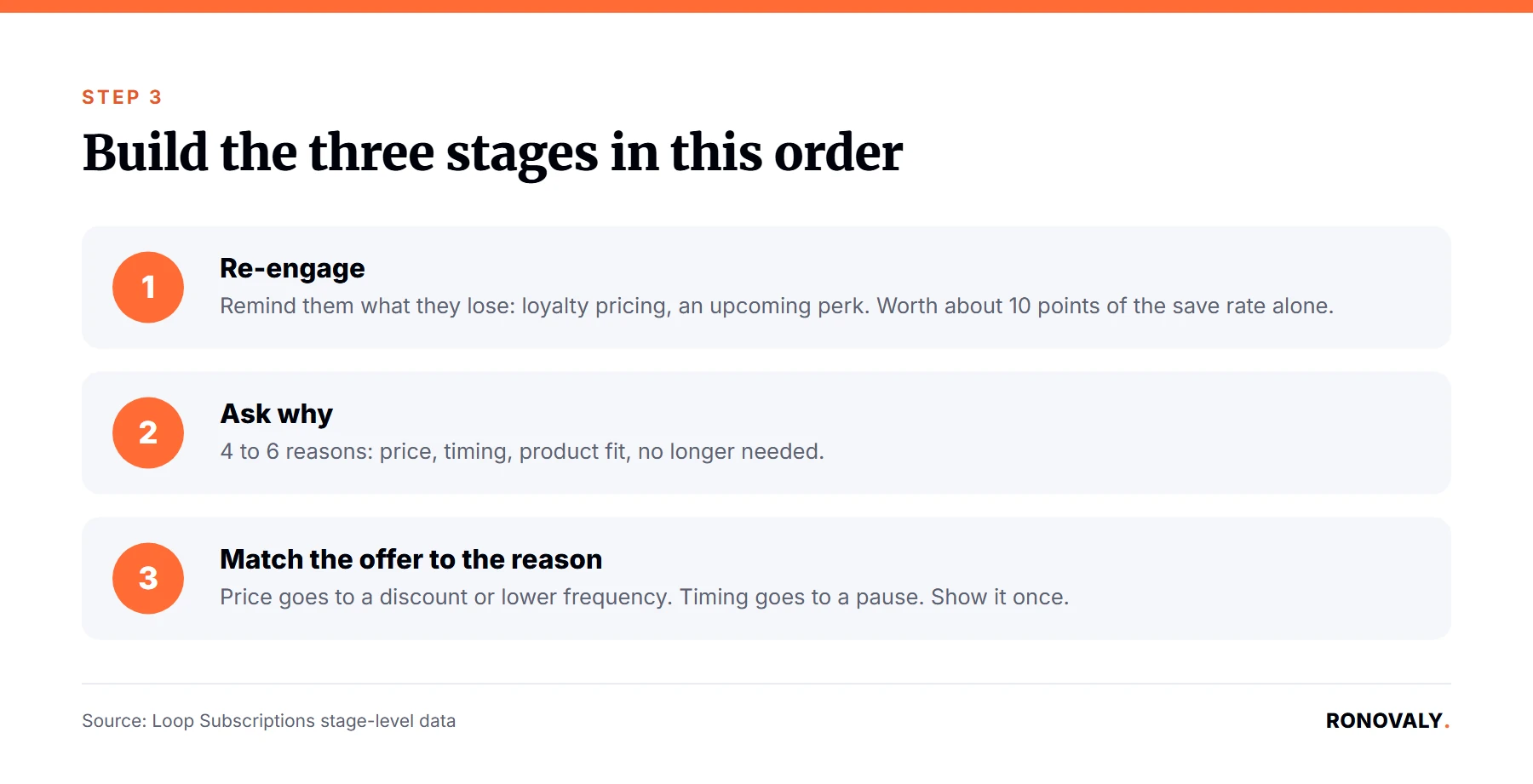
Start with the re-engage screen. This is a benefit reminder, not a sales pitch. Show what the subscriber is about to lose: loyalty pricing, an upcoming perk, or order history, before asking anything of them. Notably, Loop’s stage-level data attributes roughly 10 percentage points of the total save rate to this step alone, more than either of the two that follow it.
Next, add the reason survey. Keep it short: four to six reasons covering price, timing, product fit, and “no longer needed.” This step matters beyond its own save contribution too, since it is what lets the final stage match an offer to the actual reason, instead of guessing. Subsequently, route each reason to a specific offer. Price objections go to a discount or a lower-frequency tier. Timing objections go to a pause or skip. Fit objections go to a product swap, not a discount.
Reason-code routing is the practice of sending each cancellation reason to a specific, pre-mapped offer, instead of showing every subscriber the same retention screen. It is what makes the third stage a matched offer, rather than a second discount pitch. Finally, present the matched offer once, without repeating it if declined. A subscriber who says no to a well-matched offer has usually made a real decision. In contrast, repeating the same offer a second time is exactly where flows start to read as manipulative rather than helpful.
Step 4: Set Guardrails So the Flow Doesn’t Become a Dark Pattern
By the end of this step, your flow will have a hard limit on friction steps and an honest exit. This protects both the subscriber experience and your store from regulatory risk.
The FTC’s “Click to Cancel” rule was vacated by the Eighth Circuit Court of Appeals on July 8, 2025, on procedural grounds. As of this writing, no federal click-to-cancel rule is in force. However, that does not mean the underlying obligation disappeared. ROSCA, the Restore Online Shoppers’ Confidence Act, still requires a straightforward cancellation mechanism for online subscriptions. Likewise, FTC Section 5 still prohibits unfair or deceptive practices, and several states, including California and New York, have their own negative-option laws that do not depend on the federal rule’s status. As a result, the safest design choice is also the one the save-rate data supports: three stages, a clear exit at every one, and no dead ends.
Cap your flow at three intervention screens, matching the structure in Step 3. Every screen needs a visible, working “cancel anyway” option, not one greyed out or buried below the fold. Additionally, avoid guilt-based copy like “you’ll lose your benefits forever.” In fact, 87.5% of major subscription services already use language like this, per EmailTooltester’s analysis. That is the specific pattern tied to the 92% of consumers who say they would switch to a competitor over it. Meanwhile, a flow that respects the exit converts better on repeat subscribers anyway, since word gets around when a brand’s cancel process is honest.
Step 5: Track Save Rate by Reason Code and Route Edge Cases to a Human
By the end of this step, you will know which reason code saves best, which one you are losing every time, and which cancellations should skip the flow entirely.
Most of the five apps above report a save rate broken out by reason code once you have a few weeks of data. Review it monthly at first. For example, if your price-objection save rate sits well below your product-fit save rate, that is a signal your discount tier is not competitive, not that the flow is broken. Meanwhile, a subscriber flagged for repeated failed payments or an active refund dispute should skip the retention flow entirely. Route them straight to your support team instead, since offering a discount to someone with an unresolved billing issue rarely resolves the underlying problem.
Common Mistakes to Avoid
The most expensive mistake I see is treating the discount as the whole strategy and skipping the first two stages entirely. What else goes wrong?
Leading with the discount instead of the benefit reminder. Loop’s own stage data attributes the largest single share of saves to the re-engage step, not the offer. Skip straight to a coupon code, and you leave that share on the table.
Repeating the same offer after a decline. One matched offer per cancellation is a fair try. However, a second identical offer reads as pressure, and pressure is exactly what the dark-pattern backlash data punishes.
Copying a vendor’s marketed save rate as your own expectation. Case-study numbers like a 323% lift are real for the brand that earned them. That said, they are vendor-selected success stories, not an average. Budget for something closer to the 15% structured-flow average instead, then treat anything above that as upside.
Ignoring reason-code data for more than a month. A flow that never gets reviewed drifts out of date with your actual cancellation reasons. As a result, you lose the entire point of asking in the first place.
Assuming the FTC rule’s vacatur means cancellation friction is now low-risk. It is not. ROSCA enforcement and state-level rules did not go away when the federal rule was struck down. Consequently, a flow built on that assumption is one complaint away from a problem.
What Success Looks Like
If you built all five stages, you should now have a cancellation flow that saves somewhere in the 15% to 25% range of attempts. The exact number depends on your product category and how well your offers match your actual cancellation reasons.
Look for three signs it is working. First, your overall save rate should sit meaningfully above the 6% generic-discount baseline within the first month. Second, your reason-code breakdown should show at least one offer type clearly outperforming the others, which tells you where to invest next. Third, complaint volume and chargebacks tied to cancellation should stay flat or drop, not rise. That is because a flow with a fast, honest exit does not generate the friction that drives disputes. As a next step, revisit your reason-code offers quarterly, since subscriber behavior shifts with pricing and season.
Frequently Asked Questions
Does a three-stage cancellation flow really save more customers than a discount offer?
Yes, according to the best available data. A structured three-stage flow (re-engage, reason survey, matched offer) saves about 15% of cancel attempts on average, versus about 6% for a generic discount alone. That is roughly 2.5 times more, per Loop Subscriptions’ platform data across 441,000+ cancel attempts on 87 brands. However, that figure comes from a vendor measuring its own feature, so treat it as directionally strong rather than independently audited.
Is the FTC’s click-to-cancel rule still in effect for Shopify subscription brands?
No. The Eighth Circuit vacated the rule on July 8, 2025, on procedural grounds. As of March 2026, the FTC has reopened rulemaking with an Advance Notice of Proposed Rulemaking, not an active rule. That said, ROSCA, FTC Section 5, and state-level negative-option laws still require a straightforward cancellation path, regardless of the federal rule’s status.
Which Shopify subscription app has the best built-in cancellation flow: Recharge, Loop, Skio, Stay AI, or PayWhirl?
It depends on your existing stack and subscriber volume more than any single “best” answer. For instance, Loop includes multi-stage cancellation flows on every paid tier starting at $99 a month, which makes it the strongest default for a smaller store. In contrast, a store already on Recharge for checkout typically keeps its cancellation flow there too, since Recharge’s Starter plan includes the feature.
Is Skio still worth using now that Recharge owns it?
Skio still operates as a standalone product as of this writing, per Recharge’s own announcement following the April 2026 acquisition. That said, public pricing information has gotten less consistent since the deal. As a result, confirm current terms directly with Skio’s sales team, rather than relying on a comparison post written before the acquisition.
Can a retention offer at cancellation count as a dark pattern, and what’s the risk?
Yes, if the flow adds friction without a clear, working exit. In fact, 92% of surveyed US adults say they would switch to a competitor over an intentionally difficult cancellation process, and 87.5% of major subscription services already use guilt-based copy, per EmailTooltester’s research. Capping your flow at three screens with a visible cancel option at every stage keeps you on the right side of that line.
How much does a Shopify cancellation-flow tool cost?
PayWhirl starts free, with 0% fees on your first $5,000 processed, which makes it the cheapest entry point. Loop Subscriptions’ Starter plan, in contrast, runs $99 a month plus 1.0%, with cancellation flows included at every tier. Meanwhile, Recharge and Stay AI both start closer to the $499-a-month range once you need their enhanced flow features.
How long does it take to set up a multi-stage cancellation flow on Shopify?
Budget 60 to 90 minutes for the initial build, across any of the five apps covered here. Additionally, plan on ongoing tuning once real cancellations start flowing through the reason-code data. Most of that time goes into writing the reason-code list and matching offers, not the app configuration itself.
Next Steps
You now have a three-stage cancellation flow built on sourced save-rate data instead of a vendor’s marketing page. Map your reason codes, pick a vendor on current pricing, build the re-engage, survey, and matched-offer sequence in order, cap the friction at three screens, and review your reason-code data monthly.
If predictive segmentation is already part of your retention stack, my Klaviyo AI segmentation setup for abandoned carts covers the same reason-based logic applied earlier in the funnel, before a subscriber ever reaches the cancel button. Once this flow is live, revisit its ongoing app cost using the same method Alex uses for auditing a Shopify AI app stack for hidden subscription costs, since retention tools carry their own per-transaction and tier-overage traps.
This post contains affiliate links. If you make a purchase through these links, we may earn a commission at no extra cost to you.