Shopify Klaviyo flows setup: the complete guide for DTC Brands (2026)
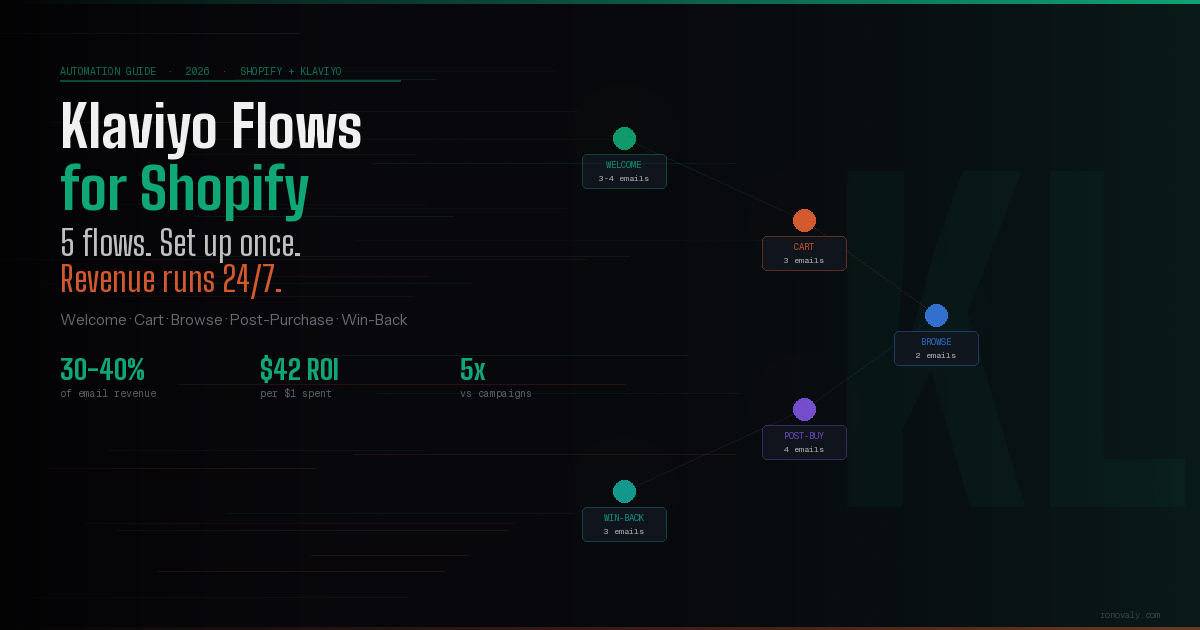
The Shopify Klaviyo flows setup most founders rush through is also the one that drives 30–40% of their total email revenue. Here’s how to do it right — from welcome series to win-back, step by step.
Klaviyo flows are most effective when they sit inside a fully automated store — the complete Shopify automation guide covers the full system these flows connect to.
Email is still the highest-ROI channel in e-commerce. But most Shopify stores are leaving the majority of that revenue on the table — not because they don’t have Klaviyo, but because their Shopify Klaviyo flows setup is incomplete, misconfigured, or running on default templates that convert like it’s 2019.
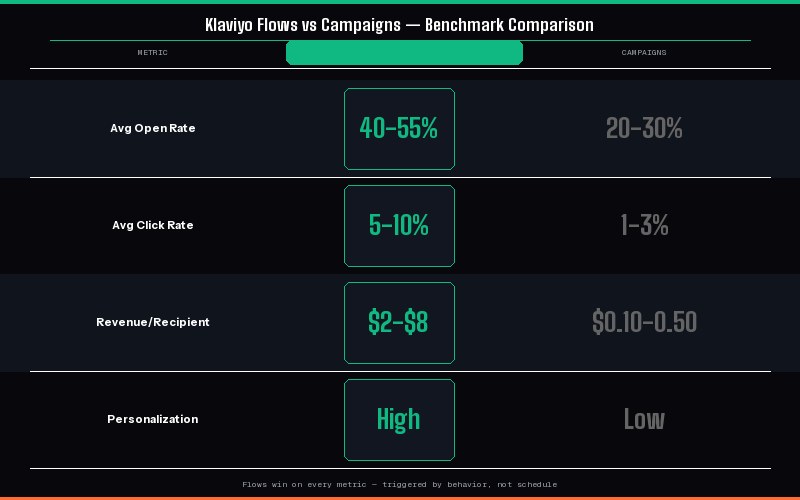
The average DTC brand generates 30–40% of total email revenue from automated flows — not campaigns. (Source: Klaviyo Email Marketing Benchmarks 2026). Flows run 24/7 without you touching them. A well-built abandoned cart flow alone can recover $8,000–$15,000/month for a store doing $200K in monthly revenue.
This guide covers the five essential Klaviyo flows every Shopify store needs, how to connect and configure them correctly, and what benchmarks to aim for so you know when they’re actually working.
What you’ll set up: Welcome series → Abandoned cart → Browse abandonment → Post-purchase → Win-back. These five flows, properly configured, typically generate 25–40% of a store’s total email revenue automatically — before you send a single campaign.
30–40% of email revenue from automated flows
Email marketing delivers an average ROI of $36–$40 per $1 spent (Source: Litmus, 2024)
5× higher open rate vs broadcast campaigns
Table of Contents
Klaviyo Flows vs Campaigns: What’s the Difference?
Before setting up your Shopify Klaviyo flows, it’s important to understand what flows actually are — and why they outperform campaigns for revenue.
Campaigns are emails you send manually to a list on a specific date — newsletters, product launches, seasonal promotions. They require your time and attention every time.
Flows are automated sequences triggered by a customer action — signing up, abandoning a cart, making a purchase. They run automatically, 24/7, without you touching them. Once built correctly, they compound over time.
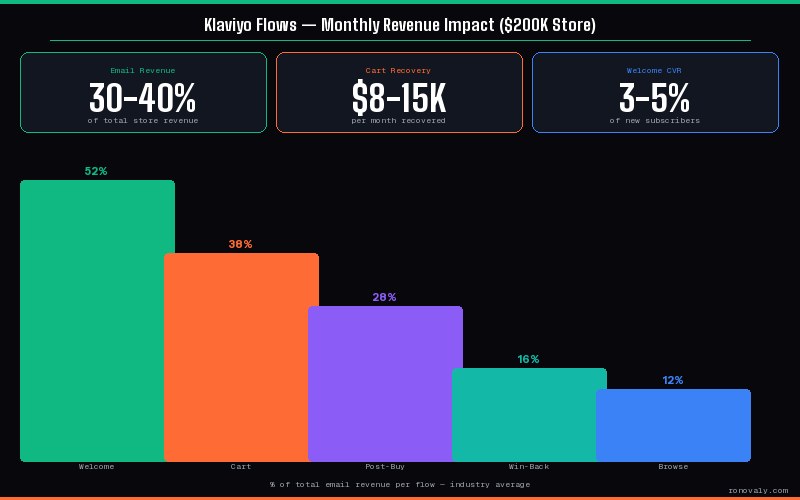
| Metric | Flows (Automated) | Campaigns (Manual) |
|---|---|---|
| Average open rate | 40–55% | 20–30% |
| Average click rate | 5–10% | 1–3% |
| Revenue per recipient | $2–$8 | $0.10–$0.50 |
| Time to maintain | Setup once, review quarterly | Every send requires work |
| Personalization level | High — triggered by behavior | Low — same for everyone |
Flows win on every metric because they’re sent at the exact right moment — when a customer’s intent is highest. That’s why completing your Shopify Klaviyo flows setup before scaling ad spend is one of the highest-leverage moves a DTC founder can make. More traffic into a broken retention funnel is just more wasted ad spend.
How to Connect Shopify to Klaviyo (5 Minutes)
Step 1
Install the Klaviyo app on Shopify
Go to the Shopify App Store, search “Klaviyo,” and install. It’s free to install — you only pay based on your contact list size. Approve the permissions Klaviyo requests (order data, customer data, product catalog).
Step 2
Connect your Klaviyo account
In the Klaviyo app settings, click “Connect to Klaviyo.” If you don’t have an account, create one — the free plan covers up to 250 contacts and 500 emails/month. Enter your Klaviyo API key when prompted.
Step 3
Enable data sync
In Klaviyo → Integrations → Shopify, verify that “Sync historical data” is enabled. This pulls your existing customer purchase history into Klaviyo — critical for segmentation and win-back flows. The sync can take 1–2 hours for large catalogs.
Step 4
Add the Klaviyo tracking snippet
In Klaviyo, go to Account → Settings → API Keys. Copy your public API key and add the Klaviyo JavaScript snippet to your Shopify theme. This enables browse abandonment tracking and on-site behavior data. Without it, browse abandonment flows won’t fire.
Step 5
Verify the integration is working
Place a test order on your store, then check Klaviyo → Activity Feed. You should see the order event appear within a few minutes. If you don’t see it after 15 minutes, re-check your API key and app permissions.
The 5 Essential Klaviyo Flows for Shopify (With Benchmarks)
1
Welcome Series
Highest ROI
Trigger: Someone subscribes to your list (popup, checkout opt-in, lead magnet)
The welcome series is your single highest-converting flow — because subscribers are at peak interest when they sign up. Most stores send one generic “welcome” email and move on. A proper welcome series runs 3–4 emails over 5–7 days.
- Email 1 (immediate): Welcome + deliver the promised discount or lead magnet. Keep it short, on-brand, one CTA.
- Email 2 (day 2): Brand story — why you started this, what makes your product different. Build trust before the next push.
- Email 3 (day 4): Social proof — best reviews, before/after, user-generated content. Address the #1 objection.
- Email 4 (day 7): Final offer or bestseller highlight. Urgency if they haven’t purchased yet.
50–60% Avg open rate Email 1
3–5% Conversion rate
$3–$6 Revenue per recipient
2
Abandoned Cart Flow
Highest Revenue Recovery
Trigger: Customer adds to cart but doesn’t complete checkout within 1 hour
About 70% of online carts are abandoned, according to the Baymard Institute, so even a small recovery rate adds up. Track your own recovered revenue in the flow’s analytics. For the full recovery playbook beyond email, see how to reduce cart abandonment on Shopify with AI. To route this flow by predicted customer value, see our Klaviyo AI segmentation setup.
- Email 1 (1 hour after): Soft reminder — “you left something behind.” Show the cart contents. No discount yet.
- Email 2 (24 hours): Address the likely objection (shipping cost, returns policy, product questions). Still no discount.
- Email 3 (72 hours): Final recovery email with a time-limited incentive (10% off, free shipping). Only for those who haven’t purchased.
Pro tip: Add a conditional split after Email 1 — if they purchased, remove them from the flow immediately. Nothing kills trust faster than sending a discount to someone who already bought at full price. This pairs well with Rebuy’s smart cart, which can show the same abandoned items as upsells on the next visit.
45–55% Avg open rate Email 1
5–15% Cart recovery rate
$5–$8 Revenue per recipient
3
Browse Abandonment Flow
Top of Funnel Recovery
Trigger: Subscriber views a product page but doesn’t add to cart within 2 hours
Browse abandonment catches people earlier in the funnel — before they’ve committed to the cart. These emails convert at lower rates than cart abandonment, but the volume is much higher. This flow requires the Klaviyo tracking snippet on your site.
- Email 1 (2–4 hours after): Show the product they viewed with a brief pitch. Keep it simple — one product, one CTA.
- Email 2 (48 hours): Show related products or a “customers also bought” recommendation. Broadens the offer.
35–45% Avg open rate
1–3% Conversion rate
$1–$2 Revenue per recipient
4
Post-Purchase Flow
LTV Builder
Trigger: Customer completes an order
Most stores treat the post-purchase period as dead air — a few transactional order confirmation emails and nothing else. This is where LTV is won or lost. A post-purchase flow turns one-time buyers into repeat customers.
- Email 1 (immediate): Thank you + order confirmation. Reinforce the buying decision, set delivery expectations.
- Email 2 (day 3–5): Product education — how to get the best results with what they just bought. Reduces returns, builds satisfaction.
- Email 3 (day 7–10): Ask for a review. Link directly to the product review form. Reviews increase conversion on the PDP for the next buyer.
- Email 4 (day 14–21): Cross-sell — complementary products based on what they bought. This is where the revenue is.
55–65% Avg open rate Email 1
10–20% Repeat purchase rate
$2–$4 Revenue per recipient
5
Win-Back Flow
Retention Essential
Trigger: Customer hasn’t purchased in 90–120 days
Acquiring a new customer costs 5–7× more than retaining an existing one. Win-back flows target customers who’ve bought before but have gone quiet — often the highest-value segment to re-engage because they already trust you.
- Email 1 (day 90): “We miss you” — gentle re-engagement, no discount. Show what’s new or what’s changed.
- Email 2 (day 97): Personalized product recommendation based on their last purchase. Show you remember them.
- Email 3 (day 104): Final offer — your best incentive. If they don’t engage after this, suppress them to protect deliverability.
25–35% Avg open rate
3–8% Re-purchase rate
$1–$3 Revenue per recipient
Klaviyo AI Features Worth Using in 2026
Klaviyo has added several AI features that genuinely improve flow performance — not just marketing fluff. Here are the ones worth enabling:
- Predictive Analytics: Klaviyo predicts each customer’s next purchase date, lifetime value, and churn risk. Use these predictions to trigger win-back flows earlier for high-LTV customers, or suppress low-LTV contacts before they hurt your deliverability.
- Smart Send Time: Klaviyo analyzes when each subscriber is most likely to open email and sends at their optimal time. Typically improves open rates by 3–8%.
- AI Subject Line Assistant: Generates and scores subject line variations. Use it as a starting point, then edit for brand voice.
- Product Recommendations: Klaviyo’s recommendation engine pulls from your Shopify product catalog to show personalized product suggestions in emails — based on browse and purchase history.
For deeper analytics on which email flows are actually driving revenue vs. which channels your customers came from, pair Klaviyo with Triple Whale’s attribution model — it shows you the full customer journey, not just the last-click email credit.
💡 Want to automate even more of your Shopify operations beyond email? Our guide to Shopify automation workflows covers how to connect Klaviyo with your inventory, CRM, and support tools using Make — no code required.
Klaviyo for Shopify: Pros & Cons
✓ Pros
- Native Shopify integration — setup in minutes
- Best-in-class segmentation and targeting
- Predictive analytics built in
- Flows fire on real behavior, not time-based rules
- Free up to 250 contacts
- Strong template library to start fast
- Product recommendations powered by Shopify catalog
✗ Cons
- Pricing scales quickly with list size
- Learning curve on advanced segmentation
- SMS features cost extra
- AI subject line tool still needs human editing
- Deliverability requires active list hygiene
Klaviyo is our top pick in the Klaviyo vs Omnisend vs Drip comparison for stores above $50K/month — the segmentation depth and predictive analytics justify the cost at that scale. Below that, Omnisend is a cheaper alternative that covers the basics well.
Start your Klaviyo flows setup today
Free up to 250 contacts. Connect to Shopify in 5 minutes and have your first abandoned cart flow running today.Get Started with Klaviyo →
Frequently Asked Questions
How long does the Shopify Klaviyo flows setup take?
The technical connection takes 5–10 minutes. Building all five essential flows from scratch — using Klaviyo’s templates as a base — takes 4–6 hours total. The abandoned cart and welcome series flows should be your first priority since they generate the most revenue. You can have both live within 2 hours of connecting your store.
How many emails should each Klaviyo flow have?
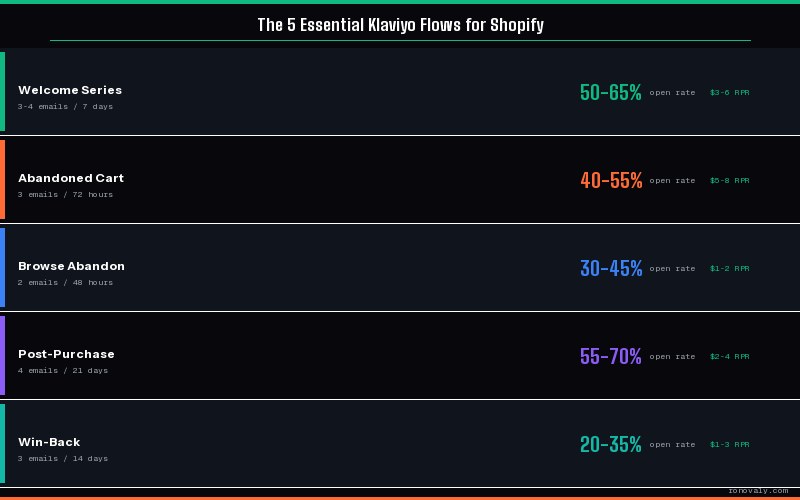
Welcome series: 3–4 emails over 7 days. Abandoned cart: 3 emails over 72 hours. Browse abandonment: 1–2 emails over 48 hours. Post-purchase: 3–4 emails over 21 days. Win-back: 3 emails over 14 days. These are starting points — test and adjust based on your unsubscribe rates and revenue per recipient.
Should I offer a discount in every Klaviyo flow?
No. Discounts in every flow train customers to wait for a deal before buying. Reserve discounts for the final email in abandoned cart (Email 3) and win-back flows (Email 3). For welcome series, welcome the subscriber first and build brand value — only use a discount if you explicitly promised one during signup (e.g., “Get 10% off by subscribing”).
What’s a good open rate for Klaviyo flows?
Welcome Email 1: 50–65% is strong. Abandoned cart Email 1: 40–55%. Post-purchase Email 1: 55–70% (transactional emails open the most). Browse abandonment: 30–45%. Win-back Email 1: 20–35%. If you’re significantly below these benchmarks, the issue is usually subject line, sender reputation, or sending to unengaged contacts. Clean your list before troubleshooting content.
Does Klaviyo work with Shopify Markets (multi-currency)?
Yes — Klaviyo’s Shopify integration supports multi-currency stores. Product recommendations and cart contents will display in the currency the customer checked out in. For multi-language stores, you’ll need to build separate flows or use conditional content blocks to show language-specific content within the same flow.
This post contains affiliate links. If you make a purchase through these links, we may earn a commission at no extra cost to you.