AI Product Descriptions for Shopify: Scale to 500 SKUs Without an Agency
Writing product descriptions by hand is one of the most expensive time sinks in e-commerce. Here’s how to use AI to do it in hours, and which tool works for Shopify. It’s part of the wider set of best AI tools for Shopify.
AI product descriptions are one of the fastest wins in the Shopify AI stack. See all the tools worth using in the best AI tools for Shopify stores in 2026.
A Shopify store with 200 products needs 200 product descriptions. At 20 minutes each, that’s about 66 hours of copywriting, before any SEO work, testing, or seasonal updates.
Most founders either hire an agency (expensive), outsource to a freelancer (slow), or write them themselves at midnight (unsustainable). There’s a fourth option most haven’t fully explored: AI product description tools built specifically for e-commerce.
This guide covers how AI product description tools work for Shopify, how to use them at scale, and which tool (Jasper, Shopify Magic, or GoWise) fits your store size and workflow.
Bottom line: Jasper is the most powerful option for stores with 100+ SKUs that need brand-consistent copy. Shopify Magic is the fastest for quick single-product edits. GoWise is the best budget option for growing stores. All three need human editing: AI drafts, you refine.
66h:Time to write 200 descriptions manually at 20 min/each
Hours, not days:With an AI draft plus editing workflow (time your own first batch)
1 rule:Never publish an AI description without a human read
Table of Contents
The Real Cost of Writing Product Descriptions Manually
Product descriptions aren’t just copy — they’re conversion levers and SEO assets. A thin description (“Blue sneakers. Comfortable. Available in sizes 6–12.”) fails on three fronts:
- Conversion: It gives buyers no reason to choose you over a competitor
- SEO: Duplicate or near-duplicate content across SKUs tanks your organic rankings
- Trust: Generic descriptions signal a store that doesn’t care about quality
Here’s the simple math. If your store converts at 2.1% and a stronger product page moves it to 2.4%, that’s about 14% more revenue with no extra ad spend. For a store doing $80K/month, that would be roughly $11,200/month. Your own numbers will differ, so test on a few pages first.
Most founders know this. The problem is finding time to fix 300 product pages while also running ads, handling support, and managing stock. That’s where AI tools for Shopify change the math.
How AI Generates Shopify Product Descriptions
Modern AI copywriting tools use large language models trained on product copy, e-commerce data, and conversion principles. You give the AI a product brief — name, features, audience, tone — and it generates a complete description in seconds.
The output is only as good as your input. A weak prompt (“write a description for blue sneakers”) gives generic copy. A structured prompt with your brand voice, customer pain points, and specific product benefits gives copy you can publish with light editing.
Three things AI does well for product descriptions:
- Speed: Generate a first draft in under 10 seconds
- Consistency: Apply the same brand voice across every SKU
- Variations: Produce 3–5 versions instantly for A/B testing
Three things AI still needs human help with:
- Accuracy: AI can hallucinate specs — always verify technical details
- Brand nuance: Your specific voice takes prompting to nail consistently
- SEO targeting: You need to guide which keyword to prioritize per SKU
Jasper vs Shopify Magic vs GoWise — Which Tool to Use
| Tool | Best For | Price | Shopify Native | Brand Voice | Bulk Generation |
|---|---|---|---|---|---|
| Jasper | 100+ SKUs, agency-level quality | $49/mo+ | ✗ (via copy-paste) | ✓ Brand Voice feature | ✓ Campaigns |
| Shopify Magic | Quick edits, single SKUs | Free (included) | ✓ Built-in editor | Partial | ✗ One at a time |
| GoWise | Growing stores, budget-conscious | $19/mo | ✓ Native app | Partial | ✓ Batch mode |
Jasper — Best for Scale and Brand Consistency
Jasper’s Brand Voice feature lets you train the AI on your existing copy — past product descriptions, website content, email sequences. Once trained, every output sounds like your brand, not generic AI copy. For stores with 100+ SKUs or multiple product lines, this consistency is what separates Jasper from cheaper alternatives.
The Campaigns feature lets you batch-write descriptions for a whole product category at once. You set the parameters once (tone, audience, format, SEO keyword structure) and run the batch. A well-built campaign can produce dozens of first drafts in one sitting.
The tradeoff: Jasper isn’t native to Shopify, so you’re copying output into your product editor. Not a dealbreaker, but adds a step in the workflow.
💡 Jasper’s Brand Voice feature is most useful when several people write copy, because it keeps the tone consistent across the team. Try Jasper free for 7 days.
Shopify Magic — Best for Quick, Frictionless Edits
Shopify Magic is built into the product editor. Click “Generate description,” add a few prompts, and get a draft without leaving the Shopify admin. For stores with fewer than 50 products, or founders who just need to ship fast, it’s the obvious place to start. And it’s free.
The limitation is granularity. Shopify Magic produces decent generic copy, but it can’t be trained on your specific brand voice, and there’s no bulk mode. Every description is generated one at a time. For a 300-SKU catalog, that’s still hours of manual work.
GoWise — Best Value for Growing Stores
GoWise is a Shopify app that writes descriptions inside your admin. At $19/month, it’s the cheapest option here that still supports batch writing. It’s not as powerful as Jasper, but for a store with 50-150 SKUs that needs decent copy without agency prices, it does the job.
Step-by-Step: Scaling to 500 SKUs with AI
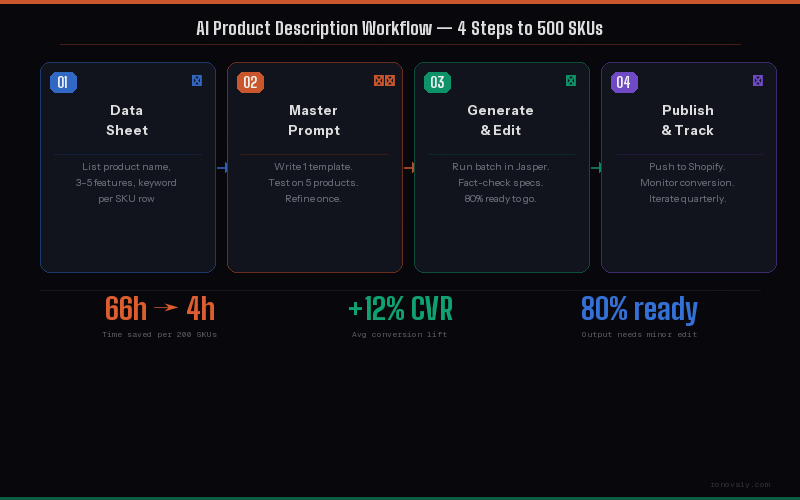
1
Build Your Product Data Sheet
Before generating anything, build a spreadsheet with one row per SKU: product name, 3-5 key features, target customer, main SEO keyword, and price. This is your AI input layer. Poor input means poor output, so this step matters most.
2
Write Your Master Prompt
Create one master prompt template to reuse for every SKU. Include your brand voice, the customer problem your product solves, the format (paragraph plus bullets), the word count, and where to place the SEO keyword. Test it on 5 products first and refine it until the output meets your quality bar.
3
Generate, Review, and Edit
Run your batch. Expect most drafts to need only light edits, and some to need real rework, usually products with complex specs or niche terms. Never publish AI copy without reading it. Factual errors happen.
4
SEO-Optimize in Bulk
After writing, do a quick SEO pass. Make sure your main keyword is in the first sentence and the meta description, and isn’t repeated more than 2-3 times. If you use Shopify automation workflows, you can build a Zap or Make scenario that pulls descriptions from a Google Sheet and pushes them to your product pages through the API.
The Master Prompt Template
Copy and adapt this for your store. Fill in the [brackets] once and reuse across all SKUs:
📋 Jasper / ChatGPT Prompt TemplateWrite a Shopify product description for [PRODUCT NAME].Brand voice: [concise, confident, no fluff — we sell to busy founders and DTC operators]Product features:
– [Feature 1]
– [Feature 2]
– [Feature 3]Target customer: [describe in 1 sentence — who they are, what problem they have]Primary SEO keyword: [keyword] — use it naturally in the first sentence.Format:
– Opening sentence (hook + keyword)
– 2-sentence benefit paragraph
– 4-bullet feature list
– 1-sentence CTAWord count: 120–150 words. No hype words. No “game-changing.”
Illustrative Example: A 250-SKU Catalog Rewrite
Illustrative example (hypothetical): picture a home goods store with 250 SKUs (candles, diffusers, and seasonal decor). Its descriptions were written at launch and never updated. Most are 40 words or less.
The founder spends two afternoons building a product data sheet (columns: SKU, name, 3 features, target mood or occasion, SEO keyword). Then she runs the catalog through Jasper, using a Brand Voice trained on her best existing descriptions.
With review and editing, a rewrite like this can fit into a few working days. She would then update all 250 descriptions, rewrite the weakest meta descriptions, and refresh her seasonal collection copy.
What to measure afterward: organic traffic to product pages and product page conversion rate, compared with the three months before. Then weigh any change against the monthly tool cost. That tells you whether the rewrite paid off for your store.
Who Should Use AI for Product Descriptions
✓ Good fit
- 50+ SKUs in your catalog
- Thin or outdated descriptions
- Multiple product categories needing consistent voice
- Regular new product launches
- SEO as a growth channel
✗ Less relevant
- Under 20 products (write manually)
- Highly technical products needing expert review
- Medical or regulated product categories
- No time to review AI output before publishing
To improve what happens after the customer reads the description (cart upsells, post-purchase flows), see our Rebuy review for AI personalization and our email marketing tool comparison for retention automation.
Using AI for Product Descriptions: Pros & Cons
✓ Pros
- 10–15× faster than manual writing
- Consistent brand voice at scale
- Easy A/B test variations
- SEO keyword integration built into prompt
- Frees founder time for higher-leverage work
- Works for seasonal refreshes, not just launches
✗ Cons
- Requires human review — never publish blind
- Jasper costs more than the other options, so it makes most sense for larger catalogs
- AI can fabricate specs on technical products
- Brand Voice training takes 1–2 hours upfront
- Shopify Magic too limited for bulk workflows
Start generating product descriptions with Jasper
7-day free trial. Connect your brand voice and run a first batch of 10 descriptions to see if the quality meets your bar. Try Jasper Free.
For the complete AI tools list: The 15 best AI tools for Shopify stores.
Frequently Asked Questions
Will Google penalize AI-generated product descriptions?
Not if the content is useful and accurate. Google has said it rewards helpful, high-quality content however it was produced. The risk is thin or duplicate AI copy, not AI itself. If you write a unique, detailed description for each SKU and edit it for accuracy, you’re on safe ground. Problems start when stores use the same generic AI template for hundreds of products.
How long should a Shopify product description be?
For standard products: 100-150 words for the main description, plus 4-6 bullet points for key features. For hero or high-ticket products: 200-300 words, with more on materials, sizing, and use cases. Very short descriptions give buyers too little to decide. Very long ones can bury the key benefits. 120-150 words suits most Shopify stores.
Can I use Shopify Magic for bulk product descriptions?
Not efficiently. Shopify Magic writes one product at a time inside the product editor, with no batch mode. For 10-20 products it’s fine. For 50+ products, you’ll want Jasper’s Campaigns or GoWise’s batch mode, which both write many descriptions in one run. Shopify Magic is best for single new launches or quick updates.
What information do I need to give AI to write good descriptions?
At minimum: product name, 3-5 key features, the target customer (who they are and what problem they’re solving), and the main SEO keyword. Optionally: brand voice guidelines, price, materials or specs, and a competitor description to set yourself apart from. The more context you give, the less editing you’ll do. Many founders skimp on the input and then blame the output.
Does AI work for product descriptions in niche or technical categories?
Yes, but with more oversight required. For technical products — electronics, supplements, tools — AI can get specs wrong. Build in a fact-checking step where a human verifies all specific claims (dimensions, materials, certifications) before publishing. For regulated categories (supplements, medical devices), have a compliance review regardless of how the copy was written. AI handles the structure and persuasion layer; you handle the accuracy layer.
This post contains affiliate links. If you make a purchase through these links, we may earn a commission at no extra cost to you.