AI-Generated Product Images for Shopify: Quality vs Cost
AI generated product images for Shopify cost $8 to $49 a month across the tools I checked. By comparison, a traditional photo shoot runs $50 to $350 per image, according to Shopify’s own 2026 pricing guide. For a plain product on a plain background, AI tools have their best chance of closing that gap. However, the gap reopens fast on anything with fine print, a metallic finish, or a glass surface. In fact, every tool I checked still shows visible errors in its own Shopify App Store reviews, and always on those same product types. So this week, I priced four AI product-photo tools that are actually live for Shopify stores right now and read their public reviews. Specifically, I checked each tool’s own pricing page against its real review text, instead of taking the marketing copy at face value.
The category moved fast, so some “best tools” lists are already wrong. For example, Booth.ai, a Y Combinator-backed AI photo platform, shut down in 2025. Its domain is now listed for sale. Even so, it still shows up in roundups published this year. As a result, this post answers three questions directly. Which tools are actually live today? What do they cost per month, against what they cost per image? And where do their own users say the output breaks down?
Key Takeaways
- Pebblely, Photoroom, Claid, and Flair AI are all live and usable on Shopify as of this check, ranging from $8 to $49 a month depending on tier.
- Traditional product photography runs $50 to $350 per image, per Shopify’s own pricing guide, so a $19/month AI plan can replace dozens of simple shoots.
- Real Shopify App Store reviews for two of these tools describe distorted labels and missing garment details, not vendor marketing claims.
- A named 2026 industry breakdown documents six recurring AI failure modes: logo degradation, unreadable text, color shifting, material misrepresentation, shape distortion, and lost fine detail.
- Booth.ai shut down in 2025. If a roundup still lists it as active, that roundup is out of date.
The Quality-vs-Cost Comparison Table
Photoroom and Claid win on background realism and batch scale. Pebblely wins on price for a small catalog. However, all four fail the same way on fine text, metallic reflections, and transparent materials.
I built this table from each tool’s own pricing page. Where available, I also checked its real Shopify App Store review text. I checked everything on September 7, 2026.
| Tool | Starting price | What you get | Documented quality risk | Best for |
|---|---|---|---|---|
| Pebblely | $9/mo (30 images) | 40+ background themes, custom prompts | No Shopify App Store review data found on failure modes | Solo sellers testing the category cheaply |
| Photoroom | ~$12.99/mo (secondary-sourced) | 8,000 AI credits, background removal, retouch | Shopify review: “distort[ed] all of your product labels” on skincare | Batch catalog cleanup, Shopify-native workflow |
| Claid | $9-15/mo (secondary-sourced) | 500 background removals, 125 AI photoshoot generations | JS-rendered pricing page; no direct Shopify review checked | Larger catalogs needing brand-consistent batches |
| Flair AI | $8/mo | 1 custom model on free tier; more on paid | No Shopify App Store listing found; not Shopify-native | Lifestyle scene mockups, not catalog automation |
| Traditional photography | $50-350/image | Human photographer, real lighting and props | Lowest failure risk, but highest per-image cost | Hero shots, glass/metal products, packaging with fine text |
One rule for reading this table: the “documented quality risk” column only lists what I could verify in a real review or pricing page. It does not list every possible failure. An empty risk cell means I found no sourced evidence either way, not a clean bill of health.
Which AI Tool Is Cheapest for a Small Shopify Catalog?
Pebblely wins on raw price for a small catalog. It costs $9 a month for 30 images, which covers a launch batch for a 15-20 SKU store.
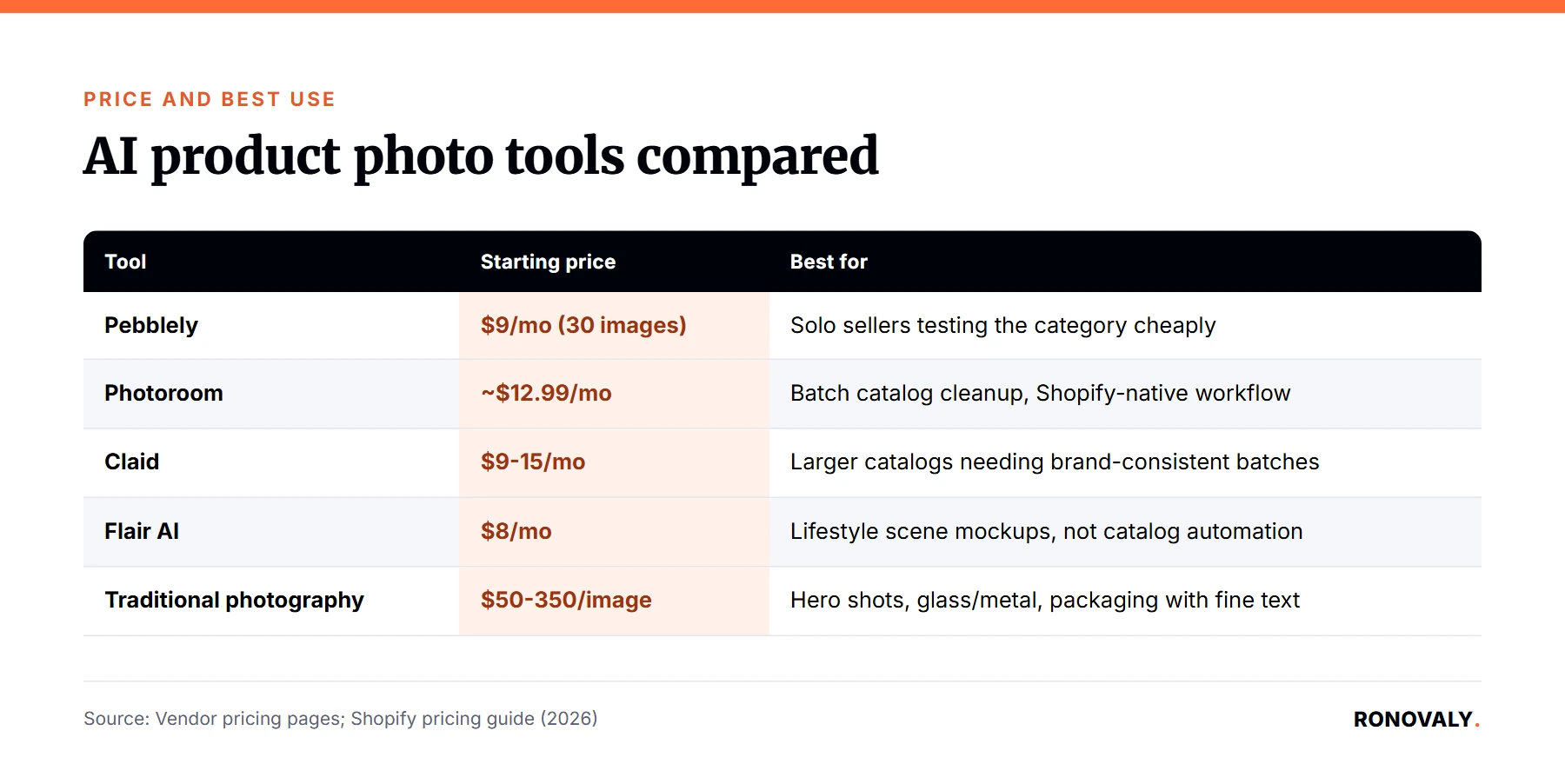
Pebblely’s Basic tier steps up to $19/month for 200 images. Its Pro tier reaches $39/month for 500 images, according to its own pricing page. Meanwhile, Flair AI’s free tier gives five generated images before you pay anything. Its Pro tier then costs $8/month. However, Flair leans toward lifestyle scenes, not straight catalog photos. Photoroom and Claid both start higher, closer to $12 to $15 a month at entry level. In exchange, they include more automation. For example, they bundle background removal plus retouching in one pass, which a pure background generator like Pebblely does not offer.
If your catalog is under 30 SKUs, start at the cheapest tier that fits your workflow. Then, upgrade only once you hit the monthly image cap. Paying for a higher tier before you need it is the same mistake I flagged with per-seat AI app pricing in my audit of hidden Shopify AI subscription costs.
Where Does AI Product Photography Still Fail?
AI product images still fail most on fine text, metallic and glass reflections, and packaging detail. Both a named industry breakdown and real Shopify merchant reviews confirm this pattern.
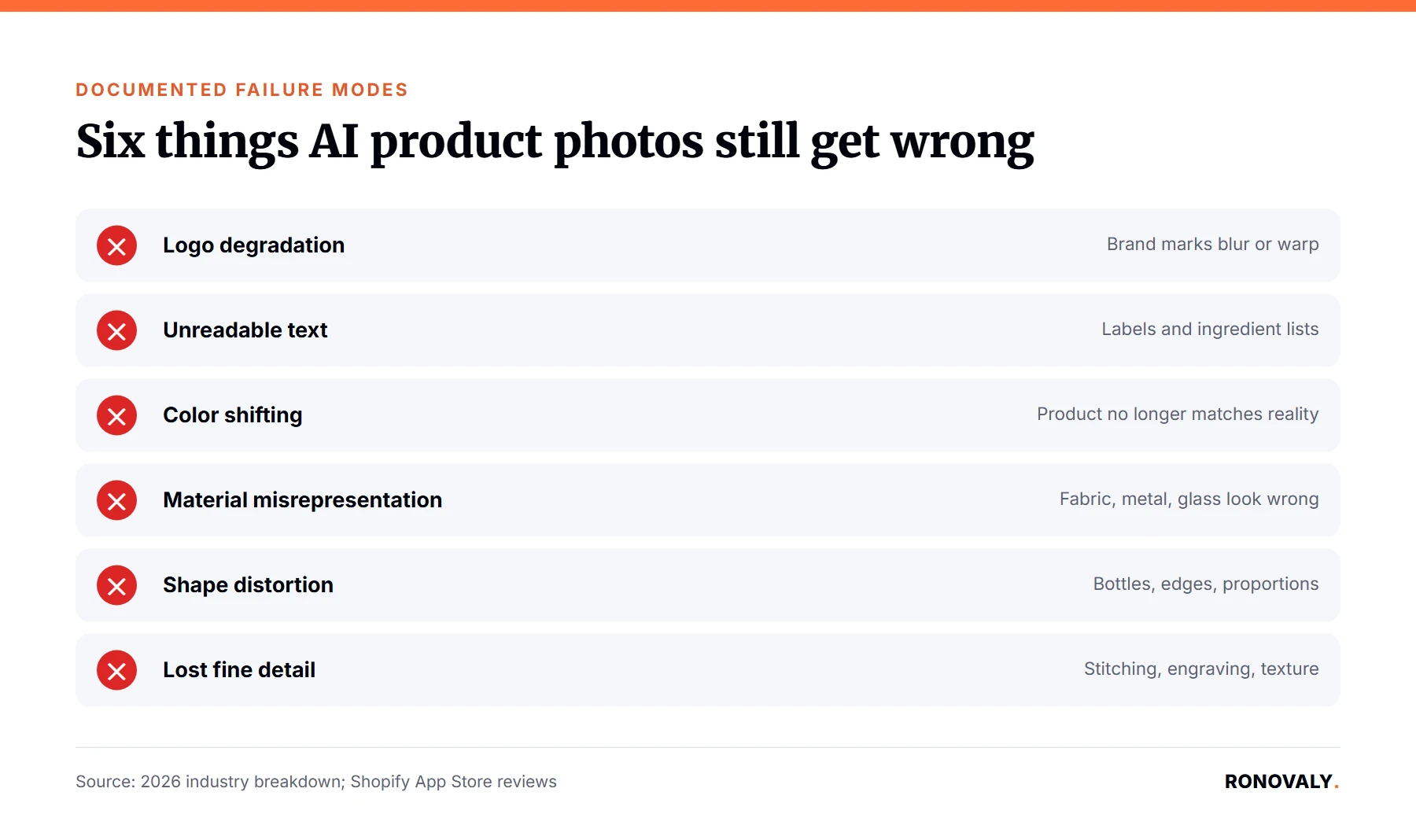
A detailed 2026 industry analysis documents six recurring failure modes. Logo degradation is when a brand mark becomes “stretched, incomplete, blurry, or replaced with invented symbols.” Label text often becomes unreadable too. Colors shift, so “a black product becomes charcoal.” Materials get misrepresented, so “leather suddenly resembles plastic.” Shapes distort, so “bottle caps shrink.” Fine detail, like jewelry prongs or stitching, gets lost during generation. Notably, real Shopify merchants report this same pattern. For instance, one Photoroom reviewer wrote that the tool “distort[ed] all of your product labels” on skincare packaging. Similarly, a reviewer of a separate Shopify AI-model app reported “the colors are wrong, buttons are missing, and the embroidery isn’t there” on a jacket photo.
Verdict: treat AI output as safe for plain-background, simple-shape products. Otherwise, keep a real photographer or a manual retouch pass for anything with fine print, metal, or glass, until you have personally checked a sample batch.
Is AI Cheaper Than a Real Photoshoot, and by How Much?
For a plain white-background listing photo, AI costs roughly $0.10 to $0.65 per image on a mid-tier plan. A professional photographer, by contrast, costs $50 to $350 per image.
That AI per-image cost comes from dividing each tool’s monthly price by its included image count. As a result, Pebblely’s Basic tier works out to about $0.10 per image, or $19 for 200 images. Photoroom’s roughly $12.99/month Pro tier covers far more volume through its credit system. However, credits do not map one-to-one to finished images. Traditional photography, per Shopify’s own pricing guide, runs $50 to $350 per image. Day rates for a photographer add up to $500 to $3,000 on top. For example, a 40-product catalog needing three images each would cost roughly $6,000 to $42,000 for a professional shoot. The same catalog costs $19 to $49 for a month of an AI tool’s mid-tier plan.
The catch: this comparison only holds where the AI tool’s failure modes do not matter. Once you factor in a photographer’s cost for products with visible logos, glass, or texture, the AI option’s savings shrink fast. In fact, those are exactly the products most likely to need a manual fix or a real reshoot anyway.
Which Products Should You Never Trust to AI Images Yet?
Skip AI-only images for anything with legible packaging text, metallic or glass surfaces, or fine texture your customer will zoom in on.
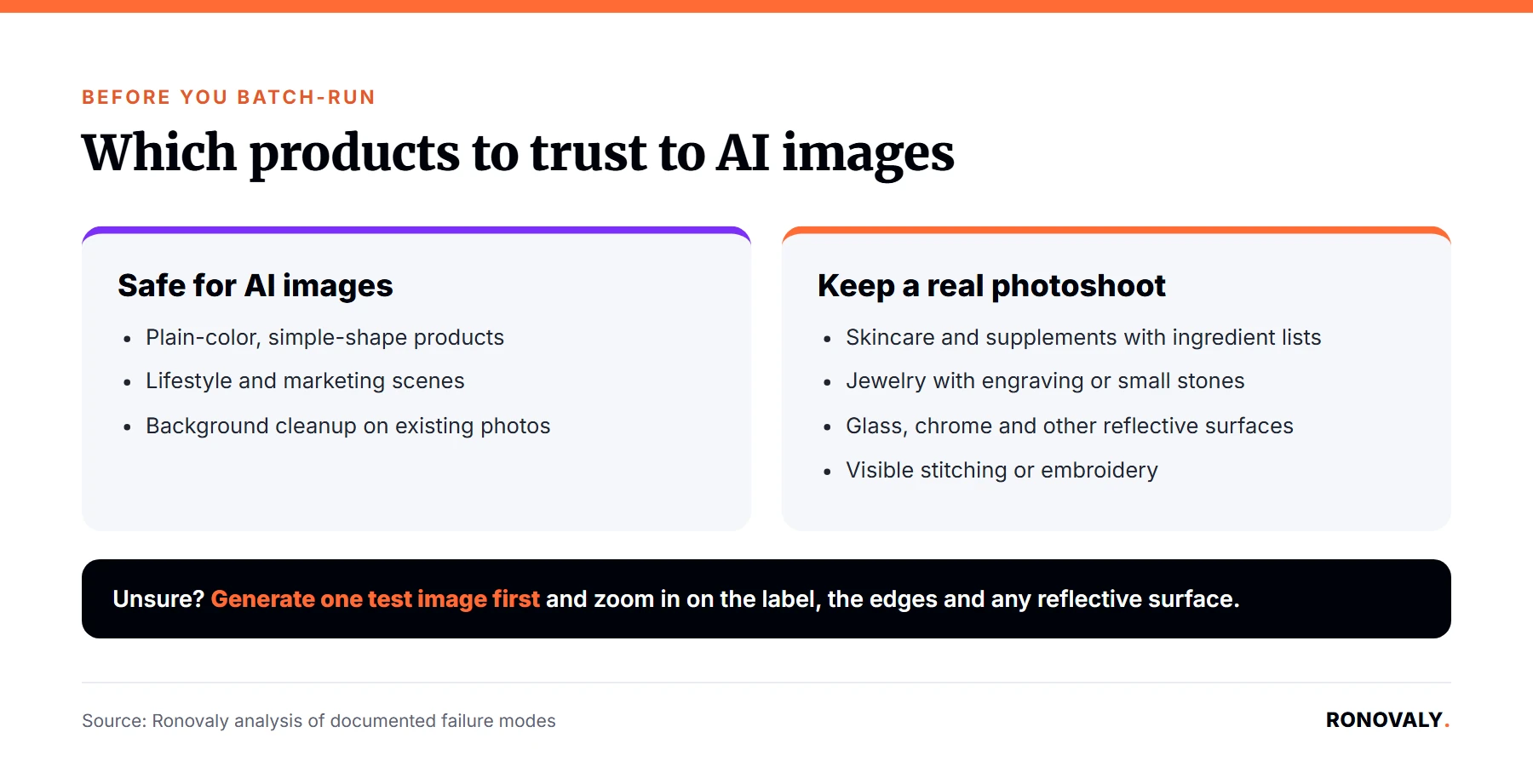
Based on the failure modes documented above, that includes skincare and supplement bottles with ingredient lists. It also includes jewelry with engraving or small stones, and apparel with visible stitching or embroidery. Similarly, it includes any product with a reflective or transparent surface, like glassware or chrome hardware. These categories show up across both the industry breakdown and the real merchant reviews I found, so this is not a guess. By contrast, a plain-color, simple-shape product carries far less documented risk. Think of a candle in a solid container, a phone case, or a basic apparel flat-lay.
If you are unsure which bucket a product falls into, generate one test image first. Then, zoom in on the label, the edges, and any reflective surface, before running the tool across your full catalog. Otherwise, a batch run without that check is exactly how a distorted-label complaint, like the Photoroom review above, ends up live on your storefront.
Who Should Choose What
Solo sellers on a tight budget: start with Pebblely’s $9/month tier. You get 30 images a month, enough to test the category before committing to a larger plan.
Growing catalogs needing batch automation: choose Photoroom or Claid instead. Both bundle background removal, retouching, and higher-volume credit tiers. Photoroom’s Max and Ultra tiers also add direct Shopify integration.
Brands doing lifestyle or scene-based marketing images, rather than catalog shots: Flair AI fits better than a straight background generator, though it is not Shopify-native.
Anything with fine print, metal, glass, or embroidery: keep a real photographer or a manual retouch pass in the loop. Do this at least until you have personally verified a sample batch against your own product line.
Frequently Asked Questions
Is AI-generated product photography good enough to replace a real photoshoot for Shopify?
For plain-background, simple-shape products, yes, based on real tool pricing and Shopify App Store review data checked this month. However, real Shopify App Store reviews describe visible distortion on products with legible packaging text, metallic or glass surfaces, or fine texture. So a real photographer or a manual check still matters there.
Which AI product photo tool is cheapest for a small Shopify catalog?
Pebblely is cheapest at entry level, at $9/month for 30 images. Flair AI’s free tier gives five images before any payment, but it is built for lifestyle scenes, not straight catalog photos. So it is not a direct substitute for Pebblely’s use case.
What do AI product image tools still get wrong?
Fine label text, logos, metallic and glass reflections, and small texture details like stitching or engraving. A named 2026 industry breakdown documents all six failure patterns. Meanwhile, real Shopify merchant reviews on two of the tools checked here describe the same distortion on live product listings.
Can I mix AI-generated images with real photography on the same Shopify product page?
Yes, and it is often the right call. Use AI for simple background variations or bulk cleanup on plain-shape products. Then, keep real photography for hero shots, or for any product with fine print, metal, or glass.
Is Photoroom or Pebblely better for a Shopify store on a tight budget?
Pebblely is cheaper at entry level, and simpler for pure background generation. Photoroom costs more, but it bundles background removal, retouching, and direct Shopify integration on its higher tiers. That can be worth the extra cost for a larger catalog.
What happened to Booth.ai, and is it still worth using in 2026?
Booth.ai, a Y Combinator-backed AI product photography platform, shut down in 2025. Its domain is now listed for sale. So it is not usable in 2026, despite still appearing as an active option in some “best AI tools” roundups published this year.
Do AI-generated product images create any legal or trademark risk for packaging text and logos?
Possibly. The documented failure mode of “logos becoming stretched, incomplete, or replaced with invented symbols” means an AI-generated image can misrepresent your own packaging. So always zoom in and verify logo and label accuracy before publishing, since an inaccurate image is a customer-trust risk either way.
Verdict: Category Winners
| Category | Winner |
|---|---|
| Cheapest entry price | Pebblely |
| Batch automation + Shopify integration | Photoroom |
| Large-catalog brand consistency | Claid |
| Lifestyle/marketing scenes | Flair AI |
| Lowest failure risk on hard products | Traditional photography |
| Overall for a small Shopify catalog | Pebblely to start, Photoroom or Claid once you outgrow it |
None of these four tools remove the need for a human quality check. So run a small test batch first. Zoom in on labels and reflective surfaces, and only then commit to a full catalog run. If you are still deciding which AI tools belong in your stack at all, my six-category AI productivity stack guide covers where image tools fit relative to support, inventory, and content automation.
This post contains affiliate links. If you make a purchase through these links, we may earn a commission at no extra cost to you.